DNS & BIND 9 (Linuxhotel Februar 2024)
1 Course Notes and exercises
This page contains the course notes and exercise instructions for attendees of the online training DNS & BIND 9 (Linuxhotel).
Click on images to zoom in.
1.1 Introduction
- what is your interest in DNS?
- what is your prior knowledge of DNS?
- what do you want to learn about DNS?
2 New terminology used in DNS & BIND
- The terms
masterandslavehave been used to describe primary and secondary authoritative DNS servers in the past.- However this terminology is wrong and misleading, for reasons discussed in the Internet Draft Terminology, Power, and Inclusive Language in Internet-Drafts and RFCs: https://tools.ietf.org/html/draft-knodel-terminology
- in this document, and in configuration examples, we are using the
new terms
primary(instead ofmaster) andsecondary(instead ofslave) whenever possible. - BIND 9 has started adopting the new terms with BIND 9.14, however
the transition is not complete, and some terms in configuration
statements still use the old terms. This will change with
future releases
- if you use an older version of BIND 9, please substitute the new terms for the older ones
- the old terminology will also be found in older books and standards documents (RFCs and Internet Drafts)
- DNS terminology can be confusing and is sometimes overloaded. RFC 8499 DNS terminology ( https://tools.ietf.org/html/rfc8499 ) tries to collect and document the current usage of DNS terminology.
3 DNS Basics - how the protocol works
3.1 from HOSTS.TXT to DNS
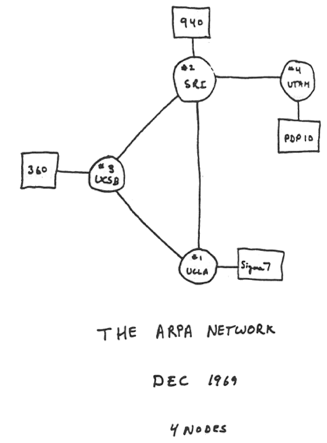
- RFC 226 "STANDARDIZATION OF HOST MNEUMONICS" in 1971-09 was the first standardization of a naming convention for hosts on on the ARPANET.
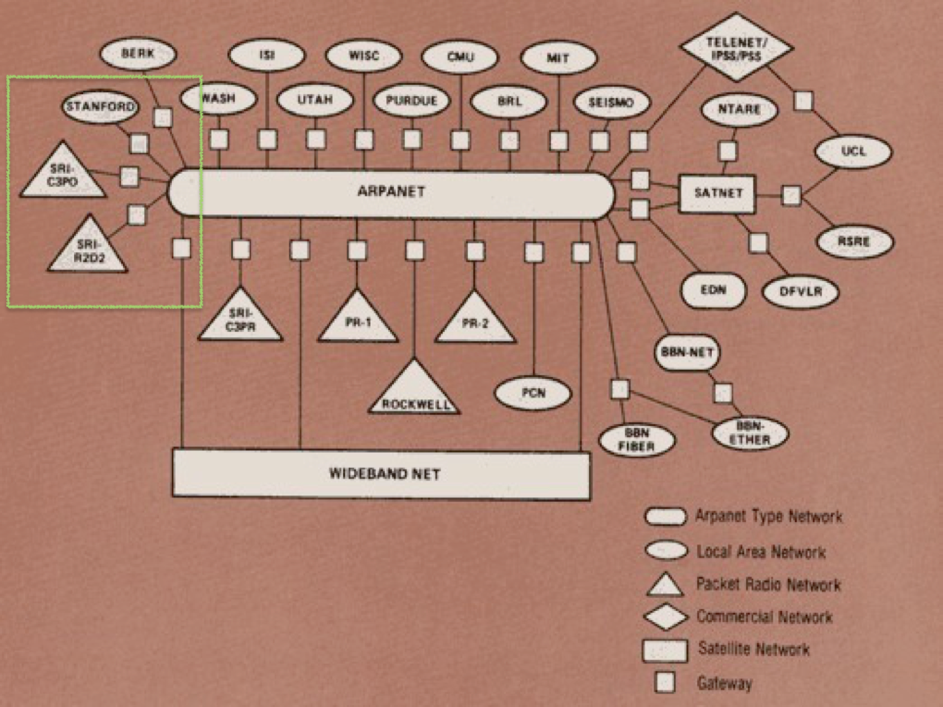
- From 1970-1991 the Stanford Research Institution-Network
Information Center was the information hub for the ARPANET
including maintaining
hosts.txt. - The
hosts.txtfile- Contained IP addresses and names of all of the hosts on the Internet
- Contained host information as well…
- Produced twice per week and available via FTP
- Changes, adds and deletes were sent via e-mail
3.1.1 Exercise
- there are repositories with ancient
hosts.txtfiles on Github - open a new browser tab or window and look at a
hosts.txtfrom the pre-DNS aera: https://github.com/ttkzw/hosts.txt/blob/master/pub/hosts/19830119/HOSTS.TXT - compare with the file from December 1988: https://github.com/ttkzw/hosts.txt/blob/master/pub/hosts/19881208/HOSTS.TXT
- you will see DNS domain names in the 1988 file. Any name you recognize?
- what is strange (from today's point of view) about the IP addresses given to the first HOSTS in the 1988 list? Write your guess in the chat window.
3.2 the creation of DNS (Domain Name System)
- Problems with
hosts.txt- Maintained by a single entity
- Pulled (manually) from a single host
- Namespace collisions
- Consistency
- In 1983, it was determined that something had to be done

Davis Mills: RFC 799 (1981) - Internet Name Domains 
Jon Postel & Zaw-Sing Su: RFC 819 (1982) - The Domain Naming Convention for Internet User Applications 
Paul Mockapetris: RFC 882 & RFC 883 (1983) - DOMAIN NAMES - CONCEPTS and FACILITIES / DOMAIN NAMES - IMPLEMENTATION and SPECIFICATION - RFC 882 was obsoleted by RFC 1034 (1987-11) and RFC 883 was obsoleted by RFC 1035 (1987-11)
3.3 The DNS namespace
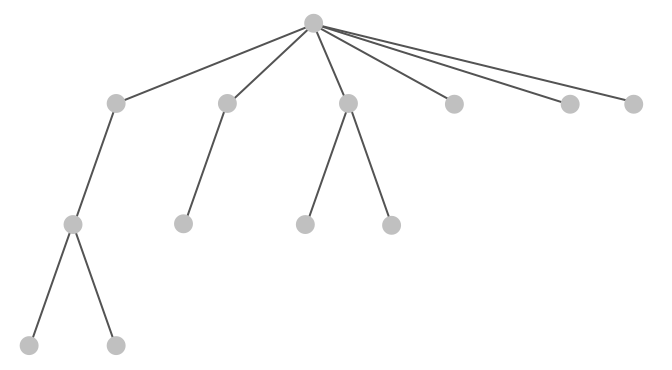
3.4 The DNS namespace
3.5 Nodes contain data
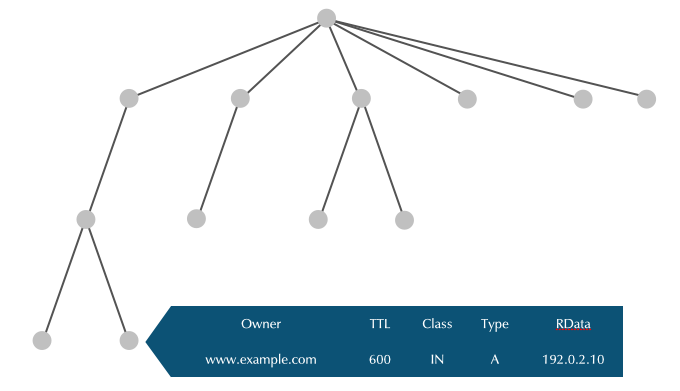
3.6 Node Label
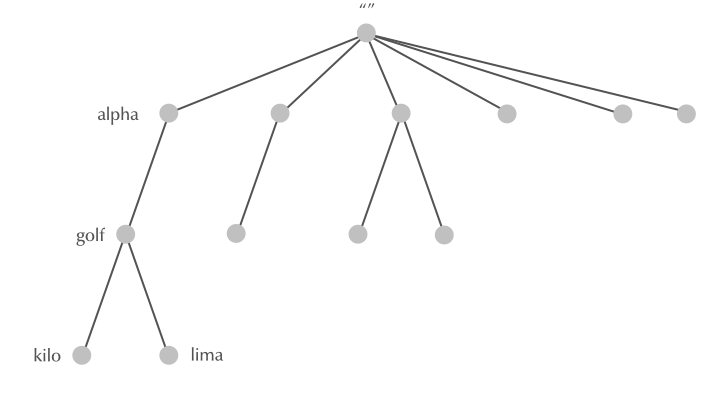
3.7 Node Label
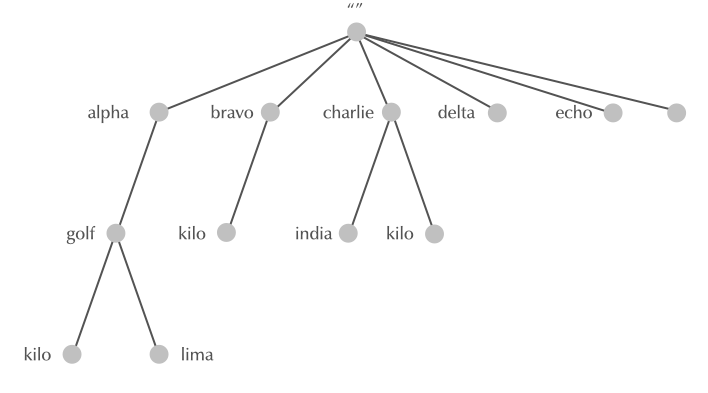
3.8 Domain Names
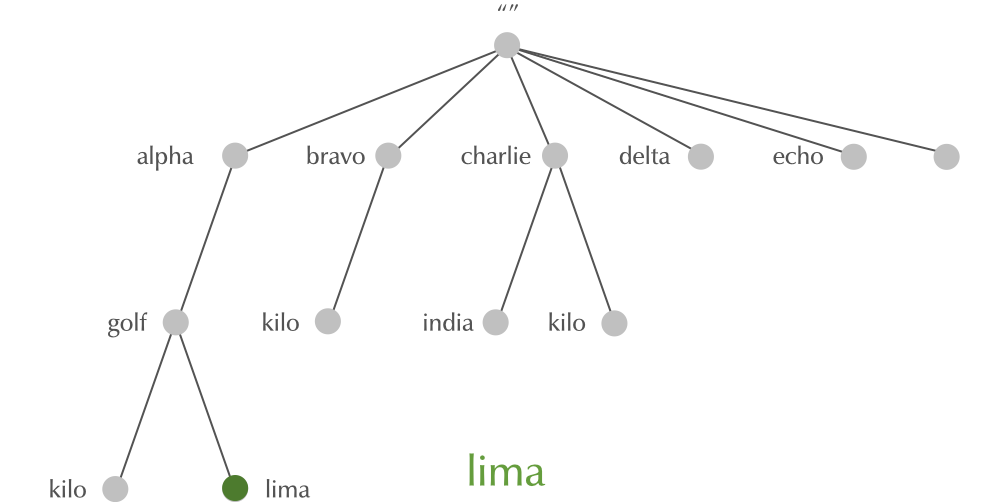
3.9 Domain Names
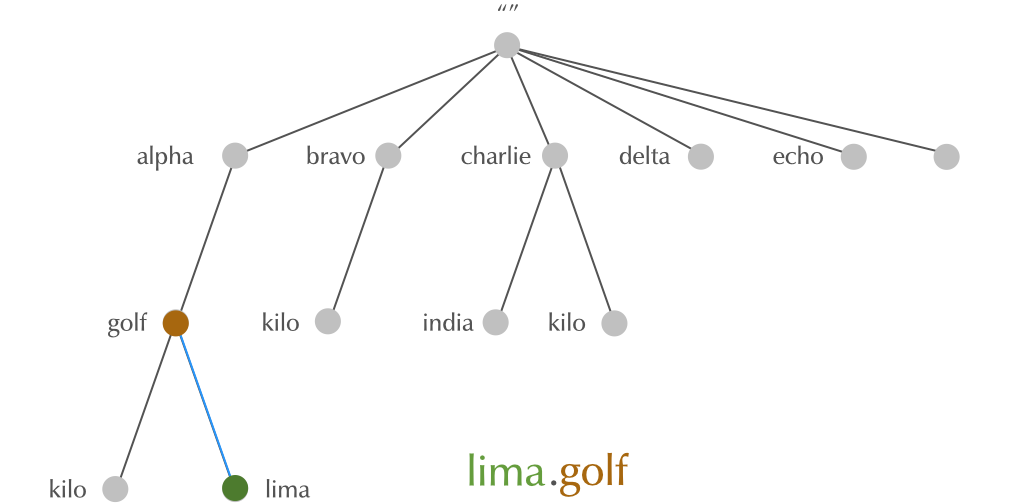
3.10 Domain Names
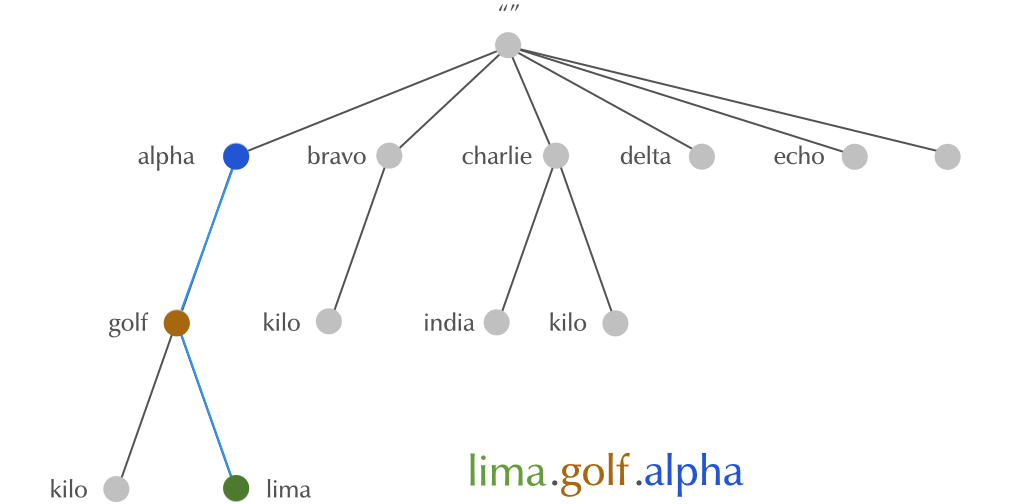
3.11 Domain Names
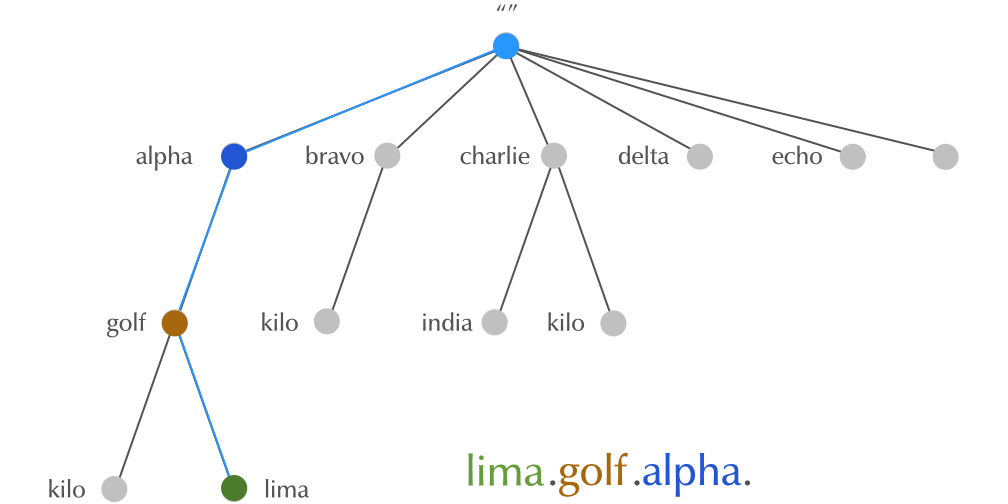
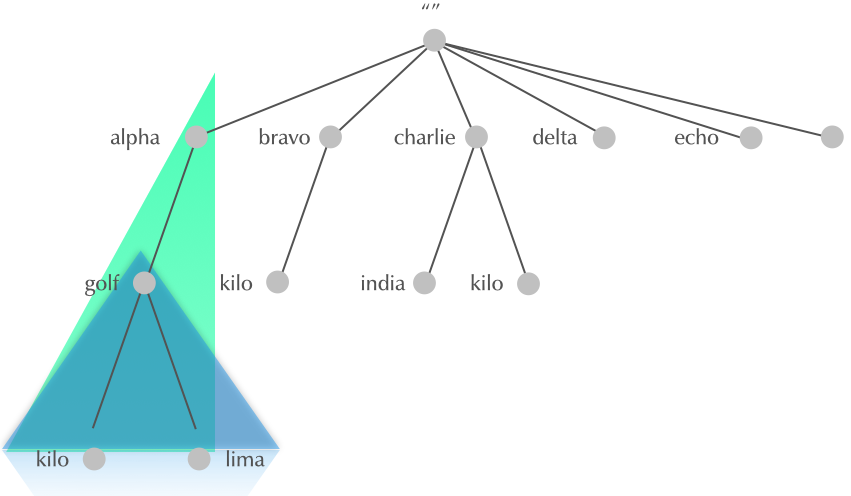
3.12 Domain
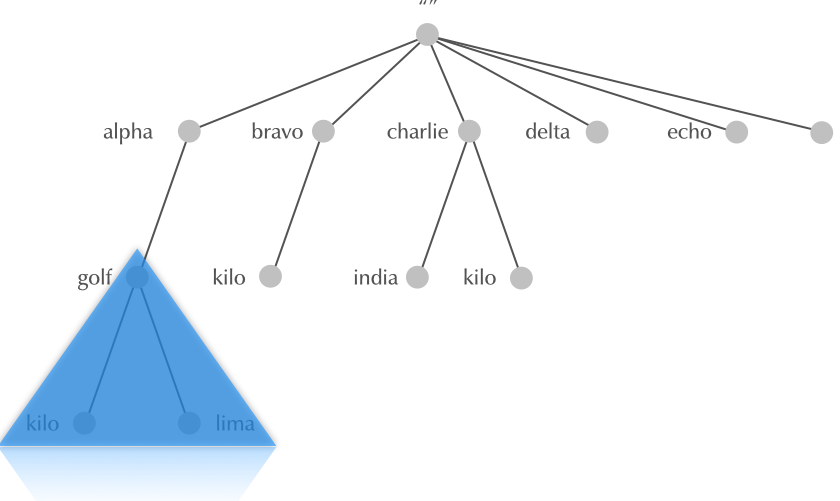
3.13 Subdomain
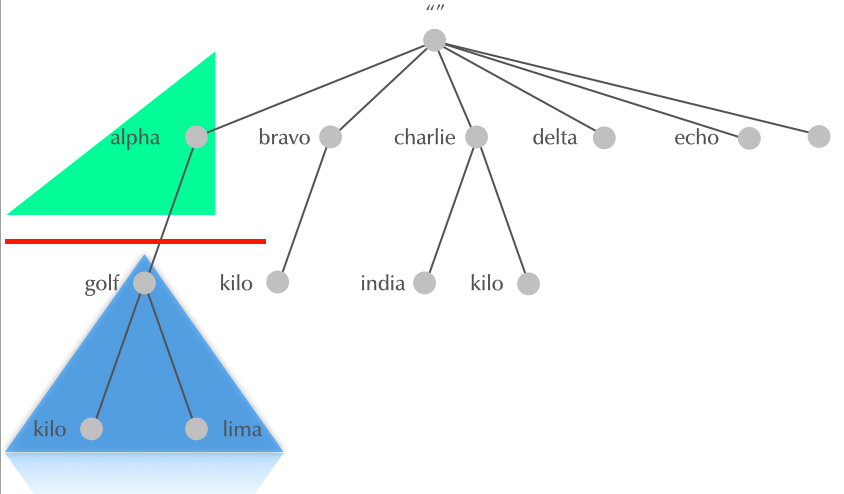
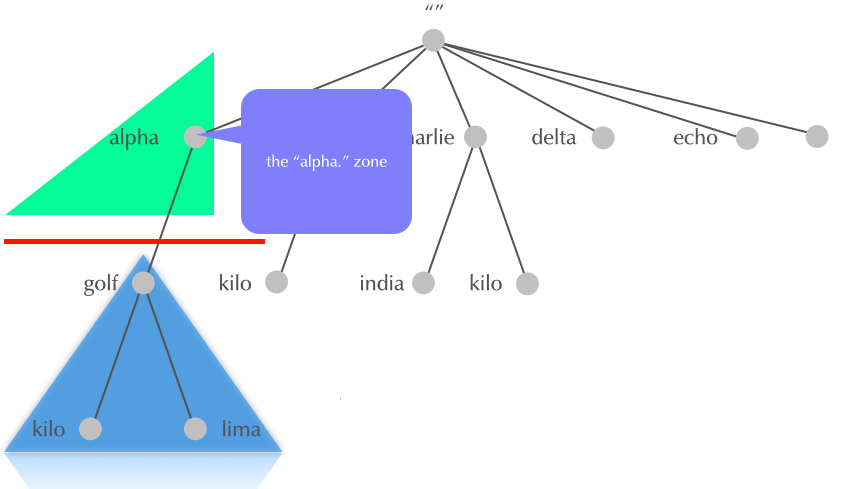
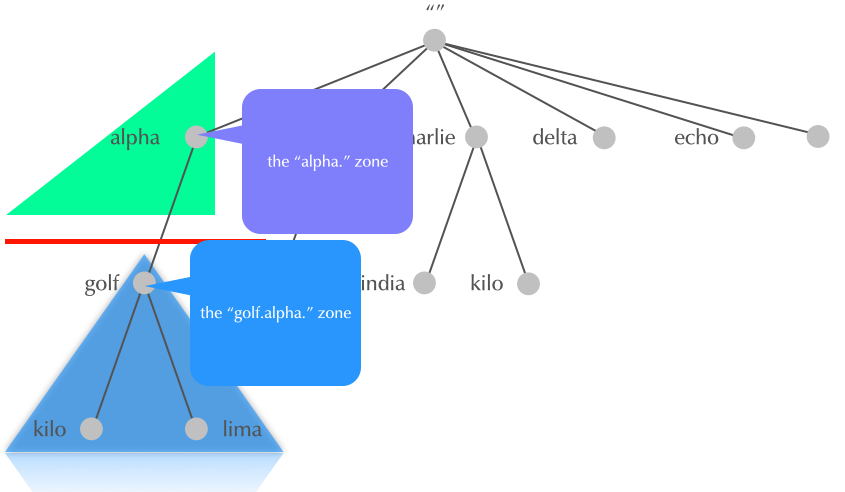
3.14 Why delegation?
HOSTS.TXTwas monolithic, one large file- The DNS system is hierarchical
- parts of the name space are delegated to the owners of the name
- every owner controls the part of the name space she is owning
- every owner can sub-delegate downwards
- delegation goes from parent domain to child domain
- owner of parent domain can revoke delegation (and re-delegate to a different owner)
3.15 Delegation
3.16 Delegation
3.17 Delegation
3.18 Internet DNS: Root-Zone, Top-Level-Domains, Second-Level Domains
- The DNS delegation in the Internet has a specific structure. Other DNS systems (like the DNS used in mobile phone roaming, or local private DNS systems) can have different delegation rules
- RFC 920 defined the original structure of DNS delegation from the root zone
3.18.1 Root-Zone
- The root-zone is the start of all DNS name resolution
- The root-zone is hosted on 13 logical authoritative DNS server
(Root-DNS-Server), named
a.root-servers.nettom.root-servers.net - many logical Root-DNS-Server are spread around the world with identical copies
- You can learn about the Root-DNS-Server system on https://root-servers.org/
- the content of the root-zone is public and can be loaded from some of the root-server systems
dig @f.root-servers.net AXFR .
3.18.2 Exercise
- go to https://root-servers.org/ and look at the map, find out how many root-server instances exist worldwide and in your country (you need to zoom into the map). Write the answer in the chat.
3.18.3 Generic Top-Level-Domains
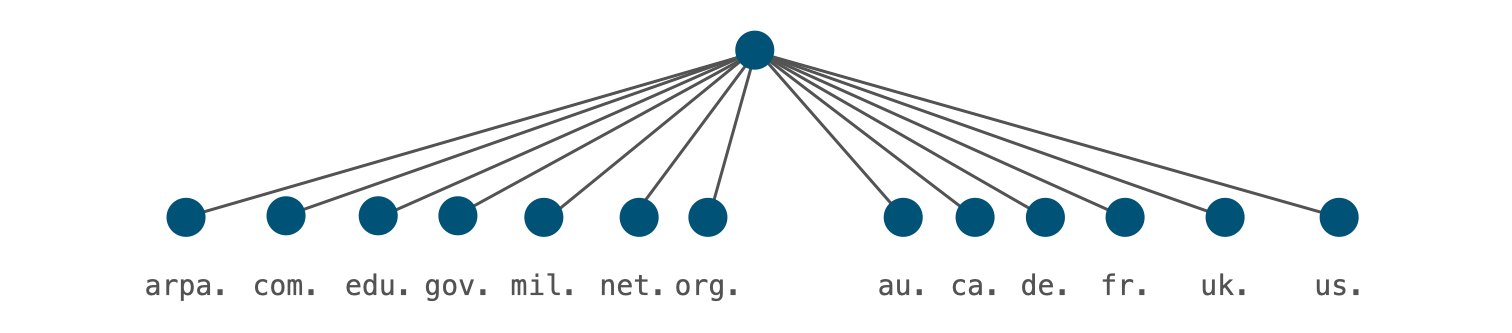
- RFC 920 created the original seven generic top-level-domains
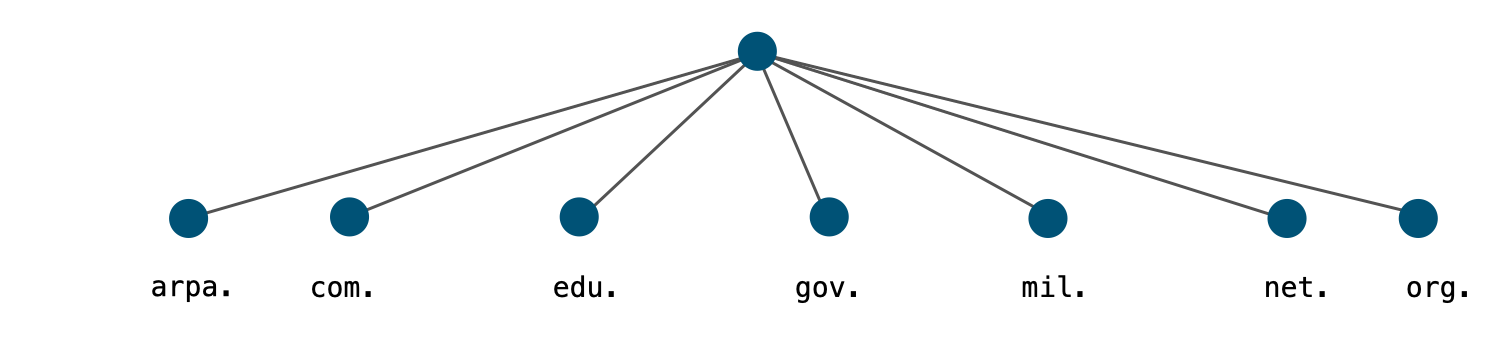
- arpa generic top level domain (gTLD)
- Originally used as a transition device from
HOSTS.TXTto DNS - Now used for Internet infrastructure data, e.g. reverse lookup tree for IPv4 and IPv6 addresses:
- IPv4:
in-addr.arpa. - IPv6:
ip6.arpa.
- IPv4:
- Registry: IANA
- Originally used as a transition device from
- com generic top level domain (gTLD)
- Commercial entities
- Over 150 million subdomains
- Largest Top Level Domain by a factor of six. (2nd is cn:~21 million)
- Registry: Verisign
- edu generic top level domain (gTLD)
- mostly U.S. based, accredited postsecondary institutions
- thousands of subdomains (
berkeley.edu,havard.edu,stanford.edu…) - Registry: Educause (operated by VeriSign)
- gov generic top level domain (gTLD)
- (U.S. Federal) government entities
- hundreds of subdomains (
fbi.gov,gsa.gov,irs.gov… ) - Some U.S. federal agencies use
.fed.us.rather than.gov. - RFC 2146 (U.S. Government Internet Domain Names) defines the use of
.govgTLD - Registry: General Services Administration
- mil generic top level domain (gTLD)
- (U.S.) military entities
- few (public) subdomains (
af.mil,army.mil,navy.mil,usmc.mil… ) - Registry: Defense Information Systems Agency
- net generic top level domain (gTLD)
- formerly networking entities and components
- now a general purpose TLD with nearly 14 million subdomains
- the 4th most popular domain (after
com,cnandde) - Registry: Verisign
- org generic top level domain (gTLD)
- Generally noncommercial entities that do not fit in other categories
- Millions of subdomains (
isc.org,npr.org,pbs.org…) - Finances the Internet Society (ISOC), which itself is responsible for the IETF and IAB
- Registry: Public Interest Registry PIR (operated by Afilias)
3.18.4 Country-Code Top-Level-Domains
- in 1985 TLDs were reserved for every country
- Called country code top-level domains, or ccTLD (RFC 1591 "Domain Name System Structure and Delegation")
- They match the two-letter abbreviations in ISO-3166-1
- Two were delegated in 1985
- Some that once existed have been deleted (e.g.
.yuYugoslavia)
3.18.5 Exercise
- how many ccTLDs are currently delegated? Write the answer in the chat.
- Unix/Linux command to calculate the number of delegated ccTLDs (from
the DNS root-zone)
$ dig @f.root-servers.net . AXFR | grep $'^[a-z][a-z]\..*IN\tNS\t' | cut -f1 | sort -u | wc -l - try to understand what this command pipeline is doing
3.18.6 Special Use Top-Level-Domains
- RFC 2606 (1999 "Reserved Top Level DNS Names") and updates in RFC
6761 (2013 "Special-Use Domain Names") reserved 4 TLDs:
example: for use in examplesinvalid: for use in obviously invalid domain namestest: for use in testslocalhost: to avoid conflict with the use of the (single label) hostnamelocalhostin Unix/Linux systemsexample.com,example.netandexample.orgare also reserved..internalis a new reserved TLD that ICANN has reserved for internal use. This domain is similar to RFC 1912 private IPv4 addresses
- Special use domains: pre-internet networks have used domain names
not registered (
.bitnet,.csnet,.uucp). Also newer technologies are using non-registered gTLDs:.onion,.exit: TOR privacy network.swift: SWIFTNet Mail.local: Zeroconf protocol (Apple Bonjour/Rendezvous, Unix/Linux Avahi)
- RFC 8375 - Special-Use Domain 'home.arpa.' defines the special
domain name
home.arpa.. This domain is intended for use inside private networks (similar to RFC 1918 IPv4 addresses). It should not be used in the Internet can be used in internal network DNS systems without risk of collisions with the Internet DNS name space. It is used in the Home Networking Control Protocol (HNCP) suite, but can also used for other cases, such as Microsoft Active Directory domains. - RFC 7050 - Discovery of the IPv6 Prefix Used for IPv6 Address
Synthesis and RFC 8880 - Special Use Domain Name 'ipv4only.arpa'
define the special domain name
ipv4only.arpa. This domain is being used in DNS64 clients on an IPv6-only network to detect the presence of DNS64 and for learning the IPv6 prefix used for protocol translation on the network. - Warning: do no use these reserved names in DNS, not even in a private network, as DNS software treats this domains differently
- IANA Registry for "special use domain names": https://www.iana.org/assignments/special-use-domain-names/special-use-domain-names.xml
3.18.7 New Top-Level-Domains
- in 1988, a new generic top-level domain was introduced:
int.intwas historically used for "Internet infrastructure databases" to replacearpa(for example used asip6.int.)- in 2000, the IAB decided to keep
arpaand useintfor international treaty-based organizations, United Nations agencies, observers at the UN
- Starting in 2000, ICANN allowed several new gTLDs to be created:
info,name,pro,aero,tel,museum,coop,biz…- Today, ICANN policies allow new gTLDs for anyone able to pay:
.xyz,.nrw,.sap,.sport,.search,.google,.etisalat,.grocery…
- Today, ICANN policies allow new gTLDs for anyone able to pay:
3.18.8 Exercise
- DNS Delegation Information: https://www.buddyns.com/delegation-lab
- Trace DNS delegation https://simpledns.plus/lookup-dg
- DNS Bajaj http://www.zonecut.net/dns/
- Use the above web-services to number of delegations from the root
for the domain
sub.dnslab.org. Not all the tools handle this domain well. Write the answer in the chat window
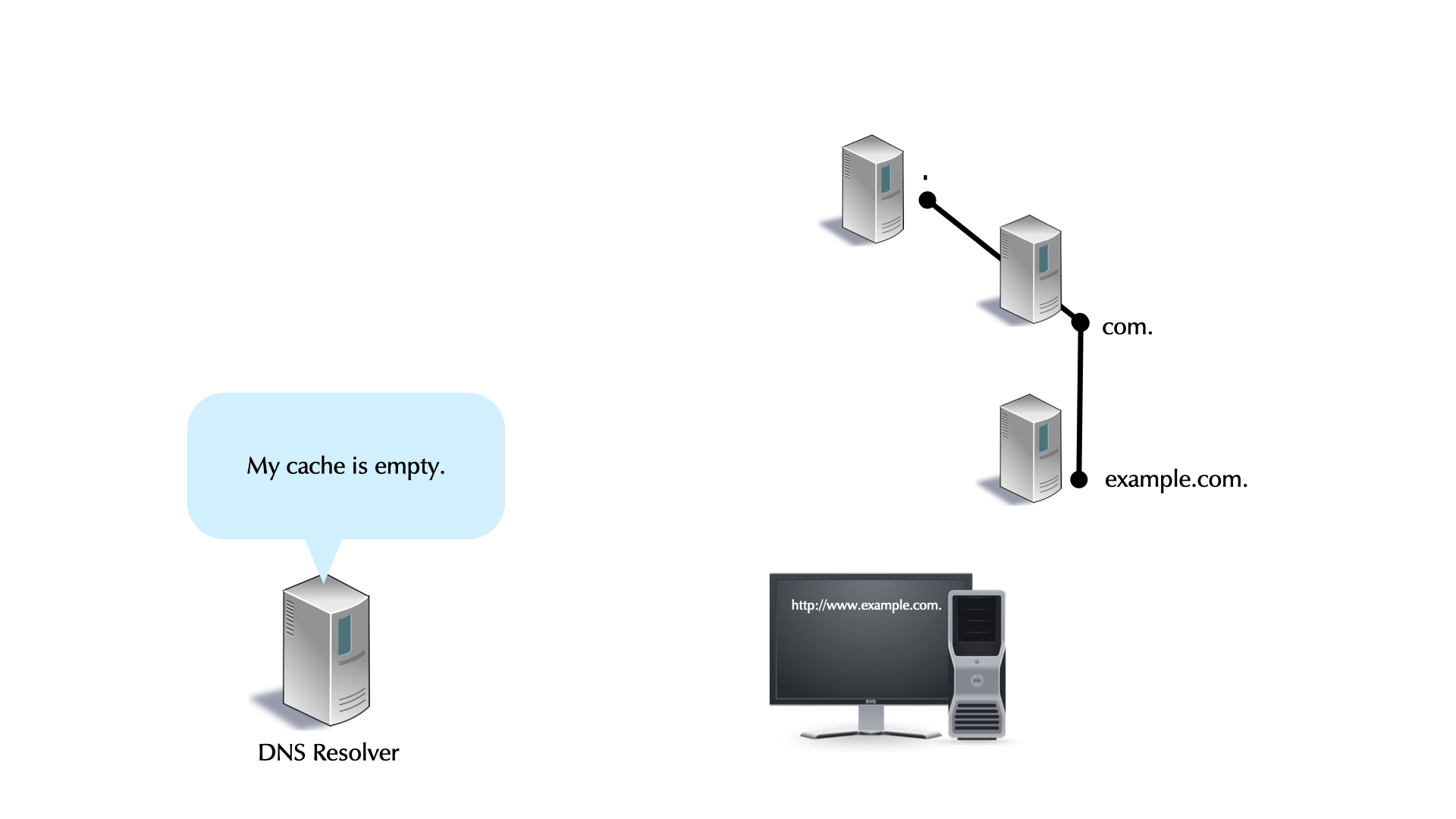
3.19 DNS Name Resolution
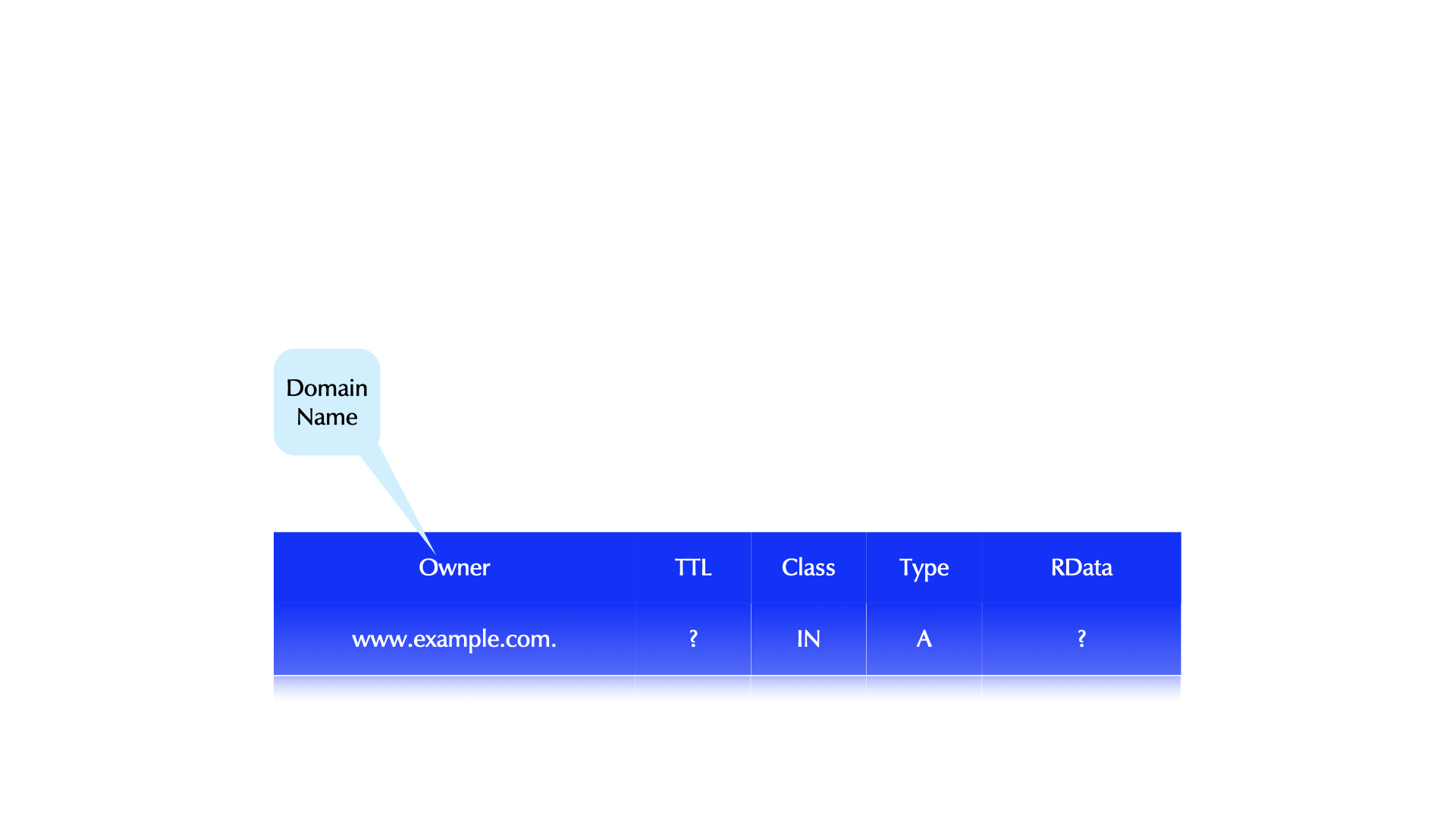
- DNS Query - what the client sends
- DNS Name Resolution
3.20 Caching
- DNS Resolver caching

3.21 Negative Caching
NXDOMAIN- the domain name does not exist.NOERROR/NODATA- the domain name exists, but not the RR type. AKA:NOERROR/NOANSWER.- For
NXDOMAINandNOERROR/NODATA, the zone'sSOAis returned in the authoritative section. - The negative TTL is the minimum of SOA's TTL and the SOA's RDATA MIN field. (RFC 2308)
- BIND's default max-ncache-ttl is 10800 seconds (3 hrs).
3.21.1 Quiz
- What is the TTL value in resource records? Write the number of your
answer in the chat window.
- Seconds a packet with this RR is allowed to be forwarded
- Seconds the RR is allowed to be stored in a recursive server's cache
- Days the RR is valid in the Internet
3.22 how DNS data is stored and sent / Anatomy of DNS resource records
- DNS Data is stored and sent in units of "DNS resource records" (or DNS RR)
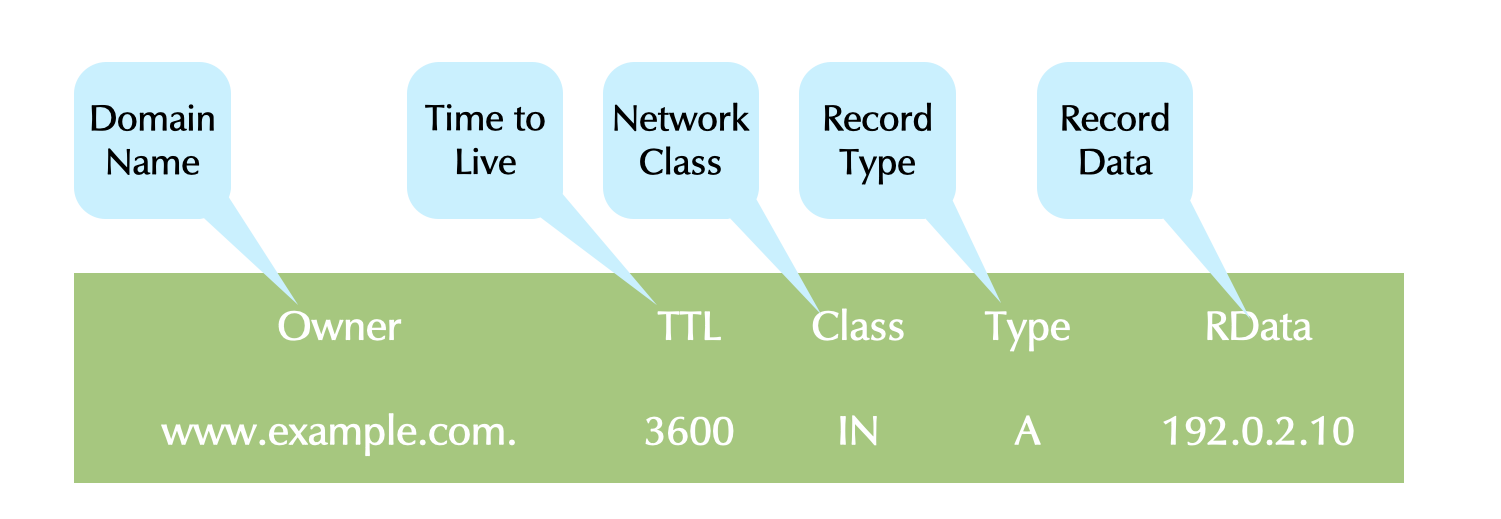
- The fields of DNS resource records
- owner: the domain name that owns the data. This is the index to the DNS database
- TTL: the Time-to-Live, the time in seconds that this DNS data is guaranteed to be valid. This is used to timeout data in caches. It is also sometimes used by applications.
- Class: The network infrastructure this data is useful in. In TCP/IP networks, this is typically IN for Internet protocol.
- Type: The type of data, it can be A for IPv4 Address records, AAAA for IPv6 Addresses, TXT for free form text, NS for nameserver entries and many more
- RData: record data, the data that is attached to the domain name. Depending on the type of record, the RData can have one to many fields
- we find DNS resource records
- in DNS zone database files on authoritative DNS servers
- in the caches of DNS resolver servers
- in the output of a DNS query and troubleshooting tools
- on the wire, the data is transported in binary form (non readable for humans)
- DNS tools convert the DNS resource records from binary form into text form for human consumption
3.23 Resource Record Sets
- A Resource Record Set (RRSet) is all RRs with identical: owner name, network class, TTL, and record type
- Each RR of a RRSet has different RDATA.
- A RRSet is not-explicit, and the RRs do not have to be contiguous in the zone file.
- All RRs in a RRSet are sent in a query response.
- They may be returned in any order.
- The TTLs of all RRs in a RRSet must be identical.
- Otherwise caching can lead to a single point of failure.
- BIND enforces this by using the first seen TTL of the RRs.
- A valid DNS resource record set
| Owner | TTL | Class | Type | RData |
|---|---|---|---|---|
| example.com. | 86400 | IN | NS | a.iana-servers.net. |
| example.com. | 86400 | IN | NS | b.iana-servers.net. |
- An invalid DNS resource record set (different TTLs, duplicate record data)
| Owner | TTL | Class | Type | RData |
|---|---|---|---|---|
| example.invalid. | 86400 | IN | NS | a.iana-servers.net. |
| example.invalid. | 3600 | IN | NS | b.iana-servers.net. |
| example.invalid. | 7200 | IN | NS | b.iana-servers.net. |
4 building and maintaining a DNS Resolver
- Benutzername:
user - Passwort:
DNSandBIND
| Name | Hostname (dnslab.org) | URL |
|---|---|---|
| Tim | dnsr001 | https://dnsr001.dnslab.org |
| Carsten | dnsr002 | https://dnsr002.dnslab.org |
| Maciel | dnsr003 | https://dnsr003.dnslab.org |
| Felix | dnsr004 | https://dnsr004.dnslab.org |
| Moritz | dnsr005 | https://dnsr005.dnslab.org |
| Volker | dnsr006 | https://dnsr006.dnslab.org |
| Daniel | dnsr007 | https://dnsr007.dnslab.org |
| Trainer | dnsr010 | https://dnsr010.dnslab.org |
4.1 installing BIND 9 from the RedHat/CentOS Repository
- inform the trainer in the chat when you're done
- use your virtual lab machine
dnsrNNN.dnslab.org - become root (Password
DNSandBIND)$ sudo -s
- install the BIND 9 DNS server software
% dnf install bind
- start BIND 9 with the default (RedHat/CentOS 8) configuration. The
BIND 9 process name is
namedfor Name Daemon% systemctl enable --now named
- check that BIND 9 is running without errors
% systemctl status named
- try if our BIND 9 works as a DNS resolver
$ dig @localhost debian.org
- repeat the last query again
- Please send the answer to this question to the chat:
- what is the answer time for the 1st request?
- what is the answer time for the 2nd request?
- guess what causes the difference?
- try to query
dnslab.org: why is the 1st query todnslab.orgfaster than the (previous) query fordebian.org?
4.2 Basic BIND 9 configuration
- the BIND 9 configuration on RedHat/CentOS systems is in
/etc/named.conf. Other Unix/Linux systems might store the configuration file in a different place (like/etc/bindon Debian/Ubuntu)
4.3 default RedHat/CentOS 9 configuration
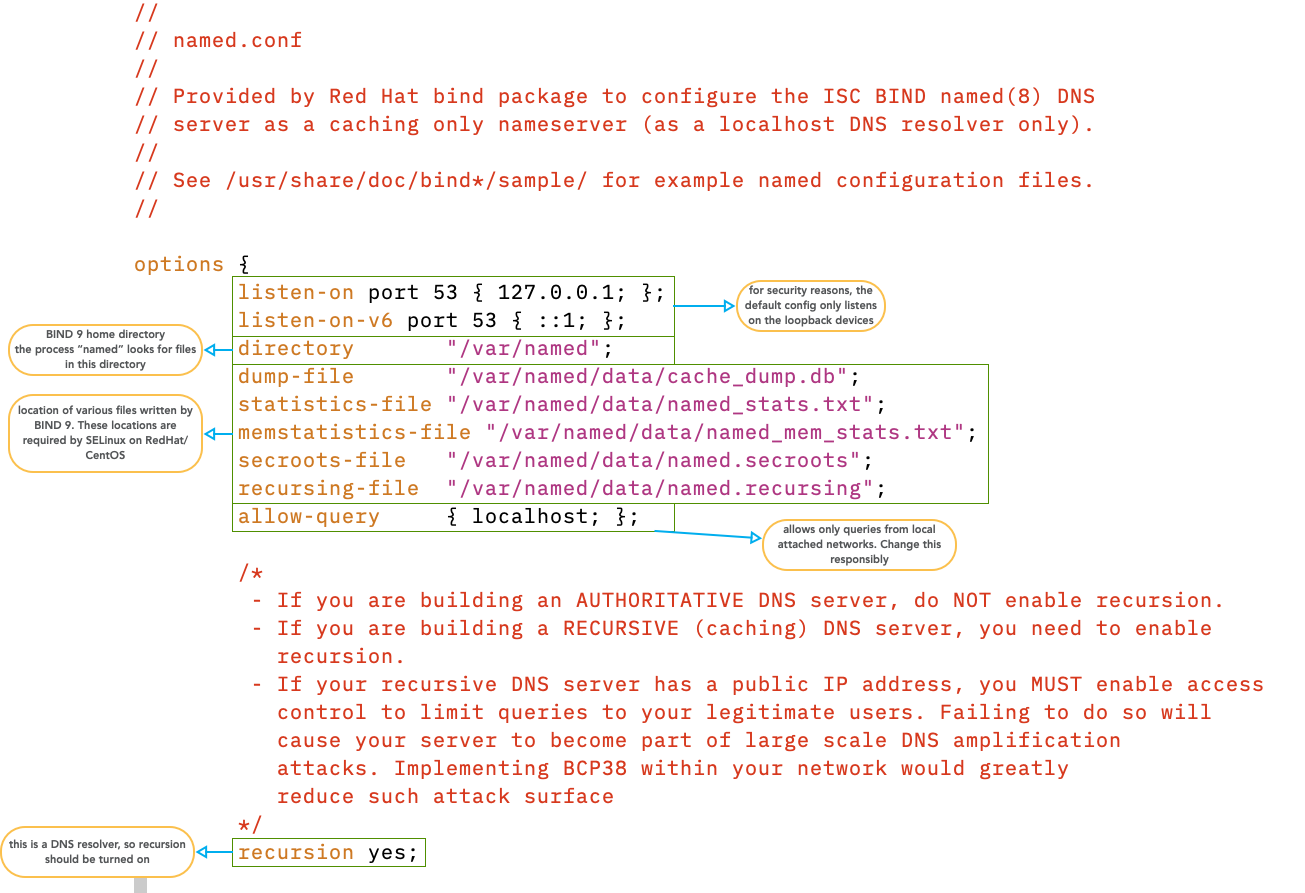
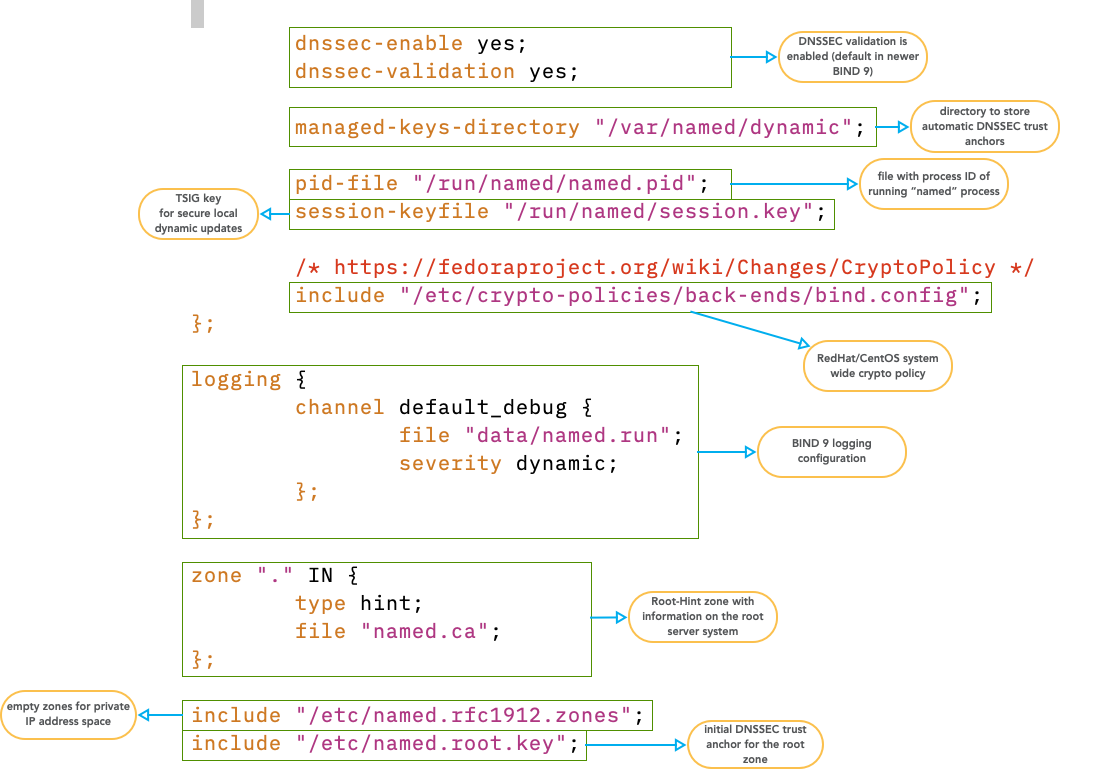
4.4 check the configuration
- after changing the BIND 9 configuration file, and before
activating the new configuration, we need to check the new
configuration for any errors
% named-checkconf
- only if no errors are reported reload/reconfig the DNS server
- reload with the BIND 9
rndctool% rndc reconfig
- reload with
systemctl% systemctl reload named
- reload old Unix style
% pkill -HUP named
4.5 rndc - remote name daemon control

- use your virtual lab machine
dnsrNNN.dnslab.org - execute
rndc status - compare your values with the screenshot above
- Find the names of the automatic empty zones in the BIND 9 log
journal
% journalctl -u named
- how many zones are configured? Write the answer in the chat.
5 Cache Maintenance
dumpdb: Dump BIND’s cache and/or zones to the filenamed_dump.db. It can be changed with thedump-filestatement.% rndc dumpdb -all # authoritative and cache data % rndc dumpdb -zones # only authoritative data % rndc dumpdb -cache # only cache data % rndc dumpdb # only cache data
flush: removes the entire cache:rndc flushflushname <domainname>: removes a single domain name from the cache.rndc flushname www.example.comflushtree <domainname>: removes everything under the domain name from the server's cache.rndc flushtree example.com
- use your virtual lab machine
dnsrNNN.dnslab.org - write the content of the BIND DNS server's memory cache to a file with
rndc dumpdb - find the file (look at
named.conffor the dump-file) and open the file in a text editor. - inspect the file content. Do you find some domain names from previous DNS queries there?
6 Master File Format
- The master file format defines DNS zone storage.
- Master File Format is defined in RFC 1035.
- Many authoritative server implementations, including BIND, support other storage.
- e.g. Databases, Active Directory, etc.
- Most minimally support entering data in Master File Format.
6.1 A Minimal Zone
- A zone must have:
- one SOA record
- at least one NS record
- We’ll show all RRs in their complete form.
6.2 The Start of Authority Record (SOA)
- A
SOARR defines configurations parameters for a zone. - The owner name of a SOA RR matches the zone's name.
- The SOA must be the first RR in a zone file.
- The SOA is an internal RR that exists for DNS' own functionality.
- Four SOA RDATA fields are information for secondaries.
- One RDATA field is for resolvers.
dnslab.org. 86400 IN SOA (
   dns1.dnslab.org.            ; MNAME: primary server
   hostmaster.dnslab.org.      ; RNAME: responsible person
   2018061901                  ; SERIAL
   900                         ; REFRESH
   300                         ; RETRY
   604800                      ; EXPIRE
   900 )                       ; negTTL (officially:MINIMUM)
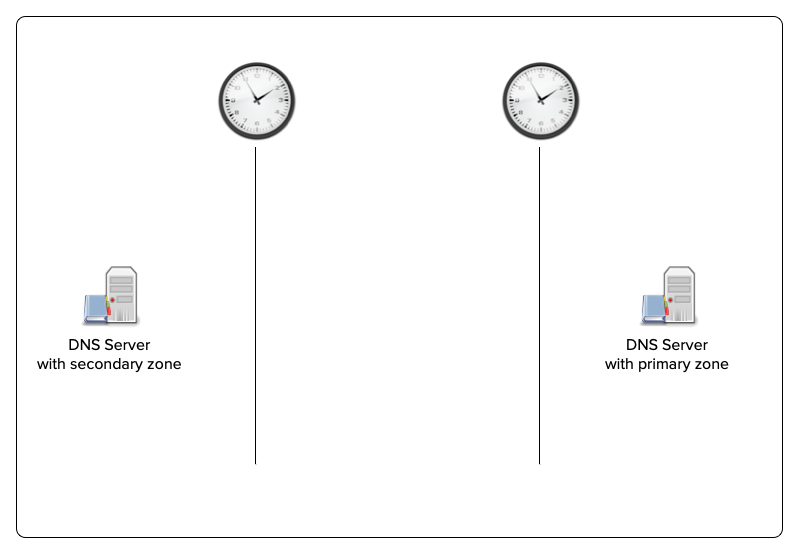
6.3 SOA record and zone transfer
- A Day in the Life of two DNS Servers
6.4 Scaled Values
- TTLs and the SOA timers can be entered as scaled values in most modern authoritative servers.
- An integer value followed by:
- s, for seconds
- m, for minutes
- h, for hours
- d, for days
- w, for weeks
- An integer value followed by:
- Example:
1w2d5h3m20s =
  1 week + 2 days + 5 hours + 3 minutes + 20 seconds =
  795,800 seconds
6.5 SOA Recommended Values
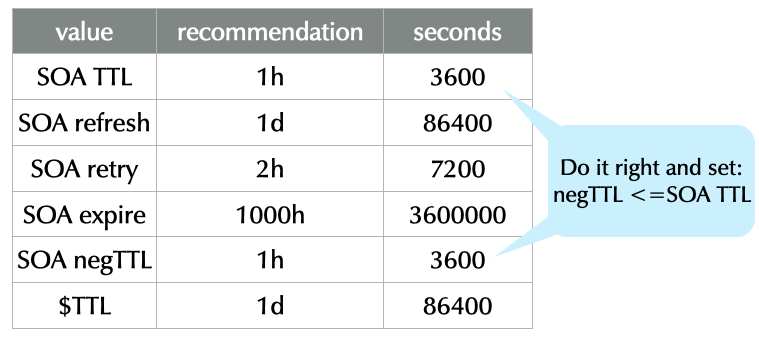 SOURCE: https://www.ripe.net/ripe/meetings/ripe-55/presentations/koch-ripe203bis.pdf
"These recommendations are aimed at small and stable DNS zones. There are many legitimate reasons to use different values…"
6.6 Master File Format Comments
- Comments in master file format begin with a semicolon (
;) and extend to the end of the line. - Example:
; important router addresses
router1.example.com.  3600 IN A 192.0.2.1   ; gateway1
router2.example.com.  3600 IN A 192.0.2.100 ; tunnel GW
6.7 Extending RRs over Multiple Lines
- A RR must be written on one line.
- Records can be written over multiple lines using parentheses.
- The parentheses can be at any whitespace in the RR.
- The opening parenthesis must be on the first line.
- Example 1
example.com. 86400 IN SOA dns1.example.com. ( hostmaster.example.com. 2012111701 ; serial 86400 ; refresh 7200 ; retry 3600000 ; expire 3600 ) ; negTTL - Example 2
example.com. ( 86400 IN SOA dns1.example.com. hostmaster.example.com. 2012111701 ; serial 86400 ; refresh 7200 ; retry 3600000 ; expire 3600 ) ; negTTL - Example 3
example.com. 86400 IN SOA ( dns1.example.com. hostmaster.example.com. 2012111701 86400 7200 3600000 3600 ) - Example 4
example.com.  86400  IN SOA ns1.test. admin.example. (
                    2012111701 86400 7200 3600000 3600 )
6.8 Zone File: Syntax & Integrity Check
- BIND includes a tool to check a zone file for syntax errors and required missing data (e.g. no NS RR).
- It is recommended to always check a zone file and correct all errors before having named (re)load it.
- Syntax:
named-checkzone <zonename> <filename>% named-checkzone example.com example.com.zonefile zone example.com/IN: loaded serial 2018072901 OK
6.9 Quiz
- Spot the many errors: What’s wrong with this SOA record? Write your
findings in the chat
example.com  3600 IS SOA (
           hostmaster.example.com
           ns1.example.com
           20180101   // serial
           3600       // retry
           3600       // refresh
           3600       // expire
           3600       // negTTL )
7 Exercise: recap from day one (10 Minutes)
- Use your virtual lab machine
dnsrNNN.dnslab.org - Work on the questions below; make notes
- Check the output of the
digcommands:- Which flags are set
- Which resource records are in the different sections
- Is the answer authoritative (AA-Flag present)?
- Is EDNS supported (EDNS OPT Pseudo-Section)?
- Is there data in the ADDITIONAL section?
- Query for an IPv4 address
$ dig www.dnsworkshop.org A
- Query for an IPv6 address
$ dig www.dnsworkshop.org AAAA
- Does an IPv4 and/or IPv6 address exist for
dnsworkshop.org(withoutwww)? - Does the domain name
ftp.dnsworkshop.orgexist? - What query does
digsend when executed without any parameter? - What do we see in the answer to this query? Is this a DNS answer?
Is the answer authoritative?
$ dig @a.nic.de www.dnsworkshop.de A
- Will this answer be received over UDP?
$ dig @9.9.9.9 larger.dnssec.works TXT +dnssec
- Which order of the parameters to
digare valid? Check it out!$ dig dnsworkshop.de SOA +multi $ dig +multi SOA dnsworkshop.de $ dig SOA +multi dnsworkshop.de $ dig dnsworkshop.de +multi SOA
- Is there an Additional Section in the answer for
$ dig strotmann.de MX
- Is there an Additional Section in the answer for
$ dig strotmann.de MX @ns3.myinfrastructure.org
- Is there an Additional Section in the answer for
$ dig strotmann.de MX @ns5.myinfrastructure.org
8 Fundamental DNS Resource Records
8.1 The NS Record
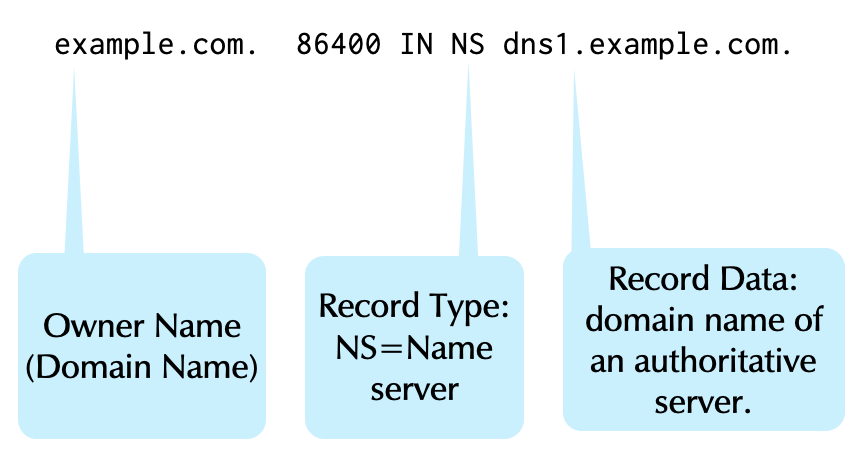
- The
NSrecord has two functions.- To define the authoritative servers for a zone.
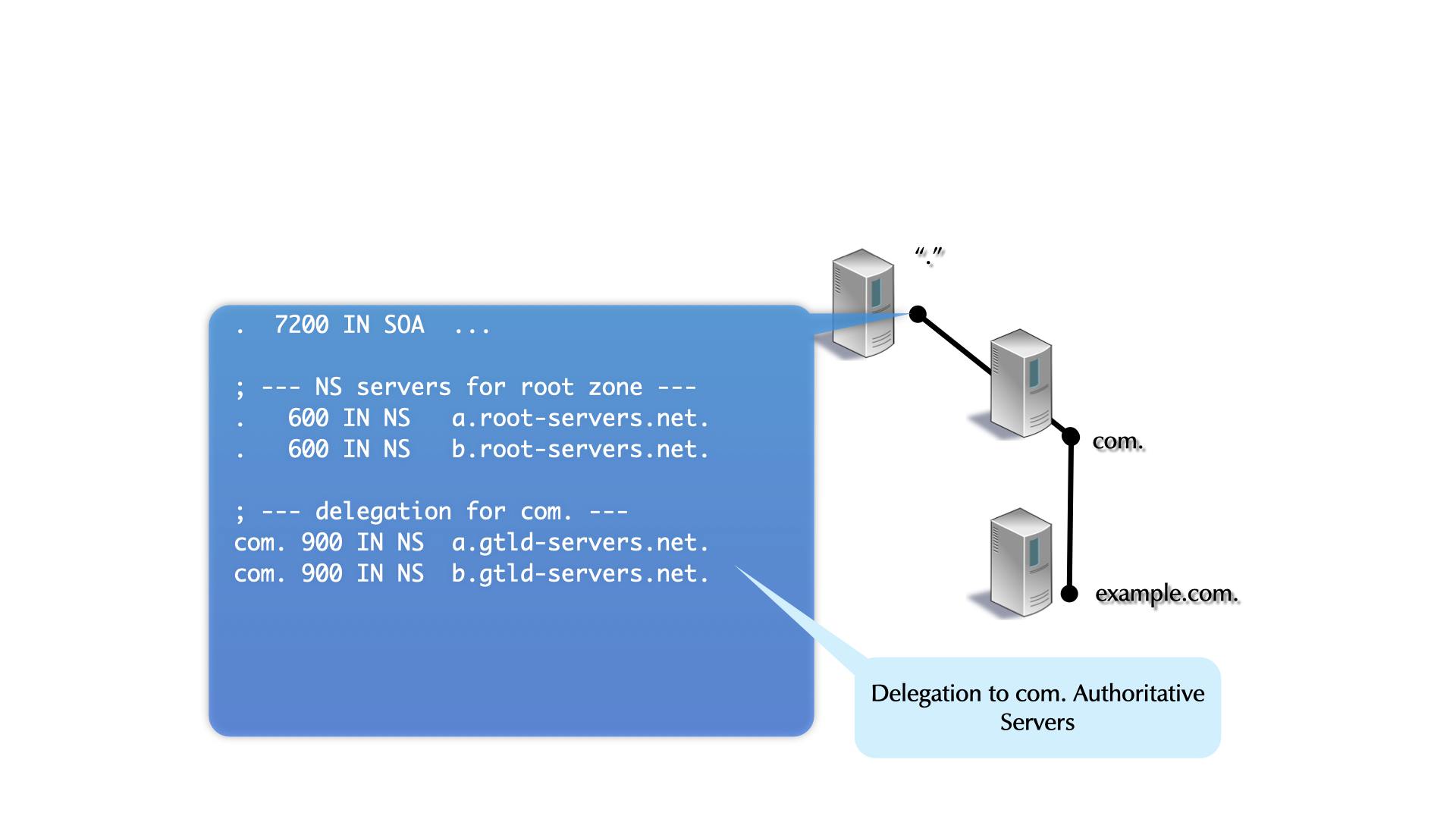
- To delegate to authoritative servers for a sub-domain.
- Like the SOA, the NS is an internal RR that exists for DNS' functionality.
8.1.1 Rules for the NS Record
- Like SOA RRs, the NS owner name is the name of the zone.
- The RDATA contains the domain name (not the IP Address) of an authoritative server for the zone.
- Zones should have more than one authoritative server, and therefore more than one NS RR (making a RRSet).
- The delegation NS RRs (in the parent zone) and the NS RR in the zone should always match. see Raffaele Sommese - When Parents and Children Disagree: Diving into DNS Delegation Inconsistency (RIPE 80)
8.1.2 Glue Records
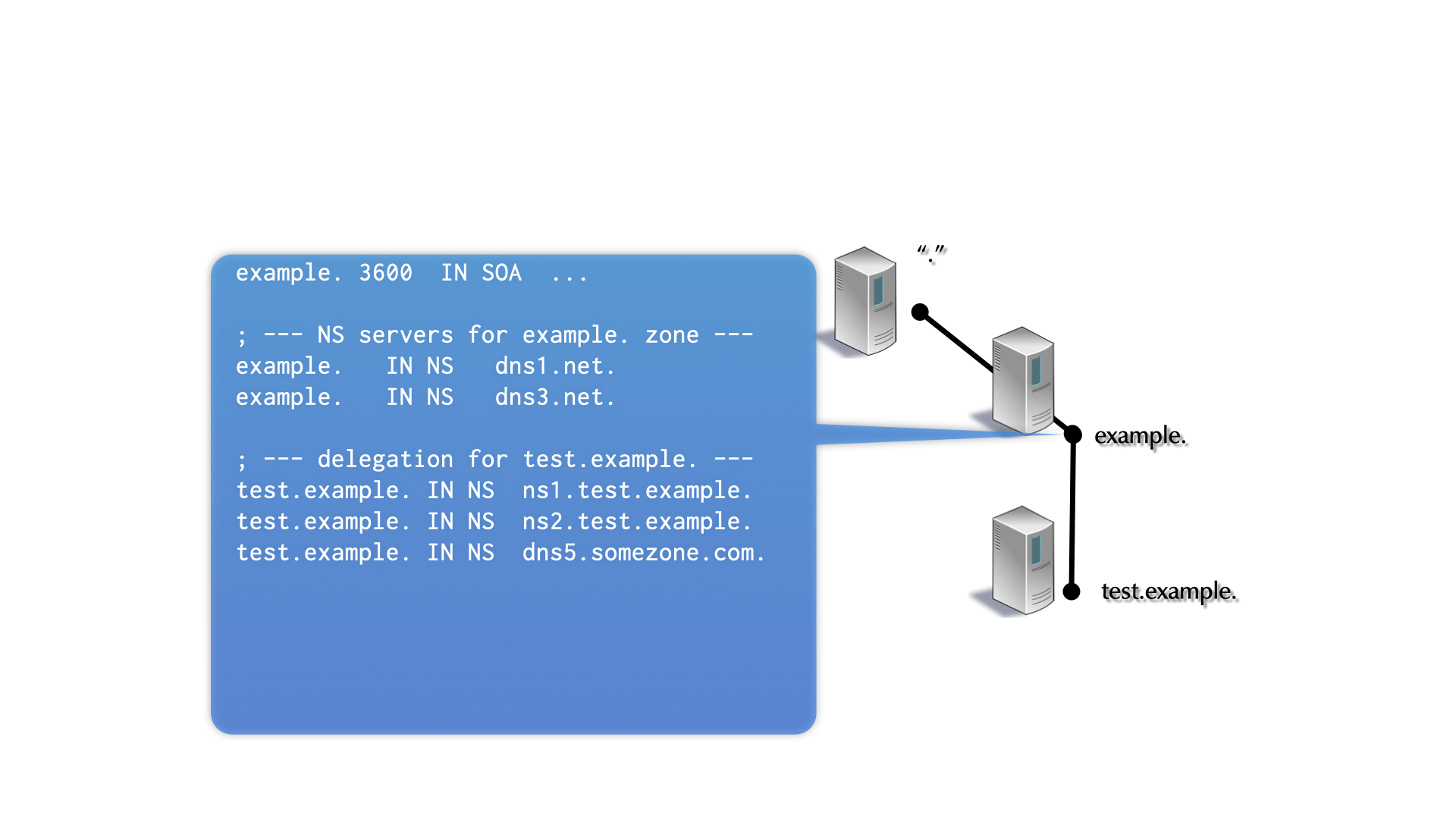
- Glue records are used to solve the “chicken-and-egg” problem of DNS delegation.
- Glue is required when a zone is delegated to a server whose domain name is in the delegated zone.
8.2 IPv4 Address record
- An
ARR maps a domain name to an IPv4 addresswww.example.com. 86400 IN A 192.0.2.10
- One domain name can map to multiple
ARRs.host.example.com. 3600 IN A 192.0.2.10 host.example.com. 3600 IN A 10.0.10.2 host.example.com. 3600 IN A 172.16.1.12
- The server returns all addresses (a RRSet).
- When a stub resolver returns multiple addresses to an application,
the application should do something intelligent.
- Many don’t :(
8.3 The IPv6 Address Record (AAAA)
- The
AAAArecord maps a domain name to an IPv6 addresswww.example.com. 86400 IN AAAA 2001:db8:110:100:20:102f:ffeb:5380
- Many applications query for a
AAAARR before falling back to an A RR. - When they get a response for the
AAAAquery, most will not try to lookup an IPv4 address. - If the successfully resolved
AAAAdoesn't lead to an active server, an application will likely fail. - So if a
AAAAaddress exists, it must be available. - The Happy Eyeball protocol addresses the problem when present: RFC 8305: Happy Eyeballs Version 2: Better Connectivity Using Concurrency
8.4 The HTTPS Record
- The
HTTPSrecord is a relativly new record. It's type number is 65 (aka TYPE65)- It has been first observed "in the wild" in Summer 2020
- It is being used in the new Apple operating systems (iOS, iPadOS, macOS) since fall 2020
- It is now the 3rd most queried DNS record in the Internet (after
AandAAAA) - It is not yet (as of September 2021) an Internet Standard: Service binding and parameter specification via the DNS (DNS SVCB and HTTPS RRs) draft-ietf-dnsop-svcb-https
- The
HTTPSdelivers connection information for an HTTPS service- IPv4-Addresses of the service
- IPv6-Addresses of the server
- The public key of the server to be used to initiate an encrypted TLS "client hello"
- Protocol selection: HTTP/2 (TCP) or HTTP/3 (QUIC)
- One or more DoH-Resolver for the service
- Example of a
HTTPSRecord for a service offering HTTP/2 and HTTP/3 (preferred)
example.com 3600 IN HTTPS 1 . alpn=”h3,h2”
- Example of a
HTTPSRecord for a service with both IPv4 and IPv6 Addresses
example.com 3600 IN HTTPS 1 . alpn=”h3,h2” ipv4hint=”192.0.2.1” ipv6hint=”2001:db8::1”
- Benefits of the HTTPS records
- Browser don't need to request explicit IPv6 and IPv4 Addresses (faster connection)
- The
HTTPSRecords is a signal to the web-browser to only allow TLS secured/encrypted connections for this domain name. This prevents downgrade attacks - With the
HTTPSRecord it is possible to create Domain-Alias definitions for whole zones (not possible with theCNAMERecord)
- The BIND 9 DNS server and tools (
dig,host) support theHTTPSrecord since version 9.16.21 (September 2021)
9 Other Basic DNS record types
9.1 CNAME
- The
CNAMErecord creates an alias from one domain name (the owner of the CNAME) to another.www.example.com. 86400 IN CNAME example.com.
9.1.1 CNAME Record Rules
- Multiple RR types for the same domain name is common:
NS,A,AAAA,TXT, etc. - A name with a CNAME RR, can not have other types.
- This is ambiguous; an error that
named-checkzonefinds:
www.example.com.  3600 IN CNAME example.com.
www.example.com.  3600 IN A     192.0.2.10

# named-checkzone example.com example.com.DB
dns_master_load: example.com.DB:15: www.example.com: CNAME and other data
<OUTPUT SUPPRESSED>
- This is ambiguous; an error that
- Don’t use CNAMEs in most RDATA (e.g. in MX or NS RRs.)
- CNAMEs in other CNAME is acceptable, but be careful to avoid loops.
- Example of bad CNAME use:
example.com.             3600 IN NS    dnsserver.example.com.
dnsserver.example.com.   3600 IN CNAME www.example.com.
- CNAME cannot alias full zones
- DNAME records can alias a full zone, but only in the parent zone (and a TLD is not editable for most domain owners)
- The HTTPS record supports full zone aliasing for Websites
9.1.2 CNAME Quiz Question
- Spot the error(s): What’s wrong with this CNAME record usage?
example.com.  3600 IN SOA ns1.example.com. (
                          hostmaster.example.com.
                          2020102201 1d 4h 41d 2h )
example.com.  3600 IN NS ns1.example.com.
example.com.  3600 IN NS ns2.example.com.
www.example.com. 3600 IN A 192.0.2.120
example.com.  3600 IN CNAME www.example.com.
9.2 TXT Record
- The
TXTRR permits a free-form text to be associated with the domain name.mail.example.com. 86400 IN TXT "Mail Server for example Domain"
TXTrecords may contain multiple strings, each up to 255 characters in length.- These strings are concatenated by the DNS client
- RDATA may not exceed 65535 bytes in total.
- The TXT RR is often used for documentation purposes, for example:
- Storing location information. (c.f.
LOCrecord) - Documenting who is responsible for a particular host. (c.f.
RPrecord) - This presumes the domain name is a host.
- Storing location information. (c.f.
- New or experimental protocols often use TXT RRs before a dedicated RR type is assigned.
- Jabber (XMPP)
- Sender Policy Framework (SPF)
- The
SPFRR has been deprecated in favor ofTXTRRs.
- The
- Domain Key Identified Mail (DKIM)
9.3 MX Record
- The
MXRR defines a mail exchange (SMTP Mail Server) for the domain name.<domain-name> <ttl> IN MX <preference> <mail transfer agent hostname> example.com. 86400 IN MX 10 mail.example.com.
- Preference: An unsigned, unscaled 16 bit value (not hops, time or anything else).
- lower value => higher preference
- Domain name (host name) of an SMTP server.
- Preference: An unsigned, unscaled 16 bit value (not hops, time or anything else).
9.3.1 Mail Server Best DNS Practices (related to the MX record)
- BEST PRACTICE: A
PTRRR for the IP of a mail server should return the server's domain name.$ dig +noall +answer cisco.com MX cisco.com. 1772 IN MX 10 alln-mx-01.cisco.com. <OUTPUT SUPPRESSED> # dig +noall +answer alln-mx-01.cisco.com A alln-mx-01.cisco.com. 1800 IN A 173.37.147.230 # dig +noall +answer 230.147.37.173.in-addr.arpa PTR 230.147.37.173.in-addr.arpa. 1800 IN PTR alln-mx-01.cisco.com.
- The
PTRandARRs of the mail server point to each other. - If the
PTRis missing, or it does not match the domain name, mail from that domain will likely be treated as SPAM.
- The
9.4 SRV Record
- The
SRVrecord gives the domain name of a server that provides the service encoded in the owner name.- It is a generalized version of the
MXRR (which only supports SMTP). - Like the
MXRR, theSRVhas additional fields that govern how clients should access the service.
- It is a generalized version of the
- Format:
# Format: [owner]  [ttl]  [class]  SRV <priority> <weight> <port> <hostname>
_ldap._tcp.example.com.   3600 IN SRV 10 100 389 dc.example.com.
- Encoded service in the owner name. Here LDAP over TCP.
- The service name is from:
/etc/services
- The service name is from:
- Priority: An unsigned, unscaled 16 bit value (Like the MX's
preference.)
- lower value => higher priority
- Weight: Preference for RRs with equal priority.
- Weight is a load distribution system.
- The port the service is listening on. This allows running a protocol on a port that is not "well known".
- Domain name (host name) of the server.
- Encoded service in the owner name. Here LDAP over TCP.
9.4.1 Use of SRV records
- SRV RRs are heavily used by Microsoft's AD.
- They are also used in Linux/UNIX systems:
- looking up a
whoisserver - Jabber (XMPP) instant messaging
- VoIP deployments (SIP)
$ dig +noall +answer  _nicname._tcp.ch SRV
_nicname._tcp.ch.	3599	IN	SRV	     0 1 43 whois.nic.ch.
- looking up a
- Applications assemble the domain name to query.
- For example, an SRV-smart web browser (KDE Konqueror) trying to
access the webpage for dnslab.org could look up
SRVRR:_http._tcp.dnslab.org
- The
httpsrecord (https://tools.ietf.org/html/draft-ietf-dnsop-svcb-https) will replace theSRVrecord for Web-Traffic
- For example, an SRV-smart web browser (KDE Konqueror) trying to
access the webpage for dnslab.org could look up
9.4.2 Example SRV Record Usage
- A SIP gateway with a backup:
_sip._tcp.example.com.  3600 IN SRV 0 0 5060 primary.example.com.
_sip._tcp.example.com.  3600 IN SRV 1 0 5060 backup.example.com.
- The endpoint with preference value
0will always be used unless it is unreachable
- The endpoint with preference value
- Load distribution with 3 SIP gateways. In both samples:
sip1will receive 50% of the trafficsip2+sip3will each get 25% of the traffic_sip._tcp.example.com. 3600 IN SRV 0 50 5060 sip1.example.com. _sip._tcp.example.com. 3600 IN SRV 0 25 5060 sip2.example.com. _sip._tcp.example.com. 3600 IN SRV 0 25 5060 sip3.example.com.
- different values for weight, but same result:
_sip._tcp.example.com.  3600 IN SRV 0 2 5060 sip1.example.com.
_sip._tcp.example.com.  3600 IN SRV 0 1 5060 sip2.example.com.
_sip._tcp.example.com.  3600 IN SRV 0 1 5060 sip3.example.com.
- Getting whois information
_nicname._tcp.de.    3600  IN SRV  0 0 43 whois.denic.de.
_nicname._tcp.at.    1800  IN SRV 10 0 43 whois.nic.at.


$ dig +nocmd SRV _nicname._tcp.at +noall +answer
_nicname._tcp.at.	10773	IN	SRV	10 0 43 whois.nic.at.
9.4.3 Empty Non-terminals (ENT)
- Empty non-terminals are nodes that have no RRs, but have subdomains.
- Example:
_sip._tcp.example.comIt is likely that_tcp.example.com.has no RRs, but that_sip._tcp.example.com.has at least anSRVRR.
- Example:
- Empty non-terminals apply to
SRVRRs, but are an independent topic… that has now been covered.
10 DNS Clients, DNS Resolvers, and Authoritative Servers
10.1 DNS components
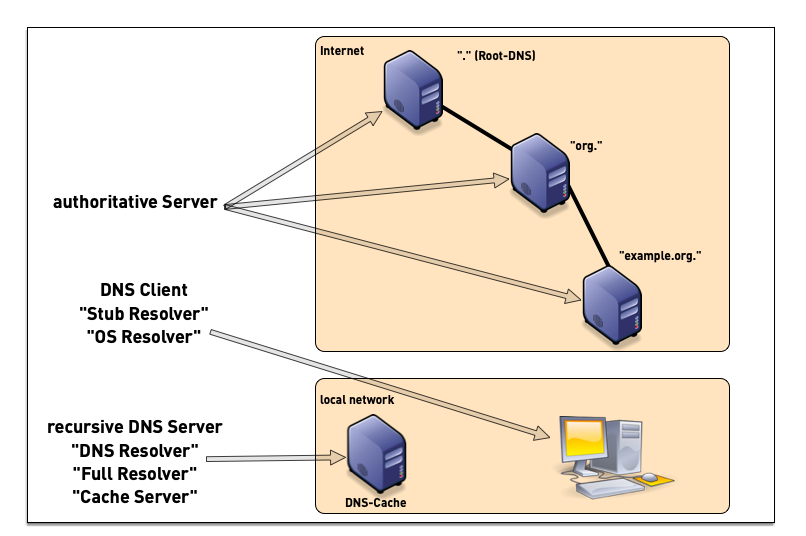
- a DNS installation constists of multiple components
- DNS clients (smartphones, tablets, desktop, laptop, server, IoT devices etc)
- DNS resolver (also named "Caching Server", "Smart Resolver", "recursive DNS Server"
- authoritative DNS Server
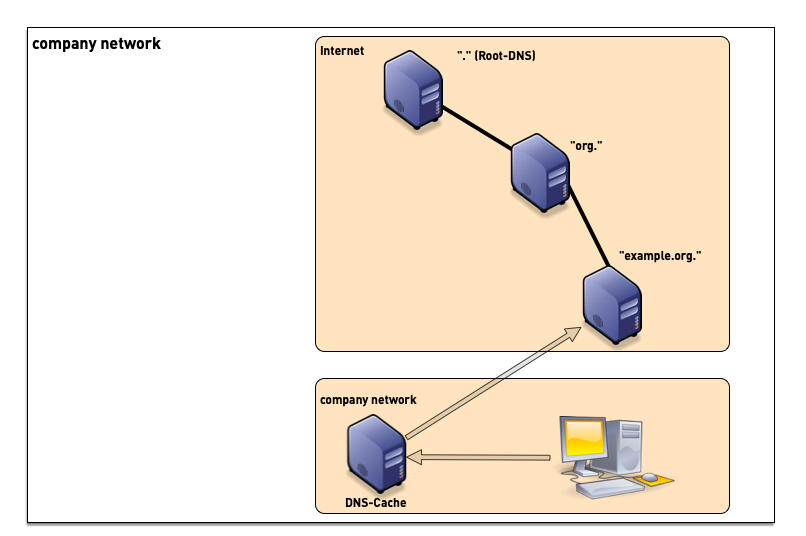
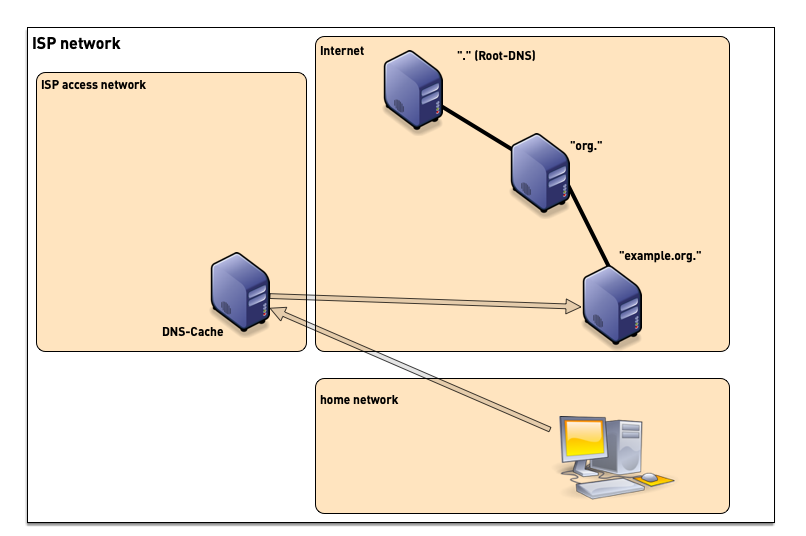
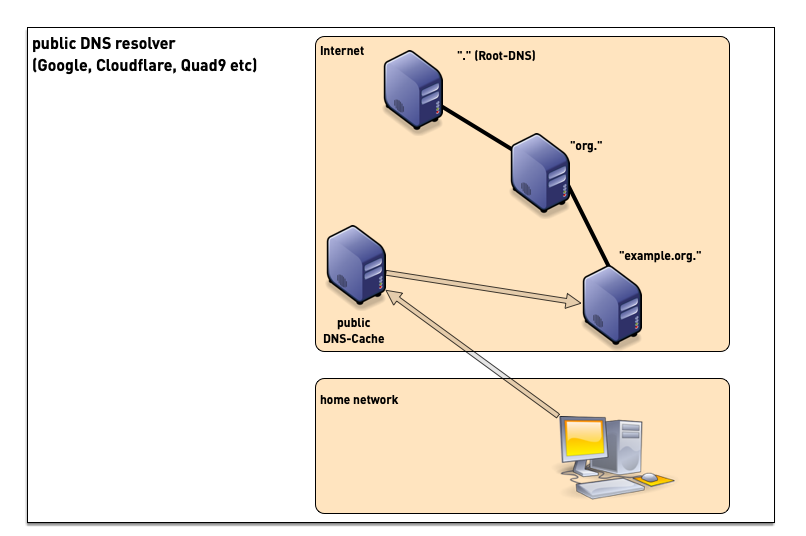
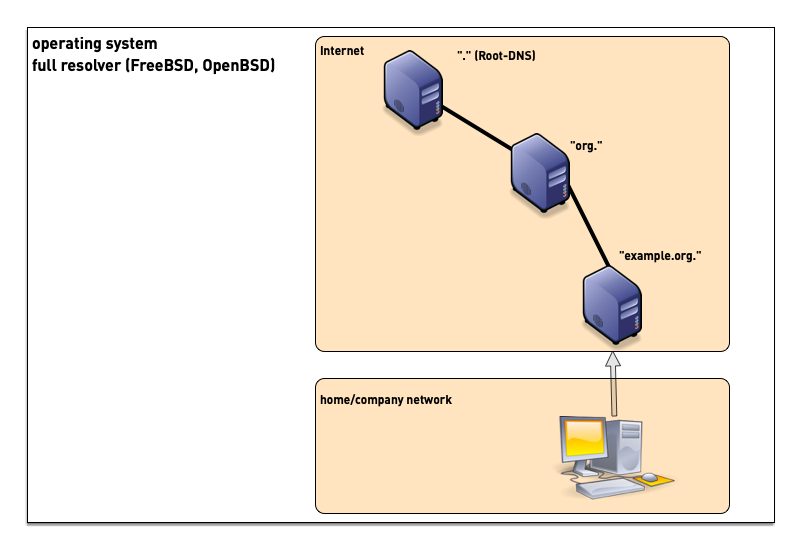
10.2 DNS Resolver placement
- in managed networks (company, university) the IT department manages one or more dedicated DNS resolvers
- ISP (Internet Service Provider) customers often use the DNS resolvers provided by the ISP
- although sometimes problematic from privacy and security point of view, many users today use public DNS resolvers in the Internet
- some operating systems support operating a full DNS resolver on each system
10.3 Authoritative Server, Primary and Secondaries

- For redundancy reasons, each DNS zone has multiple authoritative servers (one primary, multiple secondaries holding copies of the zone database)
11 DNS resolver: Authoritative Selection
- A referral commonly has multiple NS entries.
- There is no ranking or prioritization among the servers.
- None is believed to have better information than another.
- Which NS should a resolving server use?
- The same question applies to selecting a root server.
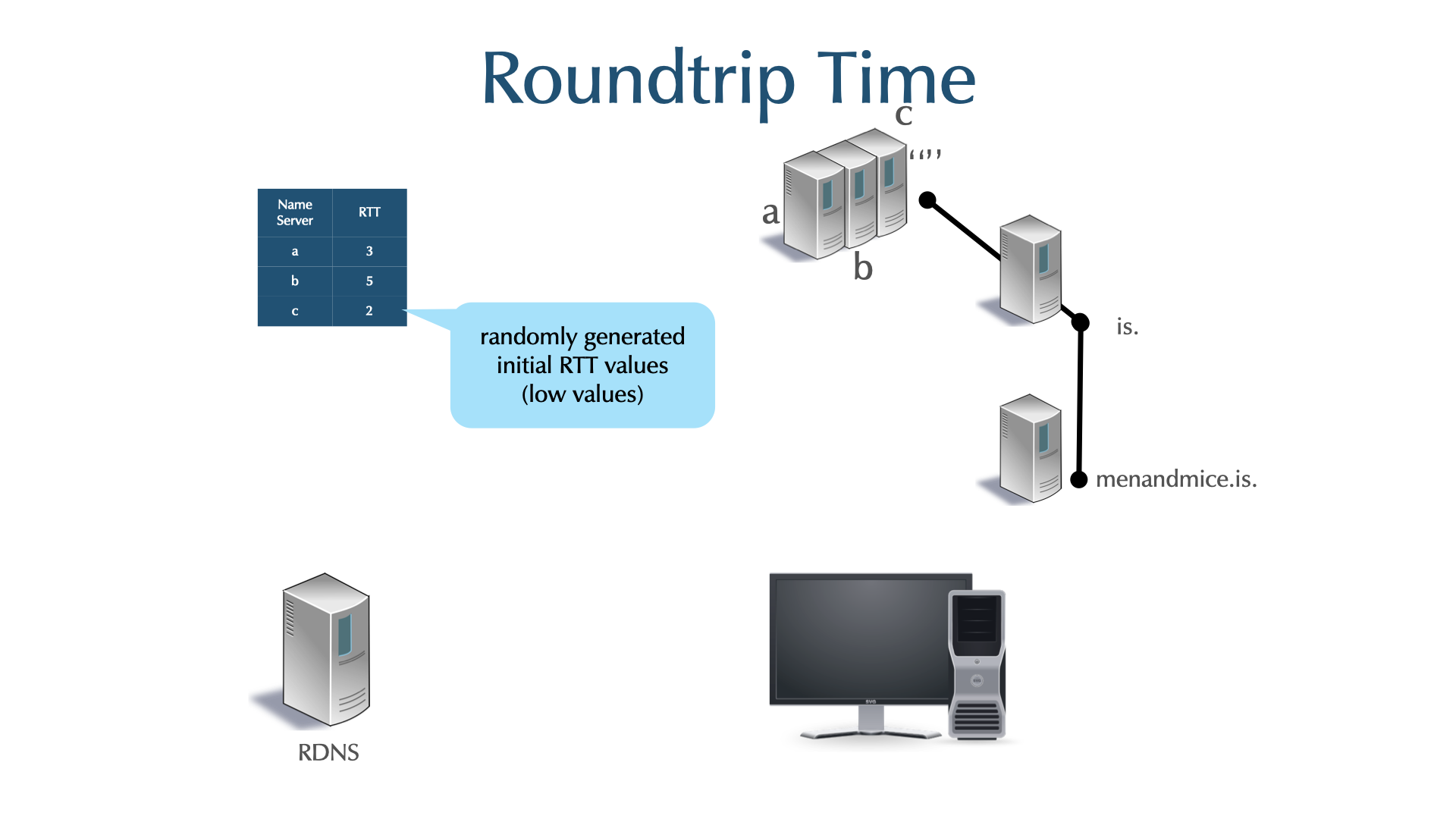
- BIND 9 uses a clever algorithm called "round trip time measurement"
to probe all authoritative DNS server for a domain at least once
and then uses the fastest while counting down the penalty of the
slower ones (decay).
- using this algorithm, BIND 9 uses the fastest authoritative from the set, while still probing all others from time to time
12 Install BIND 9 for the primary authoritative server
- Benutzername:
user - Passwort:
DNSandBIND
| Name | Hostname (dnslab.org) | URL |
|---|---|---|
| Tim | ns001a | https://ns001a.dnslab.org |
| Carsten | ns002a | https://ns002a.dnslab.org |
| Maciel | ns003a | https://ns003a.dnslab.org |
| Felix | ns004a | https://ns004a.dnslab.org |
| Moritz | ns005a | https://ns005a.dnslab.org |
| Volker | ns006a | https://ns006a.dnslab.org |
| Daniel | ns007a | https://ns007a.dnslab.org |
| Trainer | ns010a | https://ns010a.dnslab.org |
- work on the
nsNNNa.dnslab.orgvirtual machine (primary authoritative server). This is a new VM, different from the DNS resolver machine! - enable sudo
$ sudo -s
- install BIND 9
% dnf install bind
- the BIND 9 configuration file for the BIND 9 is in
/etc/named.conf. It is very minimal! - enable and start ISC BIND 9
% systemctl enable --now named
- lets tweak the configuration file
/etc/named.conffor an authoritative-only DNS serveroptions { directory "/var/named"; listen-on { any; }; listen-on-v6 { any; }; dnssec-validation no; recursion no; minimal-responses yes; minimal-any yes; querylog no; max-udp-size 1232; edns-udp-size 1232; dnssec-dnskey-kskonly yes; zone-statistics yes; rate-limit { responses-per-second 15; window 5; exempt-clients { localhost; } ; }; }; - logging for the authoritative server
logging { channel default_syslog { // Send most of the named messages to syslog. syslog local2; severity debug; }; channel xfer { file "transfer.log" versions 10 size 10M; print-time yes; }; channel update { file "update.log" versions 10 size 10M; print-time yes; }; channel named { file "named.log" versions 10 size 20M; print-time yes; print-category yes; }; channel security { file "security.log" versions 10 size 20M; print-time yes; }; channel dnssec { file "dnssec.log" versions 10 size 20M; print-time yes; }; channel ratelimit { file "ratelimit.log" versions 10 size 20M; print-time yes; }; channel query_log { file "query.log" versions 10 size 20M; severity debug; print-time yes; }; channel query-error { file "query-errors.log" versions 10 size 20M; severity info; print-time yes; }; category default { default_syslog; named; }; category general { default_syslog; named; }; category security { security; }; category queries { query_log; }; category dnssec { dnssec; }; category edns-disabled { default_syslog; }; category config { default_syslog; named; }; category xfer-in { default_syslog; xfer; }; category xfer-out { default_syslog; xfer; }; category notify { default_syslog; xfer; }; category client { default_syslog; named; }; category network { default_syslog; named; }; category rate-limit { ratelimit; }; }; - test the configuration
% named-checkconf
- reload/reconfig the BIND 9 configuration
% rndc reconfig
- Open port 53 (DNS) in the firewall
% firewall-cmd --permanent --zone=public --add-service=dns
% firewall-cmd --reload
12.1 The Zone Statement: Primary Zones
- For primary zones, the zone statement minimally defines:
- The domain name of the zone.
- The zone type (primary).
- The zone data file.
zone "example.com" { type primary; file "example.com"; }; - For secondary zones, the zone statement minimally defines:
- The domain name of the zone.
- The zone type (secondary).
- The IP address(es) of the primary name server(s).
- A backup zone file (optional, but standard).
zone "example.com" { type secondary; primaries { 192.0.2.10; 192.0.2.20; }; file "example.com"; }; - A secondary zone can have more than one primary (max 10).
- This adds robustness and allows secondaries that can't reach the primary (perhaps because of a firewall).
12.1.1 named.conf Syntax Check
- the tool
named-checkconfchecks the syntax of the main configuration filenamed.conf - Usage:
named-checkconf [filename] - The default file is
named.confin the sysconfdir whennamedwas built
% named-checkconf /etc/named.conf
/etc/named.conf:10: missing ';' before 'zone'
/etc/named.conf:14: missing ';' before end of file
named-checkconf -zalso checks primary zone files.
12.2 setting up a DNS zone
- next we need a zonefile for our new zone. The zone-name will be
zoneNNN.dnslab.org. The authoritative name-server is namednsNNNa.dnslab.org. - the ISC BIND 9 home-directory is at
/var/named. Use the zone template below (replace theNNNwith your attendee number) to create a new zonefile with the filenamezoneNNN.dnslab.orgin the BIND 9 home directory. Having a low TTL of 60 seconds is important in our lab environment. For production environments, the recommendation is 3600 seconds (1 hour) as a default TTL. - the period
.at the end of domain names is very important in zone files. Don't omit it. - Display the IPv4 and IPv6 addresses of a Linux-Server
hostname -I
- Zone Template
$TTL 60 zoneNNN.dnslab.org. IN SOA nsNNNa.dnslab.org. ( hostmaster 1001 1h 30m 41d 60s ) zoneNNN.dnslab.org. IN NS nsNNNa.dnslab.org. zoneNNN.dnslab.org. IN A <ipv4-address-of-the-lab-server> zoneNNN.dnslab.org. IN AAAA <ipv6-address-of-the-lab-server> - create a zone block in the
named.conffile (/etc/named.conf)[...] zone "zoneNNN.dnslab.org" { type primary; file "zoneNNN.dnslab.org"; }; - test the configuration and the zonefile(s) with parameter
-z(for Zones)% named-checkconf -z
- reload/reconfig the BIND 9 configuration
% rndc reconfig
- test if the zone resolves
- on the authoritative DNS server
$ dig @localhost zoneNNN.dnslab.org
- on your BIND 9 resolver machine (
dnsrNNN.dnslab.org)$ dig @nsNNNa.dnslab.org zoneNNN.dnslab.org
- on the authoritative DNS server
13 BIND 9 Logging
- in BIND 9, the administrator defines the channel (where to log) and the categories (what to log) and then connects the categories to the channels
- Categories
- security
- xfer-in (incoming zone transfer)
- xfer-out (outgoing zone transfer)
- queries
- dnssec
- default
- […]
- Categories: 28 in BIND 9.12; 23 in BIND 9.10 (includes default)
- Channel
- syslog
- files
- null
- stderr

13.1 default Logging
- If
named.confhas no logging statement, BIND essentially defaults to use syslog. - The default configuration is:
logging {
      category default {
          default_syslog;
          default_debug;
      };
      category unmatched { null; };
};
13.2 a logging template for a DNS resolver
logging {
        channel default_syslog {
                syslog daemon;
                severity info;
                print-category yes;
        };

        channel lame_channel {
        file "log/lamers.log" versions 5 size 100m;
               severity info;
               print-time yes;
        };
        category lame-servers    { lame_channel; };

        channel security_channel {
        file "log/security.log" versions 10 size 100m;
                severity info;
                print-time yes;
        };
        category security    { security_channel; };

        // don't log dns queries all time
        // if you need querylogging for troubleshooting an issue
        // turn it on for needed time
        // rndc querylog
        // dont forget disable with  rndc querylog
        //
        // activate debugging with
        // rndc trace
        //
        // debug errors are logged to the category query-errors
        //
        // don't forget to turn it off again
        // rndc notrace

        channel query_channel {
        file "log/queries.log" versions 1 size 100m;
               severity info;
               print-time yes;
               print-severity yes;
        };
        category queries    { query_channel; };

        channel queryerror_channel {
        file "log/queryerrors.log" versions 5 size 100m;
               severity dynamic;
               print-time yes;
               print-severity yes;
        };
        category query-errors    { queryerror_channel;};

        channel resolver_channel {
        file "log/resolvers.log" versions 5 size 100m;
               severity info;
               print-time yes;
        };
        category resolver    { resolver_channel; };

        channel general_channel {
        file "log/general.log" versions 5 size 100m;
               severity info;
               print-time yes;
        };
        category general                { general_channel; };
        category unmatched              { general_channel; };
        category client                 { general_channel; };
        category config                 { general_channel; };
        category network                { general_channel; };
        category delegation-only        { general_channel; };
        category dispatch               { general_channel; };

        channel dnssec_channel {
        file "log/dnssec.log" versions 5 size 100m;
               severity info;
               print-time yes;
        };
        category dnssec    { dnssec_channel; };

        channel edns_channel {
        file "log/edns.log" versions 5 size 100m;
               severity info;
               print-time yes;
        };
        category edns-disabled    { edns_channel; };

        channel capacity_channel {
        file "log/capacity.log" versions 5 size 100m;
               severity info;
               print-time yes;
        };
        category database    { capacity_channel;};
        category rate-limit  { capacity_channel;};
        category spill       { capacity_channel;};
};
13.2.1 Query-Logging
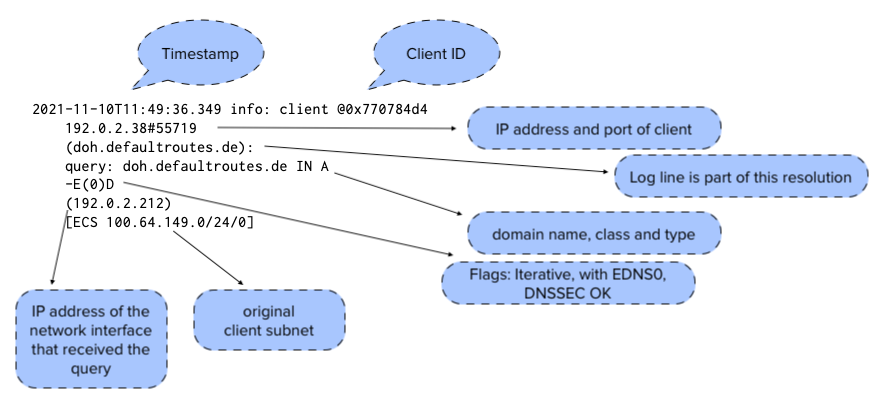
- Example BIND 9 query logging (BIND 9.16.21)
2021-11-10T11:49:36.349 info: client @0x770784d4 192.0.2.38#55719 (doh.defaultroutes.de): query: doh.defaultroutes.de IN A -E(0)D (192.0.2.212) [ECS 100.64.149.0/24/0]
2021-11-10T11:49:38.915 info: client @0x770784d4 100.64.15.30#40121 (doh.defaultroutes.de): query: doh.defaultroutes.de IN A -E(0)DC (192.0.2.212)
2021-11-10T11:49:39.195 info: client @0x770784d4 192.0.2.38#20977 (doh.defaultroutes.de): query: doh.defaultroutes.de IN AAAA -E(0)DC (192.0.2.212)
2021-11-10T11:49:39.347 info: client @0x770784d4 100.64.1.244#63082 (doh.defaultroutes.de): query: doh.defaultroutes.de IN A -E(0)D (192.0.2.212)
2021-11-10T11:49:41.455 info: client @0x770784d4 192.0.2.34#38949 (mailop.org): query: mailop.org IN A -E(0)DC (192.0.2.212) [ECS 100.64.2.0/24/0]
2021-11-10T11:49:41.809 info: client @0x770784d4 192.0.2.85#14795 (doh.defaultroutes.de): query: doh.defaultroutes.de IN A -E(0)D (192.0.2.212)
- The fields in one line of query log data
13.2.2 Logging Exercise 1
- use your virtual lab machine
dnsrNNN.dnslab.org - replace the default logging in the file
named.confwith the logging template above - create the directory for the log files
% mkdir /var/named/log
- adjust the permissions on the log directory so that the
namedprocess can write to that file% chown named /var/named/log/
- reload/reconfig the BIND 9 name server. Which log-file gets log entries? Write the answer in the chat.
13.2.3 Logging Exercise 2
- use your virtual lab machine
dnsrNNN.dnslab.org - enable query logging
% rndc querylog on
- send some queries
$ dig @localhost debian.org
$ dig @localhost google.com +dnssec
$ dig @localhost debian.org +norec
$ dig @localhost twitter.com +nocookie
- check the
queries.logfile. Try to match the output with the queries. - don't forget the turn off querylogging after these queries
% rndc querylog off
14 Debug Logging
trace <level>: Change BIND's debugging level to the filenamed.run. (reading the trace requires knowledge of BIND internals)% rndc trace 10 # tracelevel now 10 % rndc trace # tracelevel now 11 % rndc notrace # tracelevel now 0 % rndc trace 0 # same as notrace
- The current debugging level is part of BIND's status.
% rndc status | grep debug
debug level: 0
recursing: Dump the queries that are currently recursing. The default file isnamed.recursing. It can be changed with therecursing-filestatement.rndc recursing
15 Troubleshooting DNS
- DNS is very robust, it just keeps running.
- It will continue to function for a given zone, as long as at least one authoritative server remains functional.
- It fails catastrophically when all servers are broken or unreachable.
- What can go wrong?
- Delegation, misconfigured zone data,
named.conferrors, DNS server failures (software), host (hardware), network…
- Delegation, misconfigured zone data,
15.1 How to debug DNS
- Turn on logging for the feature that is misbehaving.
- Enable the logging category that covers the feature.
- Send the output where you can find it.
- Too much logging can be as bad as no logging.
- Learn what normal logging looks like so that when something breaks, you recognize the abnormalities.
- Is BIND listening?
- System tools such as
lsof,ss, andnetstatlist currently open network sockets:% lsof -Poni :53 COMMAND PID USER FD TYPE DEVICE OFFSET NODE NAME systemd-r 2509 systemd-resolve 18u IPv4 32663 0t0 UDP 127.0.0.53:53 named 3131 named 21u IPv4 38238 0t0 TCP 127.0.0.1:53 (LISTEN) named 3131 named 22u IPv6 38240 0t0 TCP [::1]:53 (LISTEN) named 3131 named 512u IPv4 38236 0t0 UDP 127.0.0.1:53 named 3131 named 513u IPv6 38239 0t0 UDP [::1]:53
- System tools such as
15.2 Troubleshooting with "dig"
dighas a number of options that aid in debugging+trace- resolve from the root servers+nssearch- retrieve SOA from all authoritative servers+tcp- use TCP instead of UDP for queries+norecurse- Do not set the "RD" bit on outbound query+multiline- produce output in multi-line (extended) format
15.3 External tools
- DNS looking glasses are web interfaces for querying.
- Like
dig, they are DNS admin tools. - They can succeed when dig fails.
- Some are simple a dig interface on a website.
- Sometimes they are called, "web based dig."
- Like
- Many sites offer a looking glass.
- These are frequently terrible: limited input options, limited RR types support, cropped or edited output, old dig versions, etc.
- Even good ones cannot query your internal-only domains.
- They are useful when
digis not available. - They can provide insight into geo-located responses, because they run somewhere else.
- Recommend Looking Glass:
https://dns.bortzmeyer.org/domain/[type]/[class]
- Recommended web based dig:
- Looking Glass: Looking At GeoIP
- https://whatsmydns.net queries a domain name using resolvers worldwide. It exposes address variations based on location.
- Other options:
- https://toolbox.googleapps.com/apps/dig
- https://digdns.com ANY only, but many other tools included and good output.
16 Turning off answers from the CHAOS class
- by default, BIND 9 answers queries to internal information in the CHAOS class (a network class not used in production anymore and repurposed for internet DNS server data)
- the DNS queries in the chaos class are
dig @<server> ch TXT version.bind- asking for the BIND 9 server software versiondig @<server> ch TXT authors.bind- asking for the list of BIND 9 developersdig @<server> ch TXT hostname.bind- asking for the BIND 9 server hostnamedig @<server> query +nsidordig @<server> ch TXT server.id- asking for the servers ID (see RFC 4892 Requirements for a Mechanism Identifying a Name Server Instance and DNS Name Server Identifier (NSID) Option
- example query with NSID
$ dig +nsid google.com ; <<>> DiG 9.11.4-P2-RedHat-9.11.4-26.P2.el8 <<>> +nsid google.com ;; global options: +cmd ;; Got answer: ;; ->>HEADER<<- opcode: QUERY, status: NOERROR, id: 1785 ;; flags: qr rd ra; QUERY: 1, ANSWER: 6, AUTHORITY: 0, ADDITIONAL: 1 ;; OPT PSEUDOSECTION: ; EDNS: version: 0, flags:; udp: 512 ; NSID: 70 72 6f 64 2d 72 64 6e 73 72 65 73 6f 6c 76 65 72 30 32 2e 61 6d 73 33 2e 69 6e 74 65 72 6e 61 6c 2e 64 69 67 69 74 61 6c 6f 63 65 61 6e 2e 63 6f 6d ("prod-rdnsresolver02.ams3.internal.digitalocean.com") ;; QUESTION SECTION: ;google.com. IN A ;; ANSWER SECTION: google.com. 44 IN A 108.177.126.100 google.com. 44 IN A 108.177.126.113 google.com. 44 IN A 108.177.126.139 google.com. 44 IN A 108.177.126.102 google.com. 44 IN A 108.177.126.101 google.com. 44 IN A 108.177.126.138 ;; Query time: 1 msec ;; SERVER: 67.207.67.3#53(67.207.67.3) ;; WHEN: Tue May 26 05:41:20 UTC 2020 ;; MSG SIZE rcvd: 189 - turning off these information sources in BIND 9
options {
   [...]
   server-id none;
   version none;
   hostname none;
};
17 Resilience - one or more secondary servers
- Currently your zone only has one authoritative server
- That is a single point of failure
- To fix this, we install another BIND 9 server
17.1 building a second authoritative server
- Work on the 2nd authoritative server machine (
nsNNNb.dnslab.org) - We want to create a new secondary server
- Become root
$ sudo -s
- Install BIND 9
% dnf install bind
- The BIND 9 configuration file for the BIND 9 is in
/etc/named.conf. It is very minimal! - Enable and start ISC BIND 9
% systemctl enable --now named
- Let's tweak the configuration file
/etc/named.conffor an authoritative-only DNS serveroptions { directory "/var/named"; listen-on { any; }; listen-on-v6 { any; }; dnssec-validation no; recursion no; minimal-responses yes; minimal-any yes; querylog no; max-udp-size 1232; edns-udp-size 1232; dnssec-dnskey-kskonly yes; zone-statistics yes; rate-limit { responses-per-second 15; window 5; exempt-clients { localhost; } ; }; }; - Logging for the authoritative server
logging { channel default_syslog { // Send most of the named messages to syslog. syslog local2; severity debug; }; channel xfer { file "transfer.log" versions 10 size 10M; print-time yes; }; channel update { file "update.log" versions 10 size 10M; print-time yes; }; channel named { file "named.log" versions 10 size 20M; print-time yes; print-category yes; }; channel security { file "security.log" versions 10 size 20M; print-time yes; }; channel dnssec { file "dnssec.log" versions 10 size 20M; print-time yes; }; channel ratelimit { file "ratelimit.log" versions 10 size 20M; print-time yes; }; channel query_log { file "query.log" versions 10 size 20M; severity debug; print-time yes; }; channel query-error { file "query-errors.log" versions 10 size 20M; severity info; print-time yes; }; category default { default_syslog; named; }; category general { default_syslog; named; }; category security { security; }; category queries { query_log; }; category dnssec { dnssec; }; category edns-disabled { default_syslog; }; category config { default_syslog; named; }; category xfer-in { default_syslog; xfer; }; category xfer-out { default_syslog; xfer; }; category notify { default_syslog; xfer; }; category client { default_syslog; named; }; category network { default_syslog; named; }; category rate-limit { ratelimit; }; }; - Test the configuration
% named-checkconf
- Open the firewall for DNS
(port 53)
% firewall-cmd --permanent --zone=public --add-service=dns
% firewall-cmd --reload
- Reload/reconfig the BIND 9 configuration
% rndc reconfig
- Test that zone transfer from the primary works
$ dig @nsNNNa.dnslab.org zoneNNN.dnslab.org AXFR
- Now we create a zone block for a secondary zone in
named.conf[...] zone "zoneNNN.dnslab.org" { type secondary; file "zoneNNN.dnslab.org"; primaries { <ipv6-address-of-primary-server>; <ipv4-address-of-primary-server>; }; }; - Test the BIND 9 configuration
% named-checkconf -z
- Reload/reconfig the configuration
% rndc reconfig
- Check if the zone file for the secondary zone has been created by a
zone transfer
% ls -l /var/named
- Our second server should now also be authoritative for this zone
(
AAFlag)$ dig @localhost zoneNNN.dnslab.org SOA
- Try to look into the new zone file. Does it work?
% less /var/named/zoneNNN.dnslab.org
- Since BIND 9.8 secondary zones are stored in a binary format. This speeds up saving and loading zone content on very large zones (> 10000 resource records). The binary format cannot be read without extra tooling
- It is possible to configure BIND 9 to write secondary zones in the text
format (was default in BIND 9 before 9.8)
zone "zoneNNN.dnslab.org" { type secondary; file "zoneNNN.dnslab.org"; primaries { <IPv4>; <IPv6> }; masterfile-format text; }; - Test configuration file and reload/reconfig the BIND 9 server
% named-checkconf -z
% rndc reconfig
- Re-transfer the zone
% rndc retransfer zoneNNN.dnslab.org
- List zone file content (should now work!)
% less /var/named/zoneNNN.dnslab.org
17.2 Fixing the NS records
- Now we have a second authoritative DNS server for our zone
- But it is not listed in the zone (Parent Child disagreement)
- We need to fix this
- Work on the authoritative primary (
nsNNNa.dnslab.org) - Add the second DNS server to the NS record set of your DNS zone
- Don't forget to increment the SOA serial number
$TTL 60 zoneNNN.dnslab.org. IN SOA nsNNNa.dnslab.org. ( hostmaster 1002 ; <-- new serial 1h 30m 41d 60s ) zoneNNN.dnslab.org. IN NS nsNNNa.dnslab.org. zoneNNN.dnslab.org. IN NS nsNNNb.dnslab.org. ; <-- new secondary zoneNNN.dnslab.org. IN A 161.35.224.95 zoneNNN.dnslab.org. IN AAAA 2604:a880:4:1d0::40:0 - Check the zone configuration and reload the BIND 9 server (primary)
- Check on the primary and the secondary that the new zone has been
transferred over to the secondary (check the
transfer.logfile) - On the DNS resolver machine
dnsrNNN.dnslab.org, test that the resolver sees both authoritative servers$ dig zoneNNN.dnslab.org +nssearch
- Do you see which server is responding faster?
18 Master Zone File Shortcuts
18.1 $ORIGIN
$ORIGINis a variable that is appended to non full qualified domain names (FQDN).- It applies to owner names and RDATA name fields.
- The default
$ORIGINis the name of the zone. @allows the explicit use of the$ORIGINvalue.

18.1.1 Example
$ORIGIN zoneNNN.dnslab.org.
@          30 IN SOA dns-main hostmaster 5 7200 3600 2592000 600
@          30 IN NS  dns-main
@          30 IN NS  dns2.someotherzone.com.
@          30 IN A   192.0.2.200
dns-main   30 IN A   192.0.2.100
www        30 IN CNAME @
18.1.2 Result in memory
zoneNNN.dnslab.org.		   30 IN SOA	 (
                                        dns-main.zoneNNN.dnslab.org.
                                        hostmaster.zoneNNN.dnslab.org.
                                        5 7200 3600 2592000 600 )
zoneNNN.dnslab.org.		   30 IN NS      dns2.someotherzone.com.
zoneNNN.dnslab.org.		   30 IN NS      dns-main.zoneNNN.dnslab.org.
zoneNNN.dnslab.org.                30 IN A       192.0.2.200
dns-main.zoneNNN.dnslab.org.       30 IN A       192.0.2.100
www.zoneNNN.dnslab.org.            30 IN CNAME   zoneNNN.dnslab.org.
18.2 Owner Name
- A RR that begins with a white space inherits the most recently specified owner name.
- This means that order matters in a zone file.
- Be careful not to add a new RR with a new name before a RR inheriting its name.
- A new owner name is always left justified.
zoneNNN.dnslab.org.      30 IN NS   dns2.someotherzone.com.
                         30 IN NS   ns1
                         30 IN A    192.0.2.67
18.3 $TTL
- A RR without a TTL is assigned the zone's default TTL.
- The default is defined with the
$TTLcontrol statement. $TTLcan be used multiple times in a zone file.- The most recent
$TTLis the default.
$TTL 30 zoneNNN.dnslab.org. IN NS dns2.someotherzone.com. IN NS ns1 IN A 192.0.2.67 - The default is defined with the
18.4 Owner Name vs. Time to Live
- Note the different inheritance rules for the Owner Name and the TTL.
- A RR without an owner name inherits the previous RR's name.
- A RR without a TTL inherits the zone's default TTL.
18.5 Network Class
- Without being explicitly assigned, a RR inherits its class from the zone’s definition.
- For BIND, the definition is in
named.conf. INis the default class. You are unlikely to create zones with any other class.
@ 30 SOA ns1 hostmaster 5 7200 3600 2592000 600 30 NS ns1 ns1 30 A 192.0.2.100 - For BIND, the definition is in
18.6 $INCLUDE
$INCLUDEreads another file into the zone file.- If you have zones with identical data,
$INCLUDElets you avoid recreating and maintaining the same information.@ 30 SOA ns1 hostmaster 5 7200 3600 2592000 600 30 NS ns1 30 NS dns2.someotherzone.com. ns1 30 A 192.0.2.100 $INCLUDE "common.rr.txt"
18.7 Quiz
- What is the TTL of each RR?
$TTL 30
zoneNNN.dnslab.org.      IN NS   dns2.xy.com.
                      45 IN A    192.0.2.44
zoneNNN.dnslab.org.      IN A    192.0.2.67

$TTL 300
abc                   90 IN AAAA 2001:db8::cafe
                     300 IN AAAA 2001:db8::dead
def                      IN AAAA 2001:db8::dab
19 Changes to the zone
- Work on the primary server
nsNNNa.dnslab.org - Add a new TXT Record to your zone
zoneNNN.dnslab.org - Increment the SOA serial number in the zone
- Check the configuration with
named-checkconf -z - If no errors are reported, reload the zone into the primary server
with
rndc reload zoneNNN.dnslab.org - Check for outgoing Notify and Zone-Transfer messags in
/var/named/transfer.log - Query the new TXT record
- From the DNS resolver machine
- From the primary server
- From the secondary server
- Do all server return the same data?
- Check the SOA serial on all authoritative DNS server for a zone
with
dig zoneNNN.dnslab.org +nssearch
20 DNS reverse resolution
- A-Records and AAAA-Records map domain names to IPv4 and IPv6 addresses
- Aometimes we want to map IP addresses back to their domain names
- DNS offers this function, it is called reverse lookup
- Reverse lookup is optional except where required by protocol
(
X11authentication) or custom (Anti-Spam checks for SMTP mail)
20.1 Reverse records
- For reverse DNS lookup, the IP address must be converted into a
domain name (because in DNS the query index is always a domain
name)
- In IP addresses, the hierarchy is from left to right (network part on the left of an IP address, host part on the right)
- In domain names, the hierarchy is from right to left (Root-Zone and Top-Level domain on the right, host part on the left)
- To map an IP address to a domain name, we reverse the order of
all digits of the address, and add the second level domains
in-addr.arpa.(IPv4) orip6.arpa(IPv6)- For IPv4 =
192.0.2.100->100.2.0.192.in-addr.arpa. - For IPv6 =
2001:db8:ff::1->1.0.0.0.0.0.0.0.0.0.0.0.0.0.0.0.0.0.0.0.F.F.0.0.8.B.D.0.1.0.0.2.IP6.ARPA
- For IPv4 =
- The domain name for an IP address is stored as a
PTR(Pointer) record with the domain name in the record data
132.0.2.192.IN-ADDR.ARPA. 3600 IN PTR www.example.com.
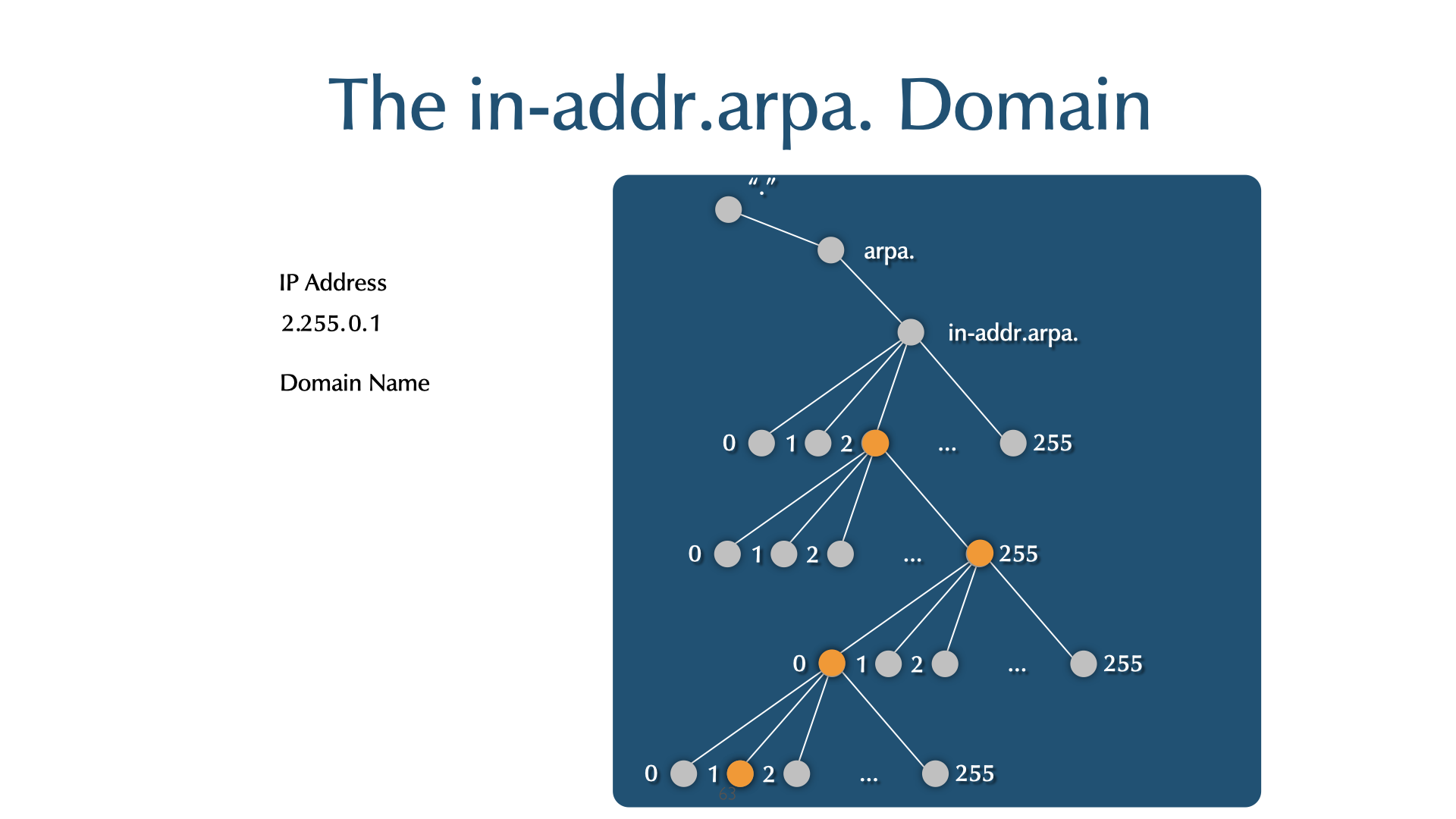
arpanameis a BIND tool for generating a PTR RR from an IP address.$ arpaname 10.4.13.132 132.13.4.10.IN-ADDR.ARPA $ arpaname 2001:db8:a1:CAFE::fab B.A.F.0.0.0.0.0.0.0.0.0.0.0.0.0.E.F.A.C.1.A.0.0.8.B.D.0.1.0.0.2.IP6.ARPA
digsupports a shortcut notation for reverse lookup queries with the-xswitch:$ dig -x 192.168.1.36
- is the same as
$ dig 36.1.168.192.in-addr.arpa PTR
- Reverse domains are delegated from the Regional Internet Registries (RIRs) and Local Internet Registries (LIRs)
| RIR | Website |
|---|---|
| APNIC | https://apnic.net/ |
| ARIN | https://arin.net |
| RIPE | https://ripe.net/ |
| AFRINIC | https://afrinic.net/ |
| LACNIC | https://www.lacnic.net/ |
- You need to request your reverse space be delegated to your authoritative servers by the entity that gave you IP address space (ISP, RIR, LIR etc)
20.2 Exercise
- Work on the primary authoritative server (
nsNNNa.dnslab.org) - Create a new zone file for the fictional IPv4 network in the
picture below
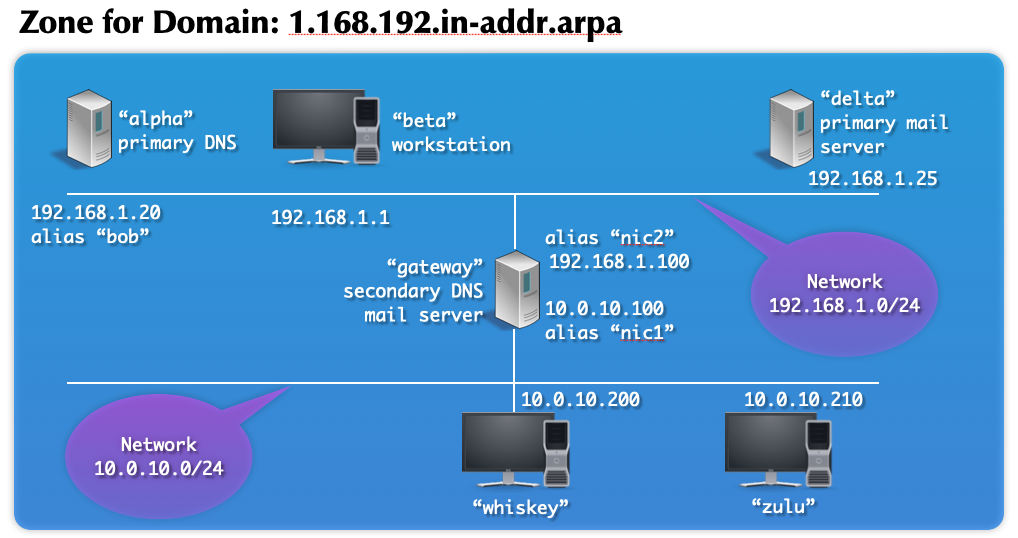
- The picture only shows the hostname label of the domain name. You
need to add the forward domains name
zoneNNN.dnslab.org.to the names. Example: Hostbetaisbeta.zoneNNN.dnslab.org.. Ignore the "alias" names shown in the picture. - The "Home" directory for BIND 9 is
/var/named - Add a zone block for this network to your BIND 9 configuration file
named.confonnsNNNa. - bonus: create a zone file and add a zone block for the second
network in the picture
10.0.10.in-addr.arpa - Check the zonefile and the configuration for errors
- Reload the BIND 9 DNS server
- Test if the zone can be resolved
$ dig @nsNNNa.dnslab.org 1.168.192.in-addr.arpa.
$ dig @nsNNNa.dnslab.org 20.1.168.192.in-addr.arpa. PTR
- Can it be reached via delegation?
$ dig -x 192.168.1.1
20.3 Solution (Template)
- Zonefile for reverse zone for network block 192.168.1.0/24:
$TTL 60 $ORIGIN 1.168.192.in-addr.arpa. ;; the domain names of the authoritative name servers are always in ;; a "normal/forward" zone, not in the namespace of a reverse zone! @ SOA nsNNNa.dnslab.org. . 1001 1h 30m 40d 60 NS nsNNNa.dnslab.org. NS nsNNNb.dnslab.org. ;; the Pointer Records point to the names of the machines 1 PTR beta.zoneNNN.dnslab.org. 20 PTR alpha.zoneNNN.dnslab.org. 25 PTR delta.zoneNNN.dnslab.org. 100 PTR gateway.zoneNNN.dnslab.org. - Zone-Block in
named.confzone "1.168.192.in-addr.arpa" { type primary; file "1.168.192.in-addr.arpa"; };
21 Giving Delegation
- A client/customer/colleague/subsidary requests a dekegation of the
sub-domain
trainer.zoneNNN.dnslab.orgto their DNS nameserver - The target name server for the delegation are
ns010a.dnslab.organdns010b.dnslab.org - Create a delegation inside your zone for
trainer.zoneNNN.dnslab.orgtowards the target DNS server - Make sure the changes propagate to your secondary server
- Test the delegation by resolving the TXT record on
trainer.zoneNNN.dnslab.org. You should get a TXT record in answer section.
21.1 Solution:
- You zone needs new delegation NS record for the subdomain
trainer.zoneNNN.dnslab.org. There are two NS records, one for each authoritative DNS server of the delegated zone:
trainer.zoneNNN.dnslab.org.     IN NS  ns010a.dnslab.org.
trainer.zoneNNN.dnslab.org.     IN NS  ns010b.dnslab.org.
- Because this is a change in your zone, the SOA serial must be incremented, else the secondaries will not pick up the change
- The zonetransfer should be visible in the zone transfer logfile
transfer.log - The command
dig zoneNNN.dnslab.org +nssearchshould show the same SOA serial on both authoritative DNS server - The test
dig TXT trainer.zoneNNN.dnslab.orgshould return the textHurra, die Delegation funktioniert!
22 A quick look at DNSSEC
22.1 DNS Security (or lack of)
- the classic DNS from 1983 was not designed with security in mind
- DNS cache poisoning

- Men-in-the-Middle data spoofing

- changes to the client DNS resolver configuration
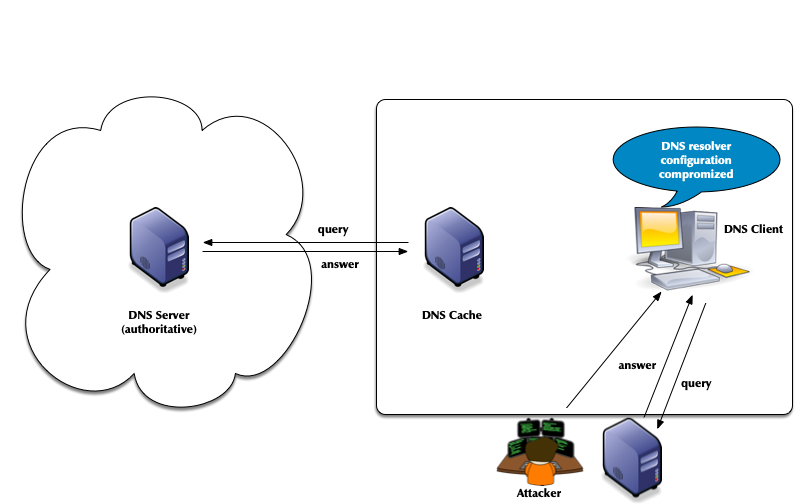
- attacks of authoritative DNS servers
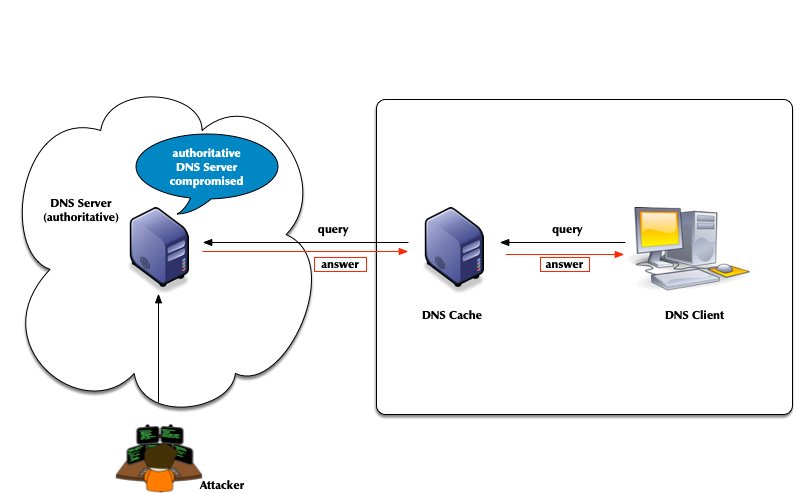
- DNSSEC can help
22.2 DNSSEC
- the DNS security extension DNSSEC secures DNS data by augmenting
the data with cryptographic signatures
- the owner (administrator) creates a key pair of private and public key for each DNS zone (asymmetric crypto)
- the owner/administrator signs all DNS data with the private key
- the recipient of the data (DNS resolvers or client operating
system or application) will verify (validate) the data
- that the data has not been changed on the server nor during transit
- that the data comes from the correct owner (the owner of the private key)
22.3 the chain of trust in DNS
- DNSSEC creates a chain of trust between the parent zone and the child zone

- Applications and DNS resolvers can follow the chain of trust to a configured trust anchor to validate the DNS data
- we will look into DNSSEC in more details later in this course* DNSSEC Intro :noexport:
- In DNSSEC, each zone has one or more key pairs.
- The private key of each pair
- Is stored securely (probably on a hidden primary)
- Is used to sign zone data
- Should never be published or stored in a RR
- The public key of each pair
- It should be public
- Is stored in the zone data, as a DNSKEY record
- Is used to verify zone data
- The private key of each pair
- A private key signs the hashes of each RRSet in a zone.
- The public key is accessible through a standard RR.
- Recursive servers or clients query for the public key RR in order to decrypt a hash.
- The RR is known as the DNSKEY and covered below.
22.4 DNSSEC key algorithms
| Algorithm | Note |
|---|---|
| RSAMD5 | deprecated, not implemented |
| RSASHA1 | not recommended, implemented |
| RSASHA256 | recommended |
| RSASHA512 | large keys |
| DSA | slow validation, no extra security |
| ECC-GOST | used in Russia |
| ECDSA | small signatures, read ECDSA and DNSSEC: http://blog.apnic.net/2014/10/23/ecdsa-and-dnssec/ |
| ED448/ED25519 | new, not widely supported RFC 8080 / RFC 8032 Edwards-Curve Digital Signature Algorithm (EdDSA) |
22.5 DNSSEC records
22.5.1 RRSIG
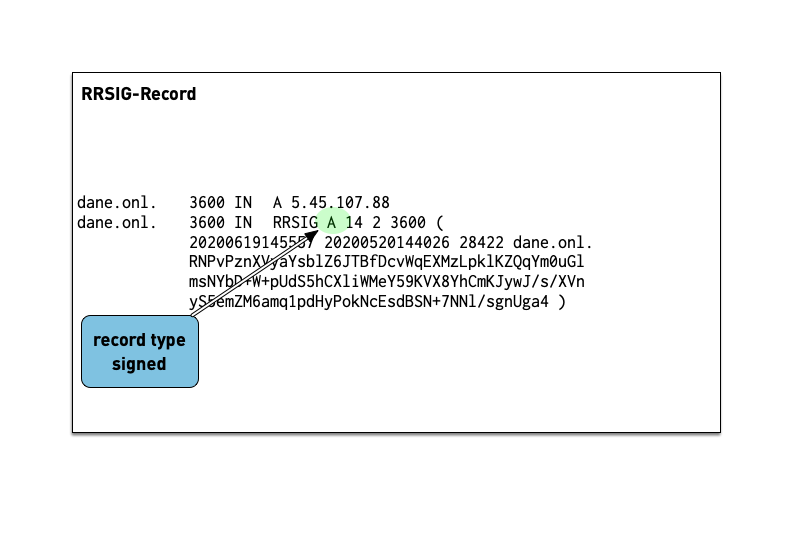
- The RRSIG record holds the cryptographic signature over the DNS data. The first field of the RRSIG holds the type this RRSIG is for. Together with the domain name of the RRSIG this data is important to match the signature to the data record.
- A zone's private key signs the RRSets in the zone.
- The signatures are added to the zone as RRSIG RRs.
- If two key pairs are in use, each RRSet is signed twice, and there is double the number of signatures.
- Signatures have start and expiration times (typically a month or more apart).
- They must be replaced before expiring. BIND 9 can automate the signature updates.
- Keys don't have expiration timers.
- work on the DNS resolver machine
- ask for the DNSSEC signature of
dnssec.works NS:
dig dnssec.works NS +dnssec +multi
- answer these questions into the chat
- which algorithm is this zone using? check the number against IANA Domain Name System Security (DNSSEC) Algorithm Numbers
- when does the signature expire?
- when did the signature become valid?
22.5.2 DNSKEY
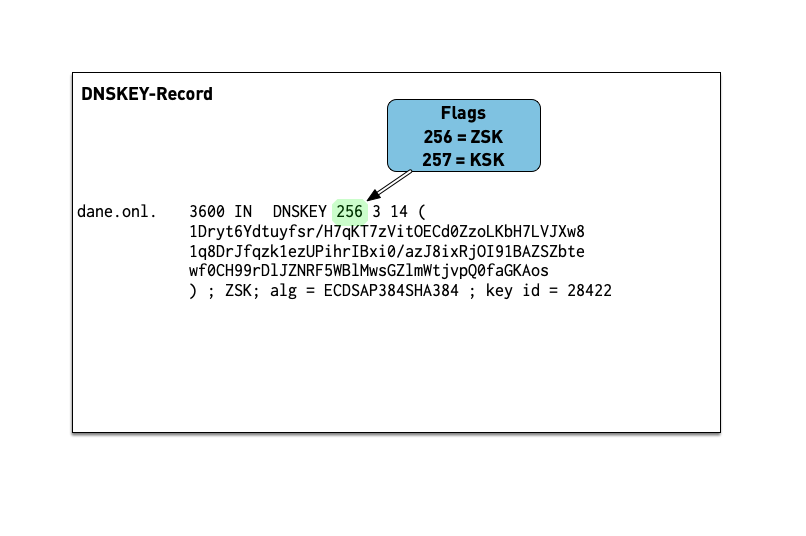
- The public key of a DNSSEC key pair is stored in a DNSKEY RR.
- The private key is not publicly available or accessible through DNS.
- DNSKEY RRs are stored in the zone they can verify.
- This conveniently means the zone administrator can sign all the RRSets and create the DNSKEY RRSet.
- work on the DNS resolver machine
- ask for the DNSSEC keys of
dnsworkshop.cz:$ dig dnsworkshop.cz DNSKEY +dnssec +multi
- answer these questions into the chat
- which algorithm is this zone using?
- compare the size of keys and signature with the zone
dnssec.works - write in the chat the sizes of both DNS answer messages as
reported by
dig
22.5.3 DS Record
- The Delegation Signer (DS) record holds the hash of the
Key-Signing-Key of a DNSSEC signed child zone.
- it is used to verify that the KSK has not been replaced without permission
- the DS record is usually submitted to the parent zone operator
via a web-based or API system implemented by the domain reseller
(registrar)
- this interface can become a target for attacker that want to change data in a DNSSEC signed zone and should be protected (two factor signon, registry lock etc).

- work on the DNS resolver machine
- ask for the DNSSEC delegation signer of
isc.org:dig isc.org DS +dnssec +multi
- answer these questions into the chat
- which algorithm is this zone using?
- what is the current key-id of the KSK in the zone
isc.org? - what hashing algorithm is used for the DS record of
isc.orgcheck against Delegation Signer (DS) Resource Record (RR) Type Digest Algorithms?
23 DNSSEC signing and validation
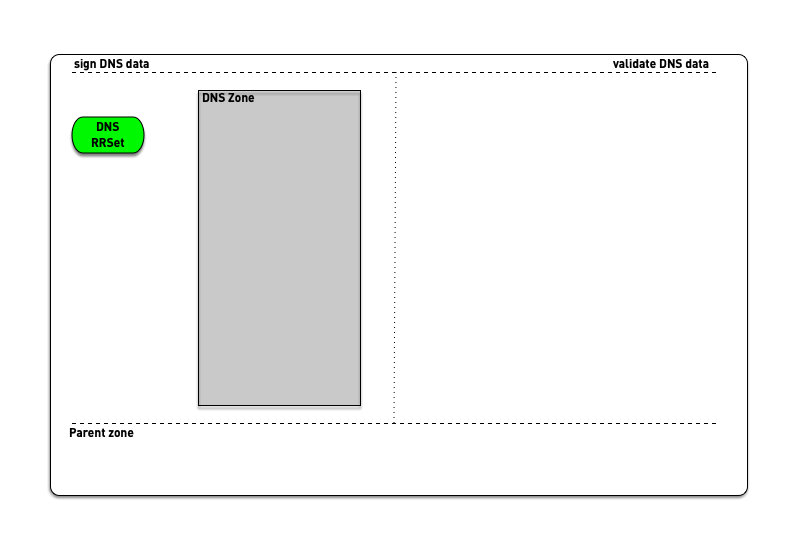
24 DNSSEC validation (simplified)
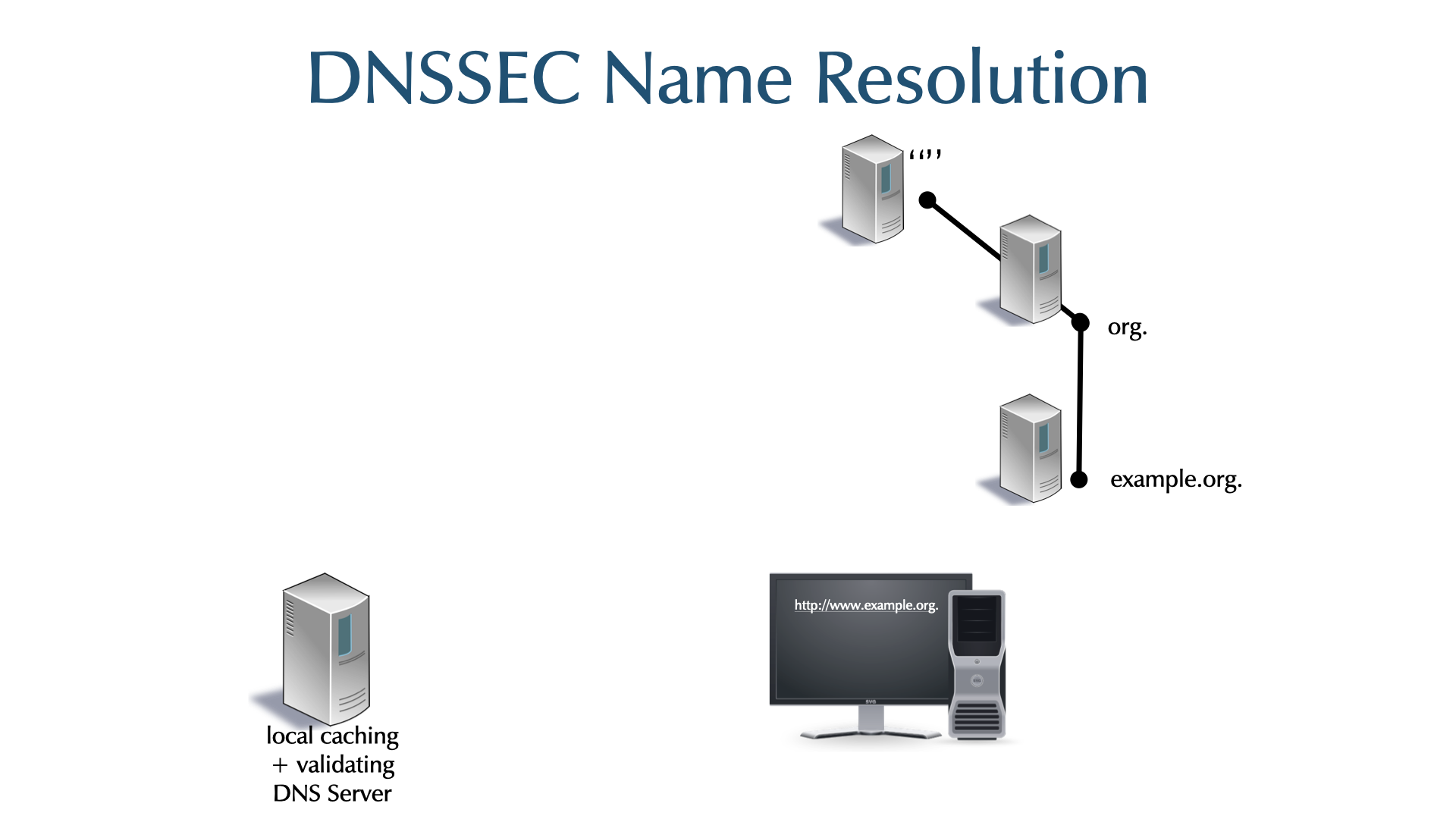
- When the validator gets an RRSIG in a response, it needs the DNSKEY, and DS RR to authenticate.
- If validation fails, the signed RRs are discarded, and SERVFAIL error is returned to the client.
- If no appropriate trust anchor exists, the RRSIG is ignored.
- If the chain of trust is broken the signature is ignored.
- The steps in the following animation are simplified.
- It only shows validation using one key per zone (SSK/CSK).
- Commonly, a zone has ZSK & KSK, so there are additional steps.
25 KSK and ZSK
- DNSSEC often uses two keys to simplify the management of the chain of trust
- a Key-Signing-Key (KSK) that is stable and large (and harder to attack)
- The KSKs hash is stored as a DS record in the parent zone
- Changing the KSK requires coordination with the operator of the parent zone (often the Top-Level-Domain)
- a Zone-Signing-Key (ZSK) that secures all the resource records in the zone
- The ZSK can be more lightweight because it can be changed (rolled) at anytime, there is no dependency to an external party (the parent zone)
- The KSK signs the ZSK to create the chain of trust from the parent via the KSK towards the ZSK
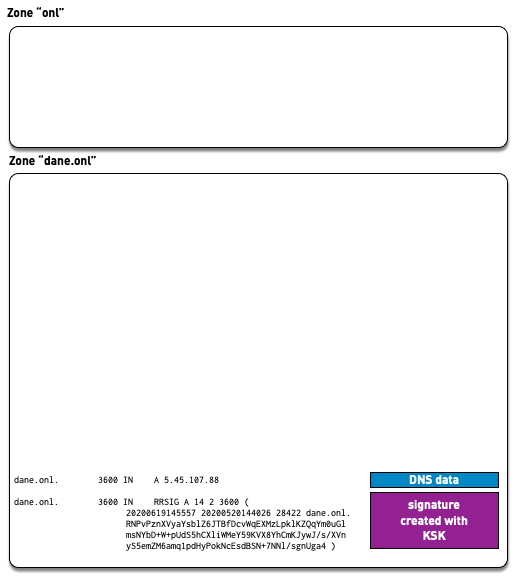
DS (parent) -> KSK (zone) -> ZSK (zone) -> Data (Signature)
- a Key-Signing-Key (KSK) that is stable and large (and harder to attack)
26 Easy DNSSEC with BIND 9.16 "default-policy"
- using DNSSEC policy configuration (available since BIND 9.16.0) makes DNSSEC easy to deploy
- BIND automatically creates the DNSSEC keys, signs the zone and keeps the signatures updated
- Policy
defaultcauses the zone to be signed with a single combined signing key (CSK) using algorithm ECDSAP256SHA256; this key will have an unlimited lifetime (no key rollover).
26.1 DNSSEC signing the zone
- We work on the primary authoritative server
nsNNNa.dnslab.org - Become root
$ sudo -s
- Open the file
/etc/named.confin an editor and add adnssec-policy default;line to the zone block:zone "zoneNNN.dnslab.org" { type primary; file "zoneNNN.dnslab.org"; dnssec-policy default; }; - Check the configuration and reload BIND 9
% named-checkconf -z
% rndc reconfig
- You should now see key files and additional zone-files in the BIND
9 home directory
% ls -l /var/named
- Test if the DNS server returns DNSSEC resource records
$ dig @localhost zoneNNN.dnslab.org +dnssec +multi
$ dig @localhost zoneNNN.dnslab.org DNSKEY +dnssec +multi
- Check that the new DNSSEC signed zone has been synchronized to the secondary
$ dig zoneNNN.dnslab.org +nssearch
- Resolve a domain name
zoneNNN.dnslab.orgfrom your zone on your resolver machine. Does it show theAD-Flag? What might be missing? Write the answer in the chat.
27 Completing the DNSSEC chain of trust
- for DNSSEC to work we need to complete the chain of trust from the parent zone to our zone
- the Delegation-Signer record containing the secure hash of the key-signing-key needs to be published in the parent zone
- work on the authoritative primary server (
nsNNNa.dnslab.org) - generate the DS-Record for the KSK of your zone
% dnssec-dsfromkey /var/named/KzoneNNN.dnslab.org.+013+zzzzz.key
- write the output of the above command in a file named
ds-zoneNNNand copy that file onto the primary DNS server of the trainer (scp ds-zoneNNN user@ns010a.dnslab.org:., so that the trainer (as the operator of the parent zone) can publish the record in the parent zone - wait for the DS-Record to appear in the parent zone, then test
DNSSEC validation again from your resolver machine. Does the
AD-Flag now appear? - if not, there might be a
NOERROR/NODATAfor theDSrecord of the zone cached. Clear the cache of your DNS resolver withrndc flushand try again.
28 DNSSEC chain of trust
29 Stub zone
- A stub zone short circuits normal recursion by going directly to an authoritative server for the zone.
- The authoritative servers (primaries) are specified in the configuration, and should match the zones' NS RRs.
- A
primariesis used only to retrieve the actual NS RRs, and glue RRs, if necessary. - The actual NSs are then used for resolution.
- When the NS RRSet's TTL expires, the NS RRSet is pulled again.
- This keeps the resolver's information for the zone up to date.
- Stub zones keep normal name resolution intact, and are less likely to fail when NS names or their addresses change.
- A stub zone is similar to a hint zone, but a hint zone is limited to reaching the root zone's authoritative servers.
- A stub zone is similar to a secondary zone, except it replicates only the NS RRs, not the entire zone.
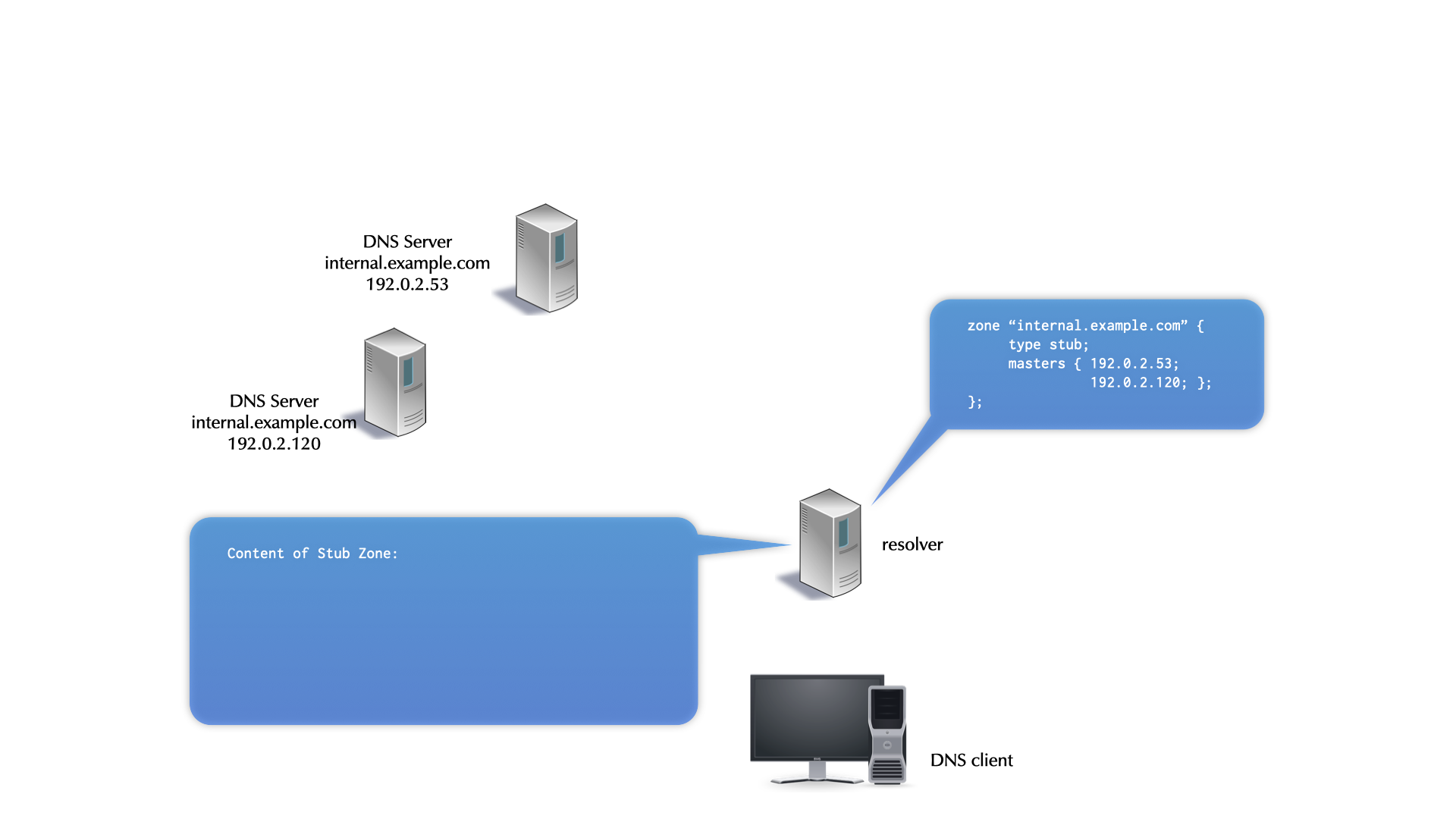
29.1 An example stub zone configuration
- stub zones are configured in the
named.confof a DNS resolver - the backup file is optional and will be created
zone "private.dns.zone.example" {
  type stub;
  primaries { <ip-addresses-of-primaries>; };
  file "private.dns.zone.example.stubzone";
};
29.2 Exercise
- work on the DNS resolver machine
dnsrNNN - our reverse zone is currently not reachable from the DNS resolver
- because it is not delegated from the root DNS zone down
- add a stub zone for the reverse zone we've created on the
authoritative servers
zone "1.168.192.in-addr.arpa" { type stub; primaries { <ip-addresses-of-primaries>; }; // address of nsNNNa and nsNNNb file "1.168.192.in-addr.arpa.stubzone"; }; - check and reload the configuration
- check that the backup file of the stub-zone is created
% cat /var/named/1.168.192.in-addr.arpa.stubzone
$ORIGIN .
$TTL 60	; 1 minute
1.168.192.in-addr.arpa	IN SOA	nsNNNa.dnslab.org. . (
   			     1001       ; serial
   			     3600       ; refresh (1 hour)
   			     1800       ; retry (30 minutes)
   			     3456000    ; expire (5 weeks 5 days)
   			     60         ; minimum (1 minute)
   			     )
   		     NS	nsNNNa.dnslab.org.
   		     NS	nsNNNb.dnslab.org.
- you should now be able to directly resolve IP addresses to names on
the DNS resolver (and all clients of that resolve can do that as
well)
$ dig @localhost -x 192.168.1.20
30 Forwarding
- The standard recursive process sends iterative queries (RD=0) to authoritative servers and follows referrals.
- Most RDNS servers support an alternate form of resolution,
forwarding.
- When configured to use forwarders, a resolver first checks its cache for the answer.
- If the answer is not cached, the RDNS server recursively queries (RD=0) a forwarder (another resolver).
30.1 Forwarding Advantages
- If multiple resolvers use a forwarder, they benefit from the forwarder's cache.
- If the forwarder has better Internet connectivity than a resolver
using it, the resolver benefits again.
- This is particularly applicable for resolvers blocked by firewalls from reaching authoritative servers.
30.2 Forwarding Disadvantages
- Forwarding architectures that depend on a small number of forwards are brittle.
- Forwarding intercepts the standard resolution process and is harder to troubleshoot.
- Forwarding configuration is not replicated by zone transfer, where
normal delegation is (named.conf vs. zone data information).
- Forwarding must be configured on each resolver using it.
30.3 Configuring Global Forwarding
- If all forwarders fail, a RDNS server resolves normally (
forward
   first
mode). forward only;completely disables normal resolution. The default isforward first;- If no forwarder returns an answer, the resolver returns:
SERVFAIL
options {
  forwarders { <IP address>; <...> };
  forward only;   # The server can no longer be accurately called recursive!
};
30.4 Forward Zones / conditional forwarding
- A forward zone configures the resolver to forward for one domain.
- The domain
"."is the equivalent of global forwarding. - Remaining queries are through the normal recursive process.
- They are used primarily in intranets, were introduced in BIND 9.1, and are known as conditional forward in Microsoft DNS (introduced in Windows Server 2003).
- The domain
30.5 Forward Zone Misuse
- A forward zone should be directed to a recursive server that can resolve for the specified domain.
- However, a forward zone is often directly to the authoritative
server of the zone.
- Before stub zones were introduced, this was reasonable.
- Today, stub zones are the best way to redirect to an authoritative server.
30.6 Forward Zones example
zone "example.com." {
     type forward;
     forwarders { 192.0.2.110; 192.0.2.120; };
};
- Forward zones apply to queries ending in the specified domain name.
- Queries for
sub.example.comandab.de.fg.example.comwould be forwarded.
30.7 Forwarding in action
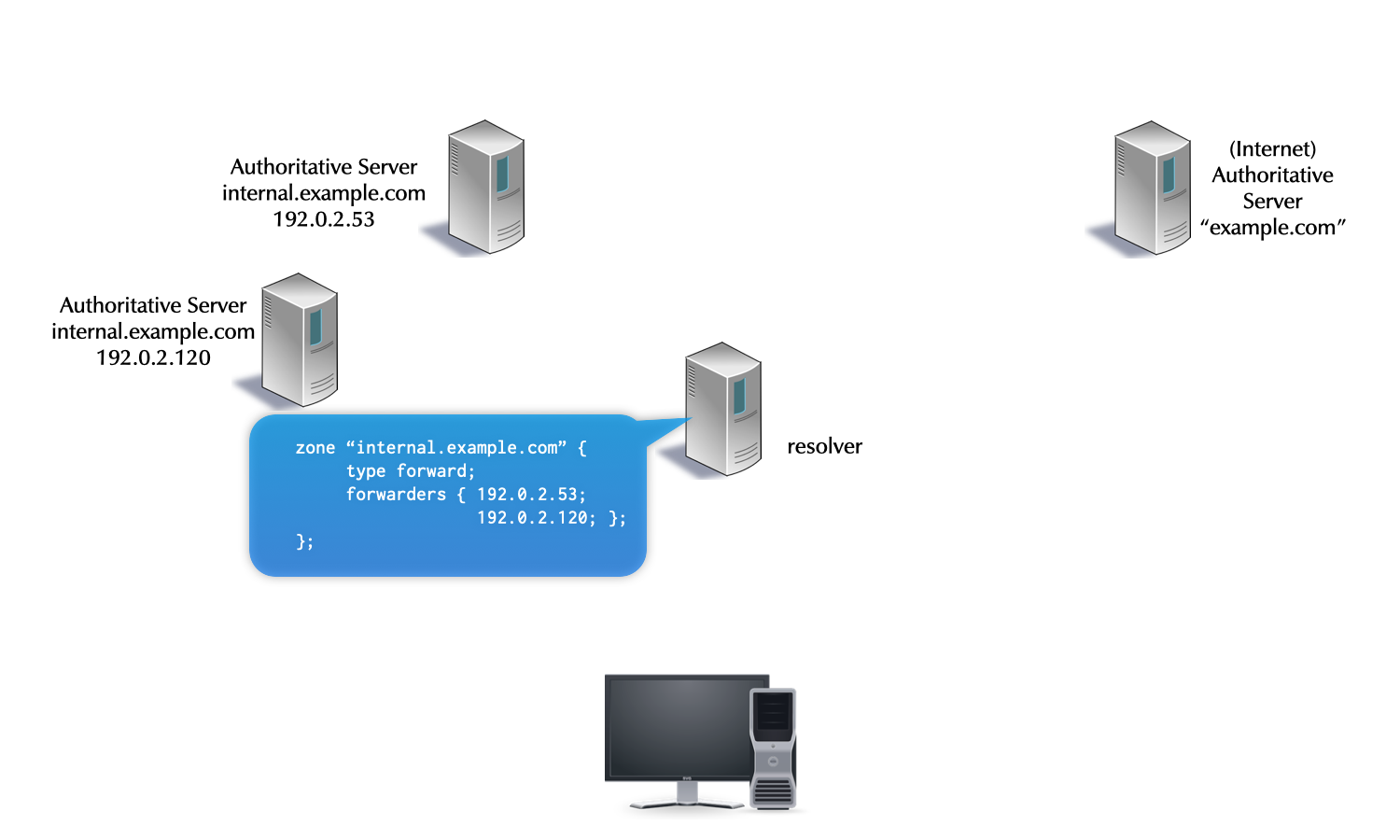
Note: In this example the DNS resolver points the forward configuration towards authoritative server. While this is bad use of forwarding, it is common in practice
30.7.1 Exercise
- Work on the DNS resolver machine
dnsrNNN.dnslab.org - Configure a forwarding (forward only) to 2 (!) upstream DNS
resolver from Quad9 (https://www.quad9.net) for the domain name
dnslab.org(and everything below) - Check and reload the BIND 9 configuration
- Run
tcpdumpin a separate terminal window (or usetmux) to observe the DNS queries going out from the server machine. Send test queries fordnslab.organd other domains. Validate that the requests fordnslab.orgare being send to Quad9.
30.7.2 Solution
- BIND 9 configuration
zone "dnslab.org" {
  type forward;
  forwarders { 9.9.9.9; 149.112.112.112; };
  forward only;
};
tcpdump
% tcpdump port 53 and host 9.9.9.9 or host 149.112.112.112
tcpdump: verbose output suppressed, use -v[v]... for full protocol decode
listening on eth0, link-type EN10MB (Ethernet), snapshot length 262144 bytes
15:34:03.721440 IP dnsrNNN.dnslab.org.31778 > dns9.quad9.net.domain: 30694+% [1au] DS? www.dnslab.org. (45)
15:34:03.733552 IP dns9.quad9.net.domain > dnsrNNN.dnslab.org.31778: 30694$ 0/4/1 (500)
15:34:03.733852 IP dnsrNNN.dnslab.org.18160 > dns9.quad9.net.domain: 23994+% [1au] DNSKEY? dnslab.org. (41)
15:34:03.742156 IP dns9.quad9.net.domain > dnsrNNN.dnslab.org.18160: 23994$ 3/0/1 DNSKEY, DNSKEY, RRSIG (765)
15:34:03.742854 IP dnsrNNN.dnslab.org.22697 > dns9.quad9.net.domain: 57733+% [1au] A? www.dnslab.org. (45)
15:34:03.929210 IP dns9.quad9.net.domain > dnsrNNN.dnslab.org.22697: 57733$ 2/0/1 A 188.166.104.92, RRSIG (233)
- DNS Query to test the forward name resolution:
dig @localhost www.dnslab.org A
31 DNS Server maintenance
31.1 Implementing Configuration Changes
reload <zonename>: after modifying a zone file.% rndc reload example.com
reload: after modifying named.conf or any zone. It reloadsnamed.confand all zone files. It can be a significant load on a server with many zones.% rndc reload
reconfig: reloads onlynamed.conf. Newly defined zones are of course loaded.% rndc reconfig
- Avoid using
rndc reload, whenrndc reconfigwill suffice! refresh <zonename>: refresh a zone from a secondary authoritative server. The SOA is queried and if the serial number has changed, a zone transfer is triggered.% rndc refresh example.com
retransfer <zonename>: transfer, regardless of the serial number. This is for a server slaving a zone.% rndc retransfer example.com
notify <zonename>: force notify messages for a zone, to trigger a refresh on the (known) secondaries. This is for a primary server of a zone.% rndc notify example.com
31.2 External Domain Checking
- Many websites offer domain name checking.
- These are most useful for your authoritative zones.
- Some checkers are broken, outdated, or simply bad.
- Two are excellent and recommended:
- https://zonemaster.net (alternative: https://zonemaster.iis.se)
- https://dnsviz.net
32 Security Best Practices
- Keep your BIND 9 software up-to-date
- use the package manager of your Linux/Unix distribution
- configure automatic unattended updates
- consider using the ISC supplied BIND 9 packages
- or use a cross-platform package manager
- pkgsrc — https://www.pkgsrc.org
- Nix — https://nixos.org/nix/
- use the package manager of your Linux/Unix distribution
- subscribe to BIND 9 announce mailing list (low volume, new versions and security announcements only) https://lists.isc.org/mailman/listinfo/bind-announce
32.1 Separating authoritative and recursive DNS
- authoritative DNS server and DNS resolver are separate functions in the DNS infrastructure
- they have different security requirements
- while BIND 9 can operate in "hybrid" mode (default), it is strongly
recommended to separate the two functions
- can run on the same hardware with operating system containers or virtualisation
- benefits of separate authoritative and recursive DNS
- required for DNSSEC validation of own zones
- security configuration optimised for the function (for example query ACLs)
- helps troubleshooting (logging)
- easier maintenance (Updates)
32.2 process isolation
- isolate the BIND 9 DNS server process from the operating system and
other applications
- reduces the impact of a security breach
- classic Unix operating systems offer the chroot function to
isolate a process into its own filesystem-tree
- while many security tutorials still explain chroot, it might not be the best option available today
- modern systems offer much richer isolation functions:
- Linux container (LXC/LXD, Docker, Podman, systemd-nspawn, Firejail)
- Linux GRSecurity Kernel enhanced "chroot" (https://grsecurity.net/features.php)
- FreeBSD jails
- Solaris/Illumnos "zones"
32.3 DNSSEC validation
- classic DNS is vulnerable to a large number of attacks on the content of DNS answers
- DNSSEC (digital signatures on DNS data) guards against many of these attacks
- the DNS root-zone, all gTLDs and nTLDs and many ccTLDs are DNSSEC
signed
- many second level domains are also DNSSEC secured
- BIND 9 comes with a trust-anchor for the Internet Root-Zone built-in
- DNSSEC validation can be enabled with just one configuration line
options { dnssec-validation auto; }; - enable DNSSEC validation on a DNS resolver
- test that DNSSEC validation is enabled:
% rndc validation check
DNSSEC validation is enabled (view _default)
$ dig SOA . @127.0.0.1 +adflag
; <<>> DiG 9.4.2-P2 <<>> soa . @127.0.0.1 +adflag
;; global options:  printcmd
;; Got answer:
;; ->>HEADER<<- opcode: QUERY, status: NOERROR, id: 46337
;; flags: qr rd ra >>ad<<; QUERY: 1, ANSWER: 1, AUTHORITY: 13, ADDITIONAL: 0
32.4 Minimal responses
- RFC 1034 defines the additional section in a DNS answer as
"Carries RRs which may be helpful in using the RRs in the other
sections."
- in the default configuration, BIND 9 tries to be very helpful, sending additional information …
- … creating larger than needed DNS answer packets
- this is sometimes exploited by attackers in distributed denial of service attacks
- configure "minimal-responses" in BIND 9
options { minimal-responses yes; }; - BIND 9 will only return the data required for the DNS protocol to work
- this reduces the "ammo" available to attackers
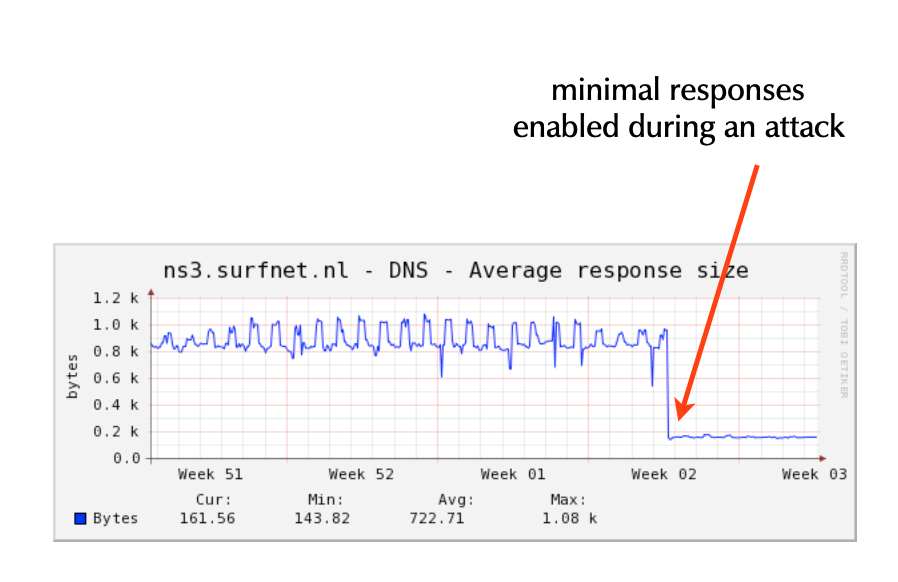
32.5 Minimal ANY
- a BIND 9 server getting an query with type ANY (QTYPE 255) will
answer with all records matching the requested domain name and
class
- this can create large UDP DNS answer packets
- starting with BIND 9.11, BIND 9 can be configured to only return
the first entry of an matching ANY query
- this mitigates the problem without causing breakage of older software (qmail etc)
options {
       minimal-any yes;
};
33 DNS and DNSSEC Monitoring
33.1 Why DNSSEC monitoring
- a DNS infrastructure with DNSSEC signed zones is more fragile
- more complex configuration
- most errors are fatal, the zone cannot be resolved anymore (this is a security feature of DNSSEC!)
- DNSSEC monitoring helps to detect issues before the DNS service is affected
33.2 Monitoring scripts
- Men & Mice has compiled 15 essential monitoring test scripts
- these scripts are simple (Bourne-) shell scripts that should work on any Unix/Linux system (and on Windows 10 with Linux-Sub-System or Windows with Cygwin)
- the scripts are available in the Men & Mice Services Github repos https://github.com/menandmice-services/dns-monitoring-scripts
- Please send pull-requests for fixes and additions
- the scripts are deliberately simple
- each script takes one input parameter
- the domain-name of a delegated zone
- the scripts can be used from a cron-job
- or embedded into an monitoring system.
33.3 DNS-Server tests
- Test 1 - UDPv4 reachability - test for each authoritative server of the DNS infrastructure
$ dig -4 test-domain +nssearch
- Test 2 - UDPv6 reachability - test for each authoritative server of
the DNS infrastructure that it is reachable over UDP IPv6
$ dig -6 test-domain +nssearch
- Test 3 - TCPv4 reachability - test for each authoritative server of the DNS infrastructure that it is reachable over TCP IPv4
$ dig -4 test-domain +tcp +nssearch
- Test 4 - TCPv6 reachability - test for each authoritative server of the DNS infrastructure that it is reachable over TCP IPv6
$ dig -6 test-domain +tcp +nssearch
- Test 5 - EDNS0 response size: tests that the server signals the correct EDNS0 response size. Size needs to be checked against the local policy. Usually 1220-1232 bytes.
echo " == #5 - EDNS0 response size == "

err=0
ednspolicy=1232

dig NS ${1} +short | while read server; do
  echo "Server: ${server} "
  ednsbuf=$(dig @${server} ${1} | grep "; EDNS:" | cut -d " " -f 7)

  if [ "${ednsbuf}" -eq "${ednspolicy}" ]; then
    echo " EDNS0-Bufsize is ${ednsbuf}, good "
  else
    err=1
    echo " EDNS0-Bufsize is ${ednsbuf}, out of policy range "
  fi
done

exit ${err}
33.4 DNS-Zone tests
- Test 6 - test that all authoritative server for a zone
respond. Count is tested against the number of delegation
authoritative servers for the zone.
echo " == #6 - IPv4 zone response tests == " err=0 # get TLD for the zone tld=$(echo ${1} | rev | cut -d'.' -f 1 | rev) # pick one TLD auth server tldns=$(dig NS ${1}. +short | tail -1) # query and count the delegation NS records for the zone parentnsnum=$(dig @${tldns} NS ${1} +short | wc -l) # query the authoritative DNS servers for the zone childnsnum=$(dig -4 ${1} +nssearch | wc -l) if [ "${parentnsnum}" -eq "${childnsnum}" ]; then echo "all authoritative DNS-Server answer" else err=1 echo "Error: Mismatch" echo "Auth DNS-Servers in Delegation: ${parentnsnum}" echo "Auth DNS-Servers in answering: ${childnsnum}" fi exit ${err} - Test 7 - test that all authoritative server for a zone respond via
TCP. Count should be tested against the known good number of
authoritative servers for the zone. The return code of the
digcommand should be checked for errors.echo " == #7 - IPv4 (TCP) zone response tests == " err=0 # get TLD for the zone tld=$(echo ${1} | rev | cut -d'.' -f 1 | rev) # pick one TLD auth server tldns=$(dig NS ${1}. +short | tail -1) # query and count the delegation NS records for the zone parentnsnum=$(dig @${tldns} NS ${1} +short | wc -l) # query the authoritative DNS servers for the zone childnsnum=$(dig -4 ${1} +nssearch +tcp | wc -l) if [ "${parentnsnum}" -eq "${childnsnum}" ]; then echo "all authoritative DNS-Server answer" else err=1 echo "Error: Mismatch" echo "Auth DNS-Servers in Delegation: ${parentnsnum}" echo "Auth DNS-Servers in answering: ${childnsnum}" fi exit ${err} - Test 8 - test that all authoritative server for a zone have the
same SOA serial. The return code of the dig command should be
checked for errors.
dig zone +nssearch
- the SOA serial can be different for short amount of times after an update on the primary (propagation delay during zone transfer)
- on a test interval of 5 minutes the test should issue a warning if the same SOA difference is seen in two successive tests
- is the same SOA difference seen after three or more tests, an event
of severity
ERRORshould be generated
- Test 8 - test that all authoritative server for a zone have the
same SOA serial. The return code of the dig command should be
checked for errors.
echo " == #8 - SOA serial == " err=0 oldsoaserial="0" dig ${1} +nssearch | while read serverres; do soaserial=$(echo ${serverres} | cut -d ' ' -f 4) if [ "${oldsoaserial}" -eq "0" ]; then oldsoaserial=${soaserial} else if [ "${oldsoaserial}" -eq "${soaserial}" ]; then echo "Match for ${soaserial}" else err=1 echo "Mismatch for ${soaserial} != ${oldsoaserial}" fi fi done exit ${err} - Test 9 - test for AA-Flag. Repeat this test for each authoritative
server for the zone. Each server must respond with an AA-Flag.
echo " == #9 - AA-Flag == " err=0 dig NS ${1} +short | while read server; do echo "Server: ${server} " aaflag=$(dig @${server} ${1} SOA +norec | grep ";; flags" | cut -d " " -f 4 | cut -b 1-2) if [ "${aaflag}" = "aa" ]; then echo " AA-Flag found, good " else err=1 echo " no AA-Flag, Server not authoritative " fi done exit ${err} - Test 10 - test for Parent-Child NS-RRset. Tests that the NS-RRset
in the parent zone (delegation) matches the NS-RRset in the zone
data.
echo " == #10 - test for Parent-Child NS-RRset == "

if [ "$1" = "" ]; then
  echo "This test fails without param. Exiting..."
  exit 1
fi

err=0
# get one authoritative server for the zone
child_dns=$(dig NS ${1} +short | tail -1)
# get TLD of Domain
tld=$(echo ${1} | rev | cut -d'.' -f 1 | rev)
# get one authoritative server for the TLD
tldns=$(dig NS ${tld}. +short | tail -1)
# query the delegation records
parns=$(dig @${tldns} NS ${1} +norec +noall +authority | grep "IN.*NS" | sort)

while read nsrec; do
  ns=$(echo ${nsrec} | cut -d ' ' -f 5)
  parentns="${parentns} ${ns}"
done <<EOF
${parns}
EOF

# query the zone records
childns=$(dig @${child_dns} NS ${1} +short +norec | sort)
parentns=$(echo ${parentns} | tr ' ' '\n' | sort)

echo "Parent delegation:"
echo ${parentns}
echo "Child zonedata:"
echo ${childns}

if [ "${childns}" = "${parentns}" ]; then
  echo "Parent/Child NS-RRSet matches"
else
  err=1
  echo "Parent/Child NS-RRSet mismatch"
fi

exit ${err}
33.5 DNSSEC tests
- Test 11 - test for DNSKEY RRset answer size. The full answer packet
of the DNSKEY rrset should be below the IPv6 fragmentation payload
limit (1232 byte)
echo " == #11 - test for DNSKEY RRset answer size == " err=0 maxsize=1232 replysize=$(dig ${1} DNSKEY +dnssec +cd | grep ";; MSG SIZE" | cut -d " " -f 6) if [ "${replysize}" -le "${maxsize}" ]; then echo "Good, DNSKEY RRSet size is ${replysize} which is below or equal to ${maxsize}" else err=1 echo "Bad, DNSKEY RRSet size is ${replysize} which is above ${maxsize}" fi exit ${err} - Test 12 - RRSIG validity: check for the lifetime timestamps of RRSIGs in the zone. This test should be done for every important RRset in the zone (SOA, DNSKEY, MX, A/AAAA)
dig zone soa +dnssec | egrep "RRSIG.*SOA" | cut -d " " -f 6
dig zone soa +dnssec | egrep "RRSIG.*SOA" | cut -d " " -f 5
- compare the output with the current system time
date "+%Y%m%d%H%M%S"- issue an ERROR event, if the inception time is in the future
- issue an ERROR event, if the expiry time is in the past
- issue an WARNING event, if the expiry time will be reached in less than 5 days
- issue an ERROR event, if the expiry time will be reached in less than 2 days
echo " == #12 - RRSIG validity == " if [ "$1" = "" ]; then echo "This test fails without param. Exiting..." exit 1 fi err=0 today=$(date "+%Y%m%d%H%M%S") inception=$(dig ${1} SOA +cd +dnssec | egrep "RRSIG.*SOA" | cut -d " " -f 6) expiry=$(dig ${1} SOA +cd +dnssec | egrep "RRSIG.*SOA" | cut -d " " -f 5) echo "Today : ${today}" echo "Inception: ${inception}" echo "Expiry : ${expiry}" if [ "${inception}" -gt "${today}" ]; then err=1 echo "ERROR: RRSIG validity (${inception}) is in the future" fi if [ "${expiry}" -lt "${today}" ]; then err=1 echo "ERROR: RRSIG validity (${expiry}) is in the past, DNSSEC signature has expired" fi twodaysahead=$(date +%s) twodaysahead=$((${twodaysahead}+172800)) twodaysahead=$(date -u --date="@${twodaysahead}" "+%Y%m%d%H%M%S") if [ "${expiry}" -lt "${twodaysahead}" ]; then err=1 echo "ERROR: RRSIG validity (${expiry}) will end in less than two days" fi fivedaysahead=$(date +%s) fivedaysahead=$((${fivedaysahead}+432000)) fivedaysahead=$(date -u --date="@${fivedaysahead}" "+%Y%m%d%H%M%S") if [ "${expiry}" -lt "${fivedaysahead}" ]; then err=1 echo "WARNING: RRSIG validity (${expiry}) will end in less than five days" fi exit ${err} - Test 13 - DS Records - test the number and the content of the DS
records in the parent zone. Issue a warning when the count or the
content changes
echo " == #13 - DS Records == " err=0 if [ -f "$0.$1.saved.dscontent" ]; then oldds=$(cat $0.$1.saved.dscontent) olddscount=$(cat $0.$1.saved.dscount) else echo "First run. This result won't be meaningful until the next run."; fi ds=$(dig ${1} DS +short) echo "${ds}" > $0.$1.saved.dscontent dscount=$(dig ${1} DS +short | wc -l) echo "${dscount}" > $0.$1.saved.dscount if [ "${ds}" != "${oldds}" ]; then err=1 echo "Warning: DS-Record has changed!" else echo "OK: DS-Record is the same as last time tested!" fi if [ "${dscount}" != "${olddscount}" ]; then err=1 echo "Warning: number of DS-Record has changed!" else echo "OK: number of DS-Record is the same as last time tested!" fi exit ${err} - Test 14 - DS Records and KSK - test that the DS-Record matches the
KSK in the zone. The two values (Key-ID) must match.
echo " == #14 - DS Records and KSK == " if [ "$1" = "" ]; then echo "This test fails without param. Exiting..." exit 1 fi err=0 dskeyid=$(dig ${1} DS +short +cd | cut -d " " -f 1 | tail -1) rrsigkeyid=$(dig ${1} DNSKEY +dnssec +short +cd | egrep "^DNSKEY" | grep "${dskeyid}" | cut -d ' ' -f 7) if [ "${dskeyid}" != "${rrsigkeyid}" ]; then err=1 echo "Error: Key-Tag of DS-Records does not match the Key-Tag of RRSIG on DNSKEY" else echo "OK: Key-Tag of DS-Records does match the Key-Tag of RRSIG on DNSKEY" fi exit ${err} - Test 15 - Count of DNSKEY records in the zone. The number can
change during a key-rollover. Any change should create an WARNING
event
echo " == #15 - DNSKEY record count == "

if [ -f "$0.$1.saved.dnskeycount" ]; then
  olddnskeycount=$(cat $0.$1.saved.dnskeycount)
else
  echo "First run. This result won't be meaningful until the next run.";
fi

err=0
dnskeycount=$(dig ${1} DNSKEY +cd +dnssec | egrep "DNSKEY.*2" | grep -v "RRSIG" | wc -l)

echo "${dnskeycount}" > $0.$1.saved.dnskeycount

if [ "${dnskeycount}" != "${olddnskeycount}" ]; then
  err=1
  echo "Warning: Number of DNSKEY-Record has changed!"
else
  echo "OK: Number of DNSKEY-Record is the same as with last test!"
fi

exit ${err}
33.6 DNSSEC Monitoring tips
- the DNSSEC monitoring system should write an audit trail of DNSSEC zone changes:
- changes to the DNSKEY records (KEY-ID and SOA Serial of the change)
- changes to the DS-Record (KEY-ID and SOA serial of the parent zone)
33.7 DNSSEC Monitoring - tools
- DNSSEC tools from .SE TLD: https://github.com/dotse/dnssec-monitor
- Verisign jdnssec-tools http://www.verisignlabs.com/dnssec-tools/
- YAZVS — Yet Another Zone Validation Script http://yazvs.verisignlabs.com/
- ldns-verify from the LDNS package http://www.nlnetlabs.nl/projects/ldns/
- Nagval - Nagios Plugin by JP Mens https://github.com/jpmens/nagval
- Key-Checker - Monitors Key-Rollover https://github.com/bortzmeyer/key-checker
- Mess with DNS https://messwithdns.net/
33.8 DNS monitoring with Prometheus
Prometheus is a very popular application for event monitoring and alerting. It records metrics in real-time in a time-series database using an HTTP pull model. It's written in Go and is Open Source.
For monitoring BIND, Prometheus requires a so-called exporter
which provides metrics which Prometheus consumes, and we'll
use bind_exporter for doing so. bind_exporter has to access
BIND's metrics which named will make available via its
statistics-channels{} feature.
- Login to your DNS resolver machine (
dnsrNNN) and become root$ sudo -i
- Ensure BIND is installed and running
% rndc status
- Run our Prometheus installer script
% /usr/local/bin/prom-setup
* Downloading bind_exporter software ..
* Downloading prometheus software ..
* Reconfiguring named ..
* Setting up bind exporter ..
* Setting up prometheus ..
* Starting services ..
Prometheus is running at https://dnsrNNN.dnslab.org:8443/
- Use a Web browser to connect to the displayed URL. Note that this configuration is not ideal as we've purposely done away with any sort of authentication. In a productional environment you will want to add that by default.
- In the input field which says
Expression (press Shift+Enter...)enter the termbind_response_rcodes_totalor select that from the dropdown list which appears when you click on the globe on the right of that field. - Press
Executeand look at the values displayed - Query your DNS resolver for existing and non-existing names (purposely
cause
NXDOMAIN)
dig @localhost dnslab.org a       # NOERROR
dig @localhost xyz.dnslab.org a   # NXDOMAIN
dig @localhost fail02.dnssec.works a  # SERVFAIL
- Click on
Executeand view the new metrics.