DNS & BIND 9

2 Course Notes and exercises

This page contains the course notes and exercise instructions for attendees of the online training DNS & BIND 9 (LWL - January 2026).

Click on images to zoom in.

3 New terminology used in DNS & BIND

  • The terms master and slave have been used to describe primary and secondary authoritative DNS servers in the past.
  • In this document, and in configuration examples, we are using the new terms primary (instead of master) and secondary (instead of slave) whenever possible.
  • BIND 9 has started adopting the new terms with BIND 9.14, however the transition is not complete, and some terms in configuration statements still use the old terms. This will change with future releases
    • If you use an older version of BIND 9, please substitute the new terms for the older ones
  • The old terminology will also be found in older books and standards documents (RFCs and Internet Drafts)
  • DNS terminology can be confusing and is sometimes overloaded. RFC 8499 DNS terminology ( https://tools.ietf.org/html/rfc8499 ) tries to collect and document the current usage of DNS terminology.

4 DNS Basics - how the protocol works

4.1 from HOSTS.TXT to DNS

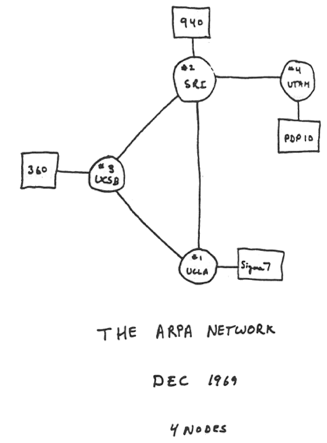
0101-arpanet-1969.png

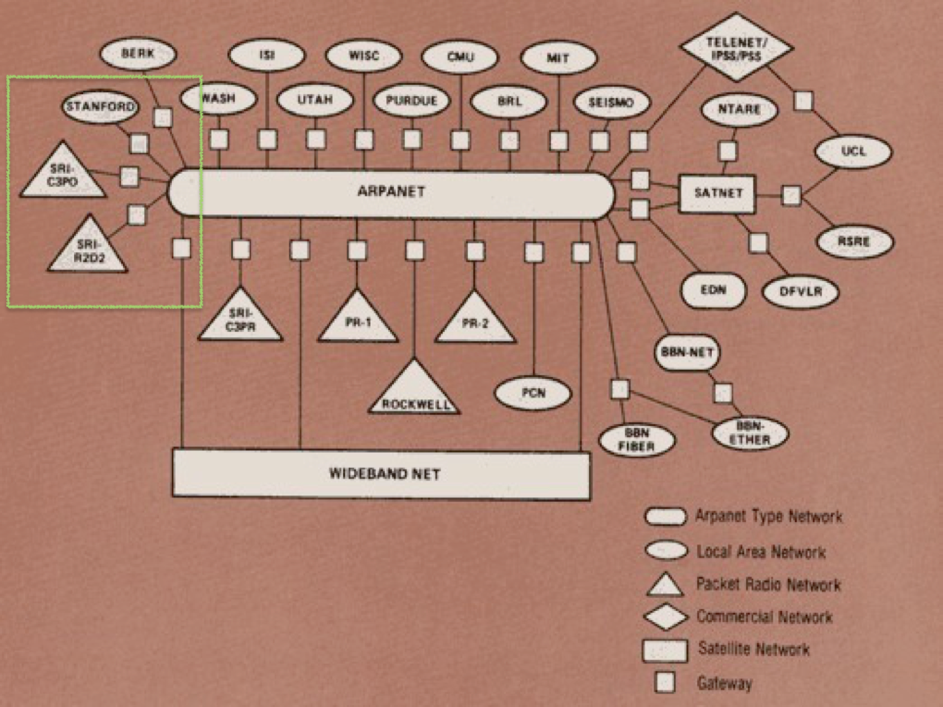
0102-Internet-1983.png

  • From 1970-1991 the Stanford Research Institution-Network Information Center was the information hub for the ARPANET including maintaining hosts.txt.
  • The hosts.txt file
    • Contained IP addresses and names of all of the hosts on the Internet
    • Contained host information as well…
    • Produced twice per week and available via FTP
    • Changes, adds and deletes were sent via e-mail

4.2 the creation of DNS (Domain Name System)

  • Problems with hosts.txt
    • Maintained by a single entity
    • Pulled (manually) from a single host
    • Namespace collisions
    • Consistency
  • In 1983, it was determined that something had to be done

    0103-David-Mills.png Davis Mills: RFC 799 (1981) - Internet Name Domains

    0104-Jon-Postel.png Jon Postel & Zaw-Sing Su: RFC 819 (1982) - The Domain Naming Convention for Internet User Applications
    0105-Paul-Mockapetris.png Paul Mockapetris: RFC 882 & RFC 883 (1983) - DOMAIN NAMES - CONCEPTS and FACILITIES / DOMAIN NAMES - IMPLEMENTATION and SPECIFICATION
  • RFC 882 was obsoleted by RFC 1034 (1987-11) and RFC 883 was obsoleted by RFC 1035 (1987-11)

4.3 The DNS namespace

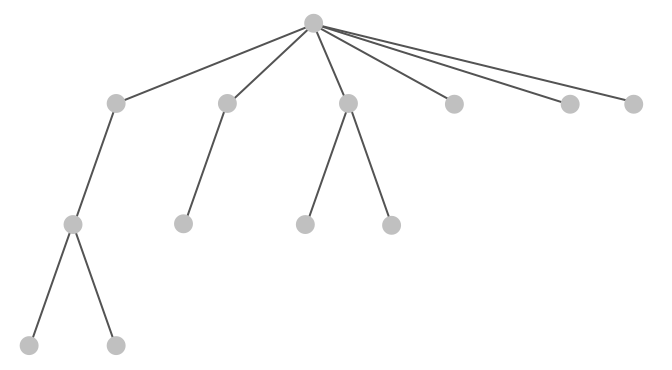
dns-namespace01.png

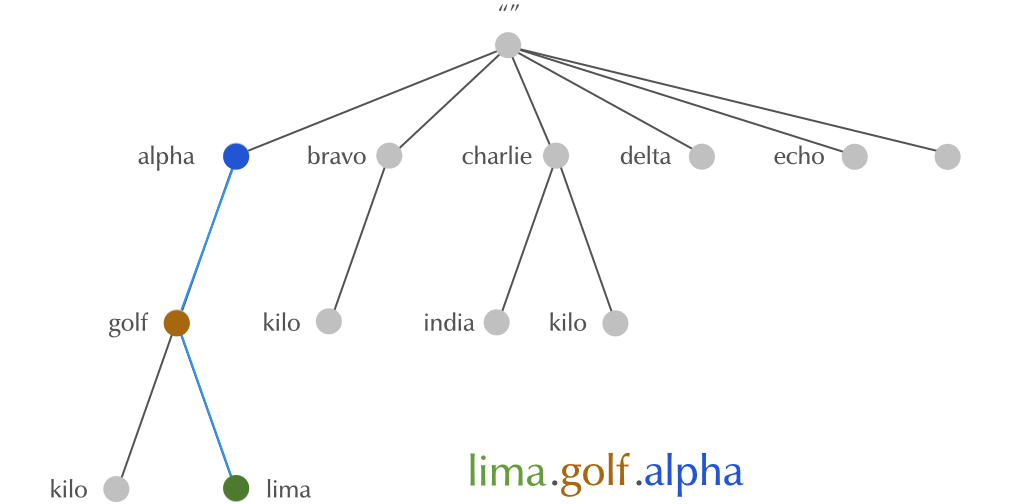
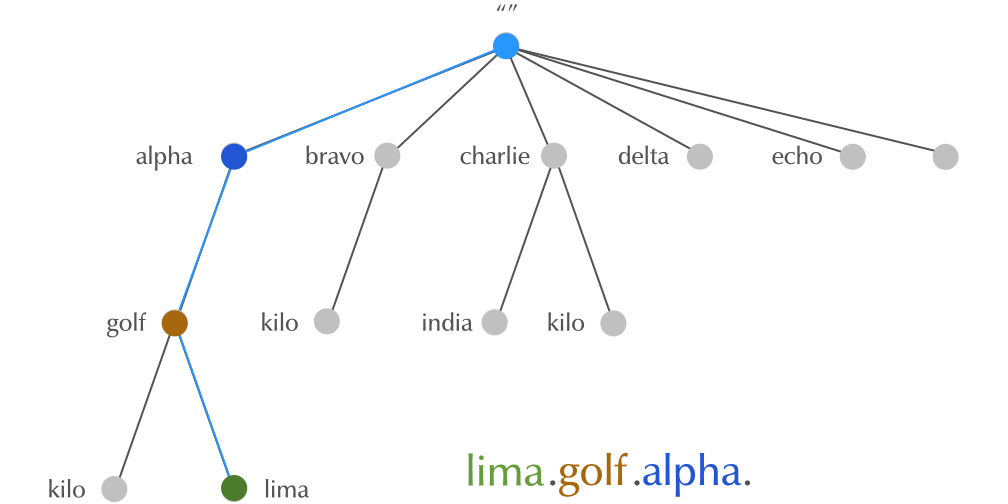
Figure 3: The DNS Namespace is often drawn as an inverted tree

4.4 The DNS namespace

dns-namespace01.png

Figure 4: The DNS Namespace can be up to 127 levels deep

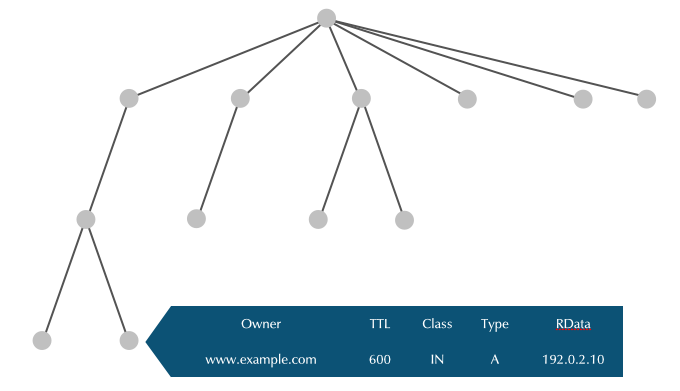
4.5 Nodes contain data

dns-namespace02.png

4.6 Node Label

dns-namespace03.png

Figure 6: Node labels can be zero to 63 bytes long

4.7 Node Label

dns-namespace04.png

Figure 7: Node label are unique for sibling nodes

4.8 Domain Names

domainnames01.png

4.9 Domain Names

domainnames02.png

4.10 Domain Names

domainnames03.png

4.11 Domain Names

domainnames04.png

4.12 Domain

domain01.png

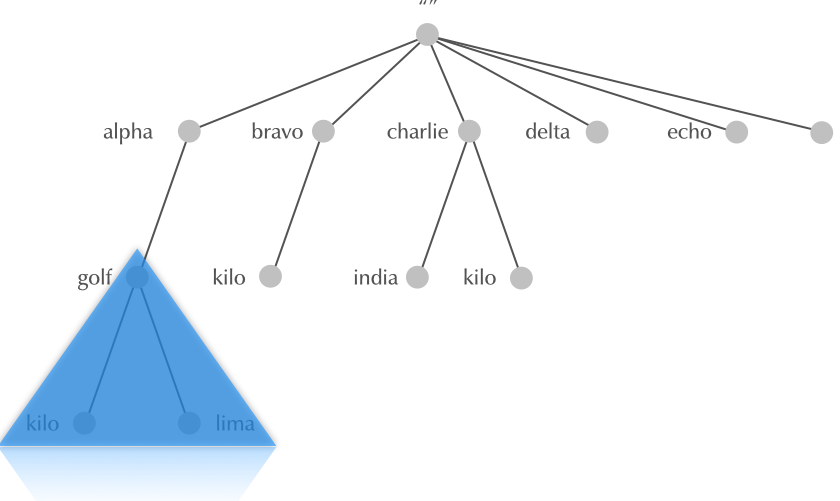
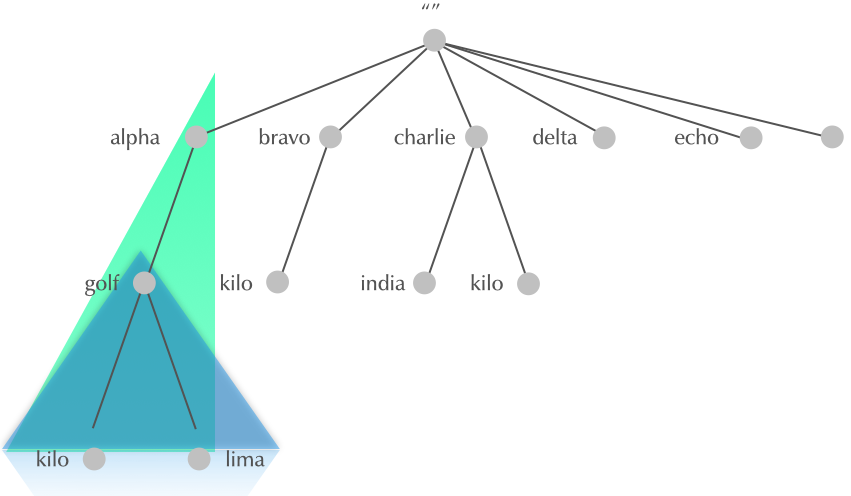
Figure 12: A domain is a subtree of the DNS namespace

4.13 Subdomain

domain02.png

Figure 13: A subdomain is a domain a domain whose apex is inside another domain

4.14 Why delegation?

  • HOSTS.TXT was monolithic, one large file
  • The DNS system is hierarchical
  • parts of the name space are delegated to the owners of the name
  • every owner controls the part of the name space she is owning
  • every owner can sub-delegate downwards
  • delegation goes from parent domain to child domain
  • owner of parent domain can revoke delegation (and re-delegate to a different owner)

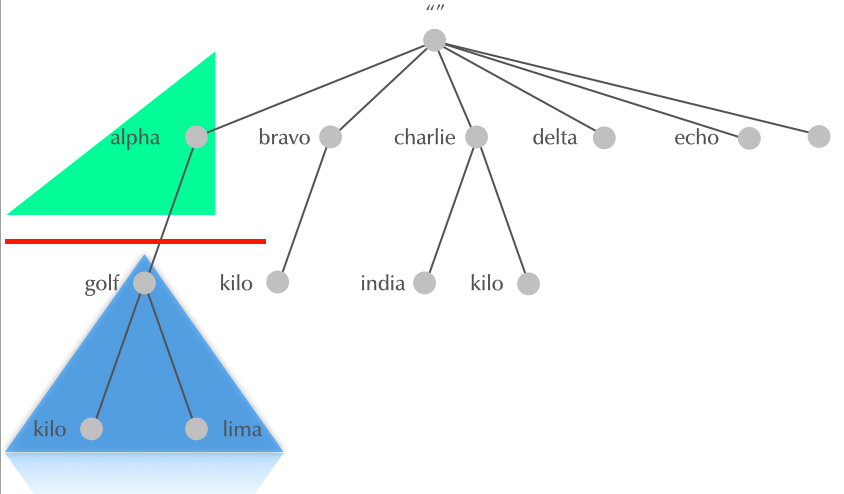
4.15 Delegation

delegation01.png

Figure 14: Delegation creates Zones

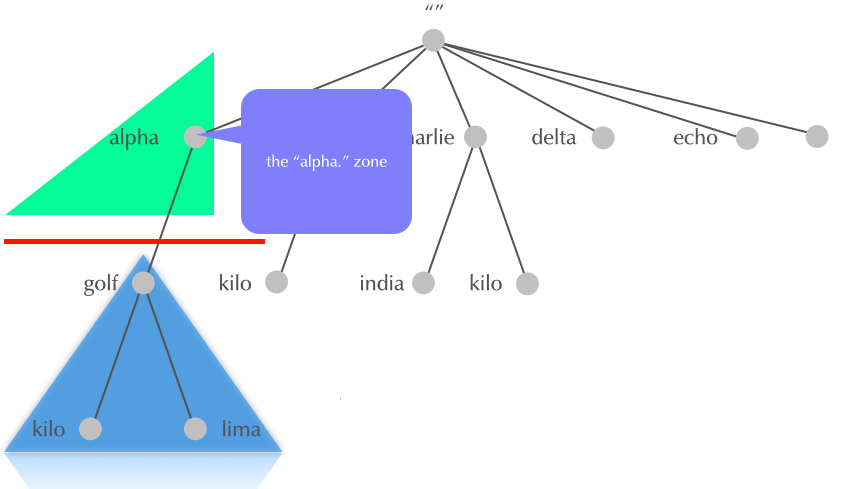
4.16 Delegation

delegation02.png

Figure 15: The apex node names a zone

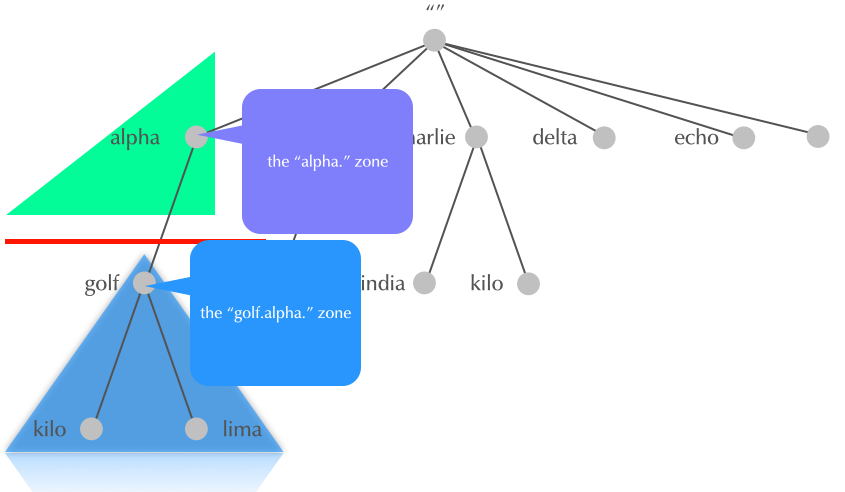
4.17 Delegation

delegation03.png

Figure 16: The apex node names a zone

4.18 Internet DNS: Root-Zone, Top-Level-Domains, Second-Level Domains

  • The DNS delegation in the Internet has a specific structure. Other DNS systems (like the DNS used in mobile phone roaming, or local private DNS systems) can have different delegation rules
  • RFC 920 defined the original structure of DNS delegation from the root zone

4.18.1 Root-Zone

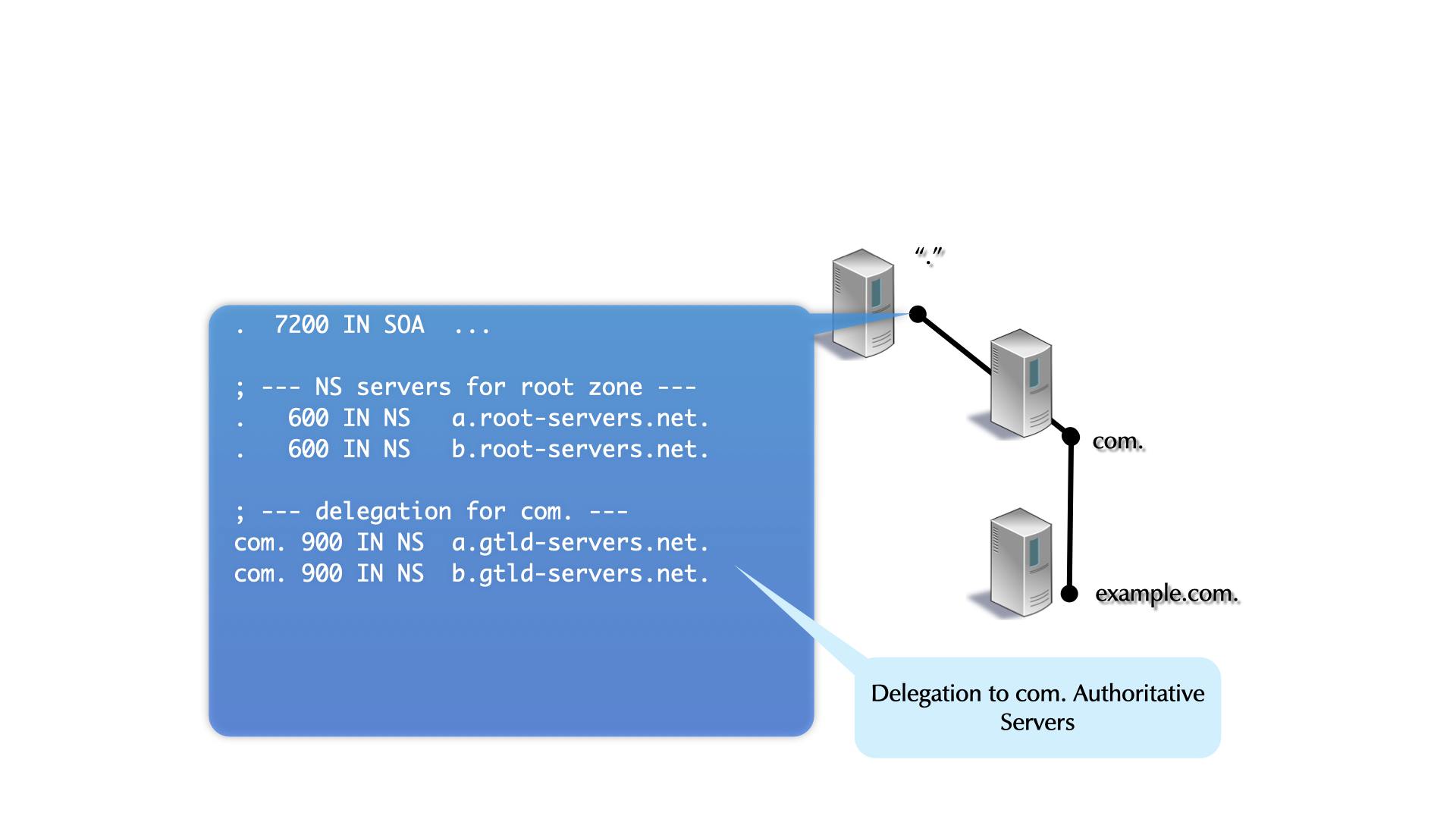
  • The root-zone is the start of all DNS name resolution
  • The root-zone is hosted on 13 logical authoritative DNS server (Root-DNS-Server), named a.root-servers.net to m.root-servers.net
  • many logical Root-DNS-Server are spread around the world with identical copies
  • You can learn about the Root-DNS-Server system on https://root-servers.org/
  • the content of the root-zone is public and can be loaded from some of the root-server systems
dig @f.root-servers.net AXFR .

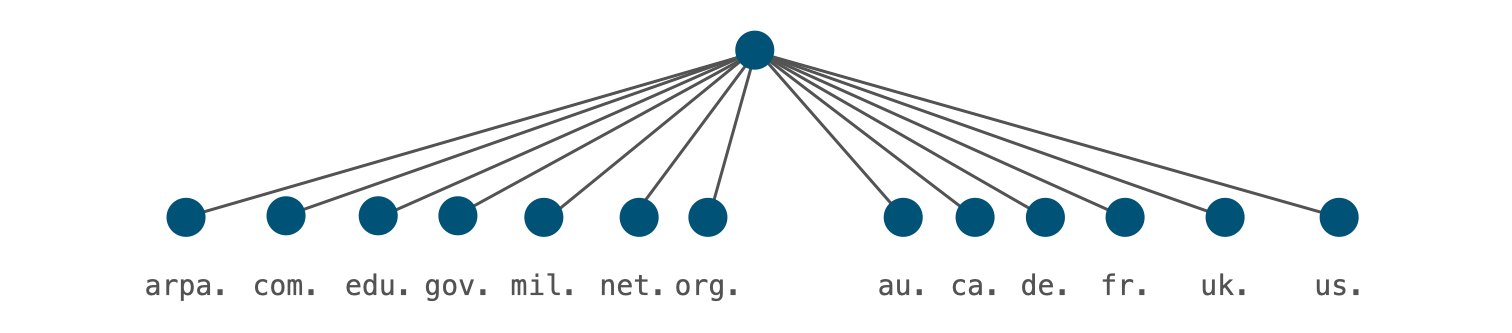
4.18.2 Generic Top-Level-Domains

  • RFC 920 created the original seven generic top-level-domains
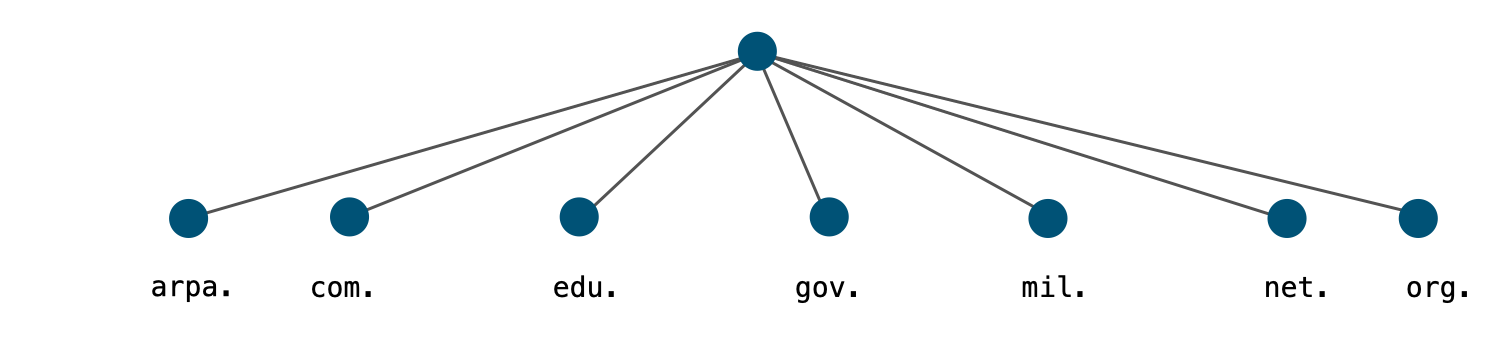
0116-genreic-TLD.png

  • arpa generic top level domain (gTLD)
    • Originally used as a transition device from HOSTS.TXT to DNS
    • Now used for Internet infrastructure data, e.g. reverse lookup tree for IPv4 and IPv6 addresses:
      • IPv4: in-addr.arpa.
      • IPv6: ip6.arpa.
    • Registry: IANA
  • com generic top level domain (gTLD)
    • Commercial entities
    • Over 150 million subdomains
    • Largest Top Level Domain by a factor of six. (2nd is cn:~21 million)
    • Registry: Verisign
  • edu generic top level domain (gTLD)
    • mostly U.S. based, accredited postsecondary institutions
    • thousands of subdomains (berkeley.edu, havard.edu, stanford.edu …)
    • Registry: Educause (operated by VeriSign)
  • gov generic top level domain (gTLD)
    • (U.S. Federal) government entities
    • hundreds of subdomains (fbi.gov, gsa.gov, irs.gov … )
    • Some U.S. federal agencies use .fed.us. rather than .gov.
    • RFC 2146 (U.S. Government Internet Domain Names) defines the use of .gov gTLD
    • Registry: General Services Administration
  • mil generic top level domain (gTLD)
    • (U.S.) military entities
    • few (public) subdomains (af.mil, army.mil, navy.mil, usmc.mil … )
    • Registry: Defense Information Systems Agency
  • net generic top level domain (gTLD)
    • formerly networking entities and components
    • now a general purpose TLD with nearly 14 million subdomains
    • the 4th most popular domain (after com, cn and de)
    • Registry: Verisign
  • org generic top level domain (gTLD)
    • Generally noncommercial entities that do not fit in other categories
    • Millions of subdomains (isc.org, npr.org, pbs.org …)
    • Finances the Internet Society (ISOC), which itself is responsible for the IETF and IAB
    • Registry: Public Interest Registry PIR (operated by Afilias)

4.18.3 Country-Code Top-Level-Domains

0117-ccTLDs.png

4.18.4 Special Use Top-Level-Domains

  • RFC 2606 (1999 "Reserved Top Level DNS Names") and updates in RFC 6761 (2013 "Special-Use Domain Names") reserved 4 TLDs:
    • example: for use in examples
    • invalid: for use in obviously invalid domain names
    • test: for use in tests
    • localhost: to avoid conflict with the use of the (single label) hostname localhost in Unix/Linux systems
    • example.com, example.net and example.org are also reserved.
    • .internal is a new reserved TLD that ICANN has reserved for internal use. This domain is similar to RFC 1912 private IPv4 addresses. (Internet Draft: A Top-level Domain for Private Use)
  • Special use domains: pre-internet networks have used domain names not registered (.bitnet, .csnet, .uucp). Also newer technologies are using non-registered gTLDs:
    • .onion, .exit: TOR privacy network
    • .swift: SWIFTNet Mail
    • .local: Zeroconf protocol (Apple Bonjour/Rendezvous, Unix/Linux Avahi)
  • RFC 8375 - Special-Use Domain 'home.arpa.' defines the special domain name home.arpa.. This domain is intended for use inside private networks (similar to RFC 1918 IPv4 addresses). It should not be used in the Internet can be used in internal network DNS systems without risk of collisions with the Internet DNS name space. It is used in the Home Networking Control Protocol (HNCP) suite, but can also used for other cases, such as Microsoft Active Directory domains.
  • RFC 7050 - Discovery of the IPv6 Prefix Used for IPv6 Address Synthesis and RFC 8880 - Special Use Domain Name 'ipv4only.arpa' define the special domain name ipv4only.arpa. This domain is being used in DNS64 clients on an IPv6-only network to detect the presence of DNS64 and for learning the IPv6 prefix used for protocol translation on the network.
  • Warning: do no use these reserved names in DNS, not even in a private network, as DNS software treats this domains differently
  • IANA Registry for "special use domain names": https://www.iana.org/assignments/special-use-domain-names/special-use-domain-names.xml

4.18.5 New Top-Level-Domains

  • in 1988, a new generic top-level domain was introduced: int
    • .int was historically used for "Internet infrastructure databases" to replace arpa (for example used as ip6.int.)
    • in 2000, the IAB decided to keep arpa and use int for international treaty-based organizations, United Nations agencies, observers at the UN
  • Starting in 2000, ICANN allowed several new gTLDs to be created: info, name, pro, aero, tel, museum, coop, biz
    • Today, ICANN policies allow new gTLDs for anyone able to pay: .xyz, .nrw, .sap, .sport, .search, .google, .etisalat, .grocery

4.19 DNS Name Resolution

  • DNS Query - what the client sends

  • DNS Name Resolution

4.20 Caching

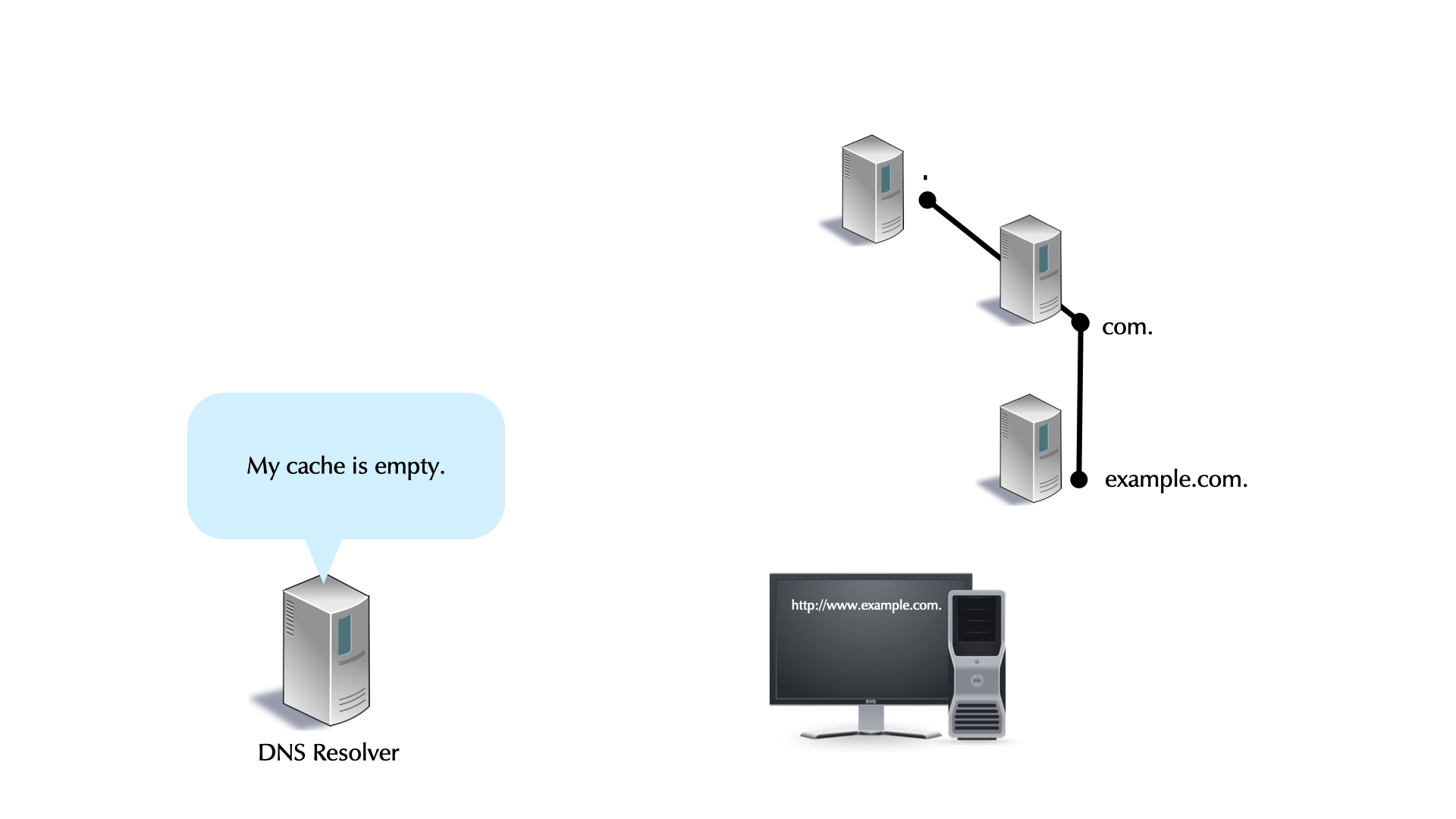
  • DNS Resolver caching

5 DNS Clients, DNS Resolvers, and Authoritative Servers

5.1 DNS components

0401-DNS-Components.png

  • a DNS installation constists of multiple components
    • DNS clients (smartphones, tablets, desktop, laptop, server, IoT devices etc)
    • DNS resolver (also named "Caching Server", "Smart Resolver", "recursive DNS Server"
    • authoritative DNS Server

5.2 DNS Resolver placement

  • in managed networks (company, university) the IT department manages one or more dedicated DNS resolvers

0401-resolver-placement.png

  • ISP (Internet Service Provider) customers often use the DNS resolvers provided by the ISP

0402-resolver-placement.png

  • although sometimes problematic from privacy and security point of view, many users today use public DNS resolvers in the Internet

0403-resolver-placement.png

  • some operating systems support operating a full DNS resolver on each system

0404-resolver-placement.png

5.3 Authoritative Server, Primary and Secondaries

0405-authoritative-DNS.png

  • For redundancy reasons, each DNS zone has multiple authoritative servers (one primary, multiple secondaries holding copies of the zone database)

6 Building and maintaining a DNS Resolver

6.1 Installing BIND 9 from the RedHat/CentOS Repository

  • Inform the trainer in the chat when you're done
  • Use your virtual lab machine dnsrNNN.dnslab.org
  • Become root (Password DNSandBIND)
    $ sudo -s
    
  • Install the BIND 9 DNS server software
    % dnf install bind
    
  • Start BIND 9 with the default (RedHat/CentOS 8) configuration. The BIND 9 process name is named for Name Daemon
    % systemctl enable --now named
    
  • Check that BIND 9 is running without errors
    % systemctl status named
    
  • Try if our BIND 9 works as a DNS resolver
    $ dig @localhost debian.org
    
  • Repeat the last query again
  • Please send the answer to this question to the chat:
    • what is the answer time for the 1st request?
    • what is the answer time for the 2nd request?
    • guess what causes the difference?
    • try to query dnslab.org: why is the 1st query to dnslab.org faster than the (previous) query for debian.org?

6.2 Basic BIND 9 configuration

  • the BIND 9 configuration on RedHat/CentOS systems is in /etc/named.conf. Other Unix/Linux systems might store the configuration file in a different place (like /etc/bind on Debian/Ubuntu)

6.3 Default RedHat/CentOS 9 configuration

0501-named-conf.png

0502-named-conf.png

6.4 Check the configuration

  • after changing the BIND 9 configuration file, and before activating the new configuration, we need to check the new configuration for any errors
    % named-checkconf
    
  • only if no errors are reported reload/reconfig the DNS server
  • Option 1: reload with the BIND 9 rndc tool
    % rndc reconfig
    
  • Option 2: reload with systemctl
    % systemctl reload named
    
  • Option 3: reload old Unix style
    % pkill -HUP named
    

6.5 rndc - remote name daemon control

0503-rndc-status.png

  • Use your virtual lab machine dnsrNNN.dnslab.org
  • Execute rndc status
  • Compare your values with the screenshot above
  • Find the names of the automatic empty zones in the BIND 9 log journal
    % journalctl -u named
    
  • How many zones are configured? Write the answer in the chat.

7 DNS resolver: Authoritative Selection

  • A referral commonly has multiple NS entries.
    • There is no ranking or prioritization among the servers.
    • None is believed to have better information than another.
  • Which NS should a resolving server use?
    • The same question applies to selecting a root server.

  • BIND 9 uses a clever algorithm called "round trip time measurement" to probe all authoritative DNS server for a domain at least once and then uses the fastest while counting down the penalty of the slower ones (decay).
    • using this algorithm, BIND 9 uses the fastest authoritative from the set, while still probing all others from time to time

8 Cache Maintenance

  • dumpdb: Dump BIND’s cache and/or zones to the file named_dump.db. It can be changed with the dump-file statement.
    % rndc dumpdb -all     # authoritative and cache data
    % rndc dumpdb -zones   # only authoritative data
    % rndc dumpdb -cache   # only cache data
    % rndc dumpdb          # only cache data
    
  • flush: removes the entire cache: rndc flush
  • flushname <domainname>: removes a single domain name from the cache. rndc flushname www.example.com
  • flushtree <domainname>: removes everything under the domain name from the server's cache. rndc flushtree example.com

  • Use your virtual lab machine dnsrNNN.dnslab.org
  • Write the content of the BIND DNS server's memory cache to a file with rndc dumpdb
  • Find the file (look at named.conf for the dump-file) and open the file in a text editor.
  • Inspect the file content. Do you find some domain names from previous DNS queries there?

9 EDNS - Response Size Limits in DNS

9.1 The early years - 512byte is enough

  • The original DNS protocol had a size limit for DNS messages over UDP of 512 bytes
    • The aim was to prevent fragmentation on the network path
      • esp. in the early days of TCP/IP, fragmentation was slow

9.2 RFC 1035

  • RFC 1035 states in 2.3.4. Size limits:

    UDP messages 512 octets or less

  • and in section 4.2.1 UDP usage:

    Messages carried by UDP are restricted to 512 bytes (not counting the IP or UDP headers). Longer messages are truncated and the TC bit is set in the header.

9.3 The 13 Root DNS Servers

  • One artifact of the size limit of the original DNS protocol is the number of authoritative DNS servers for the root zone in the Internet (aka Root-Server)
    • There are 13 logical Root-Servers (a.root-servers.net to m.root-servers.net)
    • This is because without IPv6 and without the later EDNS0, 13 DNS names and IPv4 addresses fit nicely into the 512 byte limit
  • The thirteen names
$ dig -4 @a.root-servers.net NS . +noedns +nodnssec

; <<>> DiG 9.16.7 <<>> -4 @a.root-servers.net ns . +noedns +nodnssec
; (1 server found)
;; global options: +cmd
;; Got answer:
;; ->>HEADER<<- opcode: QUERY, status: NOERROR, id: 19932
;; flags: qr aa rd; QUERY: 1, ANSWER: 13, AUTHORITY: 0, ADDITIONAL: 15
[...]
;; ANSWER SECTION:
.			518400	IN	NS	a.root-servers.net.
.			518400	IN	NS	b.root-servers.net.
.			518400	IN	NS	c.root-servers.net.
.			518400	IN	NS	d.root-servers.net.
.			518400	IN	NS	e.root-servers.net.
.			518400	IN	NS	f.root-servers.net.
.			518400	IN	NS	g.root-servers.net.
.			518400	IN	NS	h.root-servers.net.
.			518400	IN	NS	i.root-servers.net.
.			518400	IN	NS	j.root-servers.net.
.			518400	IN	NS	k.root-servers.net.
.			518400	IN	NS	l.root-servers.net.
.			518400	IN	NS	m.root-servers.net.
[...]
;; Query time: 37 msec
;; SERVER: 198.41.0.4#53(198.41.0.4)
;; WHEN: Mon Oct 26 10:14:30 CET 2020
;; MSG SIZE  rcvd: 492

9.4 DNS over TCP

  • When a DNS server needs to send a DNS response message larger than the UDP size limit, it will send an incomplete response with the TC "Truncated" flag set in the DNS header
    • The DNS client (could be a DNS resolver), will detect the TC flag and will repeat the query over TCP
      • There is no size limit on DNS responses over TCP
      • But TCP is not as fast as UDP, so this should be avoided
  • Because the DNS protocol can switch from UDP to TCP on larger responses (> 512 byte), DNS servers (authoritative as well as DNS resolvers) should always support DNS over TCP
    • And the firewall should allow DNS port 53 on UDP and TCP
$ dig -4 larger.dnssec.works TXT +noedns
;; Truncated, retrying in TCP mode.

; <<>> DiG 9.16.7 <<>> -4 larger.dnssec.works txt +noedns
;; global options: +cmd
;; Got answer:
;; ->>HEADER<<- opcode: QUERY, status: NOERROR, id: 64327
;; flags: qr rd ra ad; QUERY: 1, ANSWER: 8, AUTHORITY: 0, ADDITIONAL: 0
[...]

9.5 New developments in DNS

  • In the mid 1990ies, there was new development around the DNS protocol
    • DNS security (DNSSEC)
    • Cryptographic Signatures (TSIG and SIG(0))
    • IPv6 Resource records
    • DNS as a distribution channel for cryptographic keys for applications
  • The 512byte limit was becoming a hindrance

9.6 EDNS0

9.7 ENDS0 features

9.8 EDNS1 (2,3,4 …)

10 Recursion-Depth – changes to BIND 9 (and other DNS resolver) in October 2025

  • Due to attacks on non-DNSSEC DNS zone in 2025, the authors of DNS resolver software changed the processing of delegation "glue" records:
    • BIND now only trusts glue records if, in the associated NS record, the target name (right side) is a subdomain of the owner name (left side). Glue associated with other names is ignored, and those names are iteratively resolved instead.
    • This enhances the security posture of BIND, but some unintended side effects may also be encountered. Operators should be aware of the potential consequences.
    • On an "cold" (empty) cache, some queries with deep recursion depth can return "SERVFAIL" for the first few queries
    • Some domain might not resolve at all (circular dependencies, broken delegations) that used to resolve with older versions of BIND 9
    • Used the "Transitive Trust Checker" to visualize the delegation dependencies of a zone https://trans-trust.verisignlabs.com/?z=teams.microsoft.com
  • See " Operational Notification: Impact of Stricter Glue Checking" https://kb.isc.org/docs/strict-glue
  • ISC is working on new code inside BIND 9 to mitigate the effects of these new security fixes (See https://gitlab.isc.org/isc-projects/bind9/-/merge_requests/11205 [Free ISC Gitlab account required])

10.1 Recommendations for DNS resolver operator:

  • Increase the query limits of BIND 9 until the new code in BIND 9 is published

  • Temporary workaround for DNS resolution failures on cold cache. Should be revised and removed once new BIND 9 version is available:
    options {
         [...]
    	# see https://bind9.readthedocs.io/en/v9.20.17/reference.html#namedconf-statement-max-query-count
         max-query-count 500;        # default: 200
         max-recursion-queries 200;  # default: 50
         max-recursion-depth 14;     # default: 7
    };
    
  • Implement the above changes on the DNS resolver at dnsrNN.dnslab.org
  • Check the configuration with named-checkconf
  • Reload the new configuration with rndc reconfig
  • Clear the BIND 9 Resolver cache with rndc flush
  • Test queries (should work on first try, no SERVFAIL): dig @localhost debian.org

10.2 Recommendations for Domain owner

  • Check the "transitive trust" of your domain with https://trans-trust.verisignlabs.com/
  • Try to flatten the delegation depth
  • Fix issues in the delegation (circular dependencies, missing "glue")
  • Remove false "glue": glue records in the associated NS record where the target name (right side) is not a subdomain of the owner name (left side)
  • Deploy DNSSEC (so that these hardenings of insecure DNS is not needed anymore)

11 Exercise: recap from day one (10 Minutes)

  • Use your virtual lab machine dnsrNNN.dnslab.org
  • Work on the questions below; take notes
  • Check the output of the dig commands:
    • Which flags are set?
    • Which resource records are in the different sections?
    • Is the answer authoritative (AA-Flag present)?
    • Is EDNS supported (EDNS OPT Pseudo-Section)?
    • Is there data in the ADDITIONAL section?
  • Query for an IPv4 address
    $ dig www.dnsworkshop.org A
    
  • Query for an IPv6 address
    $ dig www.dnsworkshop.org AAAA
    
  • Does an IPv4 and/or IPv6 address exist for dnsworkshop.org (without www)?
  • Does the domain name ftp.dnsworkshop.org exist?
  • What query does dig send when executed without any parameter?
  • What do we see in the answer to this query? Is this a DNS answer? Is the answer authoritative?
    $ dig @a.nic.de www.dnsworkshop.de A
    
  • Will this answer be received over UDP?
    $ dig @9.9.9.9 larger.dnssec.works TXT +dnssec
    
  • Which order of the parameters to dig are valid? Check it out!
    $ dig dnsworkshop.de SOA +multi
    $ dig +multi SOA dnsworkshop.de
    $ dig SOA +multi dnsworkshop.de
    $ dig dnsworkshop.de +multi SOA
    
  • Is there an Additional Section in the answer for
    $ dig strotmann.de MX
    
  • Is there an Additional Section in the answer for
    $ dig strotmann.de MX @ns3.myinfrastructure.org
    
  • Is there an Additional Section in the answer for
    $ dig strotmann.de MX @ns5.myinfrastructure.org
    

12 DNS resolver best practices

12.1 Prevent DNS fragmentation

12.1.1 IPv6 and DNS fragmentation

12.1.2 Cache Spoofing Attacks via DNS fragmentation

  • Attacker can use DNS fragmentation to plant wrong information inside a DNS Resolver cache
    • Without DNSSEC, all identify information is in the 1st fragment
    • The attacker can spoof the 2nd fragment without anyone noticing

12.1.3 Preventing fragmentation

  • Configure a maximum EDNS packet size of 1232 byte (1280 IPv6 MTU - UDP header - IPv6 header)
    • This also works for IPv4 over Ethernet
    • This is the new default in DNS software (BIND 9, Unbound etc) since DNS Flag-Day 2020 (October 2020)
  • Example for BIND 9 named.conf
options {
  [...]
  max-udp-size 1232;
  edns-udp-size 1232;
};
  • Important: a DNS Resolver with this setting must support DNS-over-TCP (Port 53) to the Internet
    • Make sure that outgoing connections on port 53/TCP (DNS) are not blocked
  • Optional: to increase security, block all fragmented UDP traffic towards the DNS resolver in a firewall

12.2 Minimal responses and minimal any

12.2.1 Minimal responses

  • RFC 1034 defines the additional section in an DNS answer as Carries RRs which may be helpful in using the RRs in the other sections.
    • In the default configuration, BIND 9 tries to be very helpful, sending additional information …
    • … creating larger than needed DNS answer packets
    • This is sometimes exploited by attackers in distributed denial of service attacks

      DNS-reflection-01.png

      DNS-reflection-02.png

      DNS-Additional-Section.png

  • Configure "minimal-responses" in BIND 9
options {
    [...]
   minimal-responses yes;
};
  • BIND 9 will only return the data required for the DNS protocol to work
    • this reduces the ammo available to attackers

      Minimal-Responses.png

12.2.2 Minimal ANY

  • A BIND 9 server getting a query with type ANY (QTYPE 255) will answer with all records matching the requested domain name and class
    • This can create large UDP DNS answer packets
      ;; QUESTION SECTION:
      ;menandmice.com.                        IN      ANY
      
      ;; ANSWER SECTION:
      menandmice.com.         86400   IN      SOA     dns1.menandmice.com. hostmaster.menandmice.com. 2016052701 900 300 604800 900
      menandmice.com.         3600    IN      TXT     "HhnTdT3K"
      menandmice.com.         3600    IN      TXT     "MS=ms81797768"
      menandmice.com.         3600    IN      TXT     "v=spf1  include:spf.protection.outlook.com a:smtp.menandmice.is a:support.menandmice.com a:otrs.menandmice.com a:imap2.skyrr.is a:mx.hysing.is ~all"
      ns2.c.is.               84985   IN      A       213.176.143.102
      dns1.menandmice.com.    171385  IN      A       217.151.171.7
      dns2.menandmice.com.    171385  IN      A       217.151.171.21
      dns3.menandmice.com.    171385  IN      A       45.79.153.125
      […]
      ;; Query time: 97 msec
      ;; SERVER: 127.0.0.1#53(127.0.0.1)
      ;; WHEN: Mon Aug 15 10:49:15 CEST 2016
      ;; MSG SIZE  rcvd: 719   <-- DNS answer size
      
  • Starting with BIND 9.11, BIND 9 can be configured to only return the first entry of an matching ANY query
    • this mitigates the problem without causing breakage of older software (qmail etc)
options {
        [...]
       minimal-any yes;
};
  • Same query as before with minimal-any enabled (note the use of +notcp):
$ dig menandmice.com ANY +notcp
; <<>> DiG 9.11.0b3 <<>> menandmice.com any
;; global options: +cmd
;; Got answer:
;; ->>HEADER<<- opcode: QUERY, status: NOERROR, id: 32396
;; flags: qr rd ra; QUERY: 1, ANSWER: 1, AUTHORITY: 0, ADDITIONAL: 1

;; OPT PSEUDOSECTION:
; EDNS: version: 0, flags:; udp: 4096
; COOKIE: f0a6921ce7023ebc646d789357b1837a0962c60d534b251e (good)
;; QUESTION SECTION:
;menandmice.com.                        IN      ANY

;; ANSWER SECTION:
menandmice.com.	   60   IN   AAAA   2a01:7e00::f03c:91ff:fe89:ed54

;; Query time: 0 msec
;; SERVER: 127.0.0.1#53(127.0.0.1)
;; WHEN: Mon Aug 15 10:55:22 CEST 2016
;; MSG SIZE  rcvd: 123

12.3 Empty Zones - Protecting the Internet from Useless Queries

12.3.1 RFC 1918

  • RFC 1918 defines private address space that should not be routed on the Internet.
    Network Size
    10.0.0.0 - 10.255.255.255 (10/8 prefix)
    172.16.0.0 - 172.31.255.255 (172.16/12 prefix)
    192.168.0.0 - 192.168.255.255 (192.168/16 prefix)

12.3.2 RFC 6890, RFC 8190

12.3.3 Useless Traffic & Useless Queries

  • Packets on the Internet with a non-routeable address cause issues.
    • Organizations should prevent such packets from leaving their networks.
  • Likewise, unanswerable DNS queries cause issues and should not be allowed to reach the Internet.
    • Not all useless queries are for reverse name space (PTRs), but the problem is universal for reverse space.

12.3.4 Automatic Empty Zones

  • BIND 9.16 creates 100 empty zones for reverse name spaces.
    • The domains are in the in-addr.arpa and ipv6.arpa.
    • The zones are not created if recursion is disabled.
      • RFC 1918: Address Allocation for Private Internets
      • RFC 4193: Unique Local IPv6 Unicast Addresses
      • RFC 5737: IPv4 Address Blocks Reserved for Documentation
      • RFC 6598: IANA-Reserved IPv4 Prefix for Shared Address Space
      • IPv6 local address (locally assigned)
      • IPv6 link local addresses
      • IPv6 loopback address
      • the IPv6 unknown address
        12-Oct-2020 06:48:27.002 automatic empty zone: 10.IN-ADDR.ARPA
        12-Oct-2020 06:48:27.002 automatic empty zone: 16.172.IN-ADDR.ARPA
        12-Oct-2020 06:48:27.002 automatic empty zone: 17.172.IN-ADDR.ARPA
        12-Oct-2020 06:48:27.002 automatic empty zone: 18.172.IN-ADDR.ARPA
        ...
        
        Network/Prefix Description
        127.in-addr.arpa. IPv4 loopback
        2.0.2.192.in-addr.arpa. IPv4 Documentation
        100.51.198.in-addr.arpa. IPv4 Documentation
        113.0.203.in-addr.arpa. IPv4 Documentation
        255.255.255.255.in-addr.arpa. IPv4 Broadcast
        0.0.0.0.0.0.0.0.0.0.0.0.0.0.0.0.0.0.0.0.0.0.0.0.0.0.0.0.0.0.0.0.IP6.ARPA IPv6 unspecified address (::)
        D.F.ip6.arpa. Unique Local Address Block
        8.E.F.ip6.arpa. Link Local Addresses
        9.E.F.ip6.arpa. Link Local Addresses
        A.E.F.ip6.arpa. Link Local Addresses
        B.E.F.ip6.arpa. Link Local Addresses
        8.B.D.0.1.0.0.2.ip6.arpa. IPv6 Documentation Addresses
  • BIND 9.16 adds empty zones for home.arpa and empty.as112.arpa:
    12-Oct-2020 06:48:27.003 automatic empty zone: EMPTY.AS112.ARPA
    12-Oct-2020 06:48:27.003 automatic empty zone: HOME.ARPA
    
  • BIND 9.20 adds empty zones for resolver.arpa (RFC 9462 - Discovery of Designated Resolvers)
    Oct 29 08:32:16 dnsr07 named[2952]: automatic empty zone: RESOLVER.ARPA
    

12.3.5 Other Useless Queries

12.3.6 Stopping Useless Queries

  • Stop unanswerable queries by configuring the DNS resolver as authoritative for unanswerable zones.
    • The zones are empty, so the server answers all queries with NXDOMAIN.
    • Empty zones are not a violation of the recommendation to keep authoritative and recursive servers independent.

12.3.7 Additional Empty Zones

  • These zones are not among the automatically empty in BIND, and should be configured as empty:
    Zone Description
    local multicast DNS (Apple Bonjour, Avahi, systemd-sd)
    belkin used in Belkin network equipment
    home local TLD
    localdomain default local Domain used in Red Hat Linux
    lan local TLD, used in some CPE equipment
    corp local TLD
    domain local TLD
    internal local TLD
    dhcp local TLD
    localhost the "localhost" name

12.3.8 An Empty Zone File

  • Only MNAME (name-of-server) & RNAME (contact-email / Responsible person) are of real interest.
  • The SOA's TTL and the negative TTL, as well, but are likely to be generic.
    @   10800   IN SOA <name-of-server>. <contact-email>. 1 3600 1200 604800 10800
    @   10800   IN NS  <name-of-server>.
    
  • The empty zone is then used in named.conf.
    zone "corp"   { type primary; file "empty-zone.db"; };
    zone "local"  { type primary; file "empty-zone.db"; };
    zone "belkin" { type primary; file "empty-zone.db"; };
    [...]
    

12.3.9 Extra Empty Zones

  • Since BIND 9.5, empty zones can be configured in named.conf without a zone file.
    zone "zonename" {
    	type primary;
    	database "_builtin empty <nameserver> <contact>";
    };
    
    • nameserver = MNAME for SOA
    • contact = RNAME for SOA

12.4 Prefetch

12.4.1 Query Response Time

  • Quicker response time is a frequent goal of DNS deployment changes and of new BIND versions.
  • Prefetch makes recursive servers respond quicker for often queried RRs.
    • Not all answers are quicker, but response times are more uniformly quick.

12.4.2 Frequently Queried RRs

  • Consider a resolver that is queried for the same RR.
    • The first query takes long, because an authoritative server must be queried.
    • Subsequent queries are fast; answers are in the cache.
    • The first query after the RRs TTL expires, takes longer, as an authoritative server is again queried.
      • All queries arriving before the RR is re-cached, take longer.
      • It is these queries that prefetch speeds up.

12.4.3 Prefetch

  • Prefetch assures that frequent queries are consistently answered from the cache.
  • Prefetch was introduced in BIND version 9.10.
  • Prefetch is configured in options {}, it cannot be set per zone.
    options {
      [...]
      prefetch 8 59;
      [...]
    };
    
  • The first number is the trigger (seconds).
  • The second number is the eligibility (seconds).
  • Prefetch is enabled by default in BIND 9.10+
    • Default trigger value: 2s. Default eligibility value: 9s.
  • Set the trigger to 0s to disable prefetch.
    • The maximum trigger value is 10s.
  • Setting it higher is accepted, but will silently be 10s.
  1. Prefetch Trigger
    prefetch 8 59;
    
    • A query arriving when the remaining TTL is under the trigger, causes the server to re-query the RR.
    • This has no effect on the query that triggers the prefetch.
    • Subsequent queries benefit.
    • For frequently queried RRs, answers will more consistently come from the cache.
  2. Prefetch Eligibility
    prefetch 8 59;
    
    • Only RRs with an initial TTL greater than the eligibility, can be prefetched.
    • In the example, a TTL of 60s or greater is eligible for prefetch.
    • The eligibility must be at least 6s greater than the trigger, or it will be silently increased.

12.5 Rebind protection

  • See Protecting browsers from dns rebinding attacks https://dl.acm.org/doi/10.1145/1315245.1315298
  • BIND 9 supports rebind protection since Version 9.7.0.
  • The option deny-answer-addresses lists the address ranges that are considered private and should not be returned as part of an A/AAAA response, except for the zones listed in except-from:
options {
 [...]
 deny-answer-addresses {
    10.0.0.0/8;        // RFC 1918
    172.16.0.0/12;     // RFC 1918
    192.168.0.0/16;    // RFC 1918
    127.0.0.0/8;       // Loopback IPv4 (careful!)
    ::1/128;           // Loopback IPv6 (careful!)
    fe80::/10;         // IPv6 Link-Local
    fc00::/7;          // IPv6 Unique-Local
   }
   except-from {
     "example.com";
     "internal.example.net";
     "mylocalnet.example";
   };
};
  • Care should be particularly taken if using this option for addresses within 127.0.0.0/8. These addresses are obviously "internal", but many applications conventionally rely on a DNS mapping from some name to such an address. Filtering out DNS records containing this address spuriously can break such applications.

12.6 QNAME Minimization

  • Classic DNS resolver implementations are very talkative
    • Data is requested/supplied which (today) is not necessarily required by the DNS protocol

12.6.1 QNAME-Minimization

  • RFC 7816 DNS Query Name Minimization to Improve Privacy (https://www.rfc-editor.org/rfc/rfc7816) specifies DNS name resolution with minimal metadata
    • only DNS resolvers need to be adapted.
    • DNS clients, DNS authoritative servers, firewalls etc. do not need to be changed
    • QNAME minimization is not a change to the DNS protocol, only an implementation recommendation!

12.6.2 Traditional DNS name resolution (1/6)

dns-wo-qname-min01.png

12.6.3 Traditional DNS name resolution (2/6)

dns-wo-qname-min02.png

12.6.4 Traditional DNS name resolution (3/6)

dns-wo-qname-min03.png

12.6.5 Traditional DNS name resolution (4/6)

dns-wo-qname-min04.png

12.6.6 Traditional DNS name resolution (5/6)

dns-wo-qname-min05.png

12.6.7 Traditional DNS name resolution (6/6)

dns-wo-qname-min06.png

12.6.8 DNS name resolution with QNAME Minimization

  • A DNS resolver with QNAME minimization knows the structure of the DNS on the Internet (Root -> TLD -> SLD …)
  • The DNS resolver asks for the necessary domain name for each level (delegation/target name)
  • In most cases DNS resolution with QNAME minimization is as fast or even faster compared to traditional DNS resolution

12.6.9 DNS name resolution with QNAME Minimization

dns-with-qname-min06.png

12.6.10 QNAME Minimization implementations

  • Unbound
  • Knot-Resolver
  • BIND 9.14+

12.6.11 QNAME minimization test

  • Simple test via dig whether a DNS resolver used offers QNAME minimization
shell$ dig txt qnamemintest.internet.nl +short
a.b.qnamemin-test.internet.nl.
"HOORAY - QNAME minimisation is enabled on your resolver :)!"
  1. QNAME minimization in BIND 9
    • The option qname-minimization controls QNAME minimization behavior in the BIND resolver.
      • When set to strict, BIND follows the QNAME minimization algorithm to the letter, as specified in RFC 9156.
      • Setting this option to relaxed causes BIND to fall back to normal (non-minimized) query mode when it receives either NXDOMAIN or other unexpected responses (e.g., SERVFAIL, improper zone cut, REFUSED) to a minimized query.
      • disabled disables QNAME minimization completely.
    • The current BIND 9 default is relaxed, but it may be changed to strict in a future release.

12.7 Control minimum cache times

  • The options min-cache-ttl and min-ncache-ttl can be used on a global level to control the minimum time a resource record should be cached for. This will overwrite TTLs in the received DNS resource records that have a TTL lower than the configured values.
  • min-cache-ttl - This sets the minimum time for which the server caches ordinary (positive) answers, in seconds. For convenience, TTL-style time unit suffixes may be used to specify the value. It also accepts ISO 8601 duration formats.
    • The default min-cache-ttl is 0 seconds. min-cache-ttl cannot exceed 90 seconds and is truncated to 90 seconds if set to a greater value.
  • min-ncache-ttl - To reduce network traffic and increase performance, the server stores negative answers. min-ncache-ttl is used to set a minimum retention time for these answers in the server in seconds. For convenience, TTL-style time unit suffixes may be used to specify the value. It also accepts ISO 8601 duration formats.
    • The default min-ncache-ttl is 0 seconds. min-ncache-ttl cannot exceed 90 seconds and is truncated to 90 seconds if set to a greater value.

12.8 Local Root Mirror

  • Having a local mirror copy of the root zone can speed up name resolution
    • It also helps with the privacy of DNS queries
  • BIND supports a local copy of the root zone as defined in RFC 8806 "Running a Root Server Local to a Resolver"
  • A default list of primary servers for the root zone is built into named, allowing the primaries statement to be omitted when configuring an IANA root zone mirror.
// Root Mirror Zone
zone "." {
        type mirror;
        file "root.zone";
};

13 Serve-Stale

  • "server stale" is a new function in DNS (RFC 8767 https://www.rfc-editor.org/rfc/rfc8767) that allows an DNS resolver to respond to client queries for outdated (expired) data in the cache, in case all upstream authoritative DNS servers for the query are not available.
  • Responses for stale data increase the resiliency in case of network and server outages. The responses are given with low TTLs. Once the authoritative DNS servers for the data are reachable again, fresh DNS data will be fetched and stored in the cache.

13.1 Serve-Stale

  • RFC 8767 - "Serving Stale Data to Improve DNS Resiliency" (March 2020) allows DNS resolver to keep and return cache entries that have expired (cached longer than their TTL) in case none of the zones authoritative DNS server can be reached.
    • This mitogates certain denial of service attacks against authoritative DNS servers and makes these attacks less attractive.
    • This RFC also suggest that DNS resolver should cap the maximum TTL for DNS resource records to 7 days.

13.1.1 BIND 9 "serve-stale" configuration

  • BIND 9 supports "serve-stale" since version 9.16.0
  • stale-answer-enable <boolean>; If yes, enable the returning of "stale" cached answers when the name servers for a zone are not answering and the stale-cache-enable option is also enabled. The default is not to return stale answers.
    • Stale answers can also be enabled or disabled at runtime via rndc serve-stale on or rndc serve-stale off; these override the configured setting. rndc serve-stale reset restores the setting to the one specified in named.conf. Note that if stale answers have been disabled by rndc, they cannot be re-enabled by reloading or reconfiguring named; they must be re-enabled with rndc serve-stale on, or the server must be restarted.
    • Information about stale answers is logged under the serve-stale log category.
  • stale-refresh-time <duration>; If the name servers for a given zone are not answering, this sets the time window for which named will promptly return "stale" cached answers for that RRSet being requested before a new attempt in contacting the servers is made. For convenience, TTL-style time-unit suffixes may be used to specify the value. It also accepts ISO 8601 duration formats.
    • The default stale-refresh-time is 30 seconds, as RFC 8767 recommends that attempts to refresh to be done no more frequently than every 30 seconds. A value of zero disables the feature, meaning that normal resolution will take place first, if that fails only then named will return "stale" cached answers.
  • stale-answer-ttl <duration>; This specifies the TTL to be returned on stale answers. The default is 30 seconds. The minimum allowed is 1 second; a value of 0 is updated silently to 1 second.
  • stale-cache-enable <boolean>; If yes, enable the retaining of "stale" cached answers. Default no.
  • max-stale-ttl <duration>; If retaining stale RRsets in cache is enabled, and returning of stale cached answers is also enabled, max-stale-ttl sets the maximum time for which the server retains records past their normal expiry to return them as stale records, when the servers for those records are not reachable. The default is 1 day. The minimum allowed is 1 second; a value of 0 is updated silently to 1 second.
    • For stale answers to be returned, the retaining of them in cache must be enabled via the configuration option stale-cache-enable, and returning cached answers must be enabled, either in the configuration file using the stale-answer-enable option or by calling rndc serve-stale on.
    • When stale-cache-enable is set to no, setting the max-stale-ttl has no effect, the value of max-cache-ttl will be 0 in such case.
  • stale-answer-client-timeout ( disabled | off | <integer> ); This option defines the amount of time (in milliseconds) that named waits before attempting to answer the query with a stale RRset from cache. If a stale answer is found, named continues the ongoing fetches, attempting to refresh the RRset in cache until the resolver-query-timeout interval is reached.
    • This option is off by default, which is equivalent to setting it to off or disabled. It also has no effect if stale-answer-enable is disabled.
    • The maximum value for this option is resolver-query-timeout minus one second. The minimum value, 0, causes a cached (stale) RRset to be immediately returned if it is available while still attempting to refresh the data in cache. RFC 8767 recommends a value of 1800 (milliseconds).
options {
  stale-answer-enable yes;
  [...]
  };

14 Response Rate Limiting in BIND

  • Response Rate Limiting (RRL) reduces query responses sent by a DNS server.
    • RRL is a defense against reflection/amplification DoS attacks
    • Clients IPs are grouped into buckets. (e.g. 256 IPv4's)
    • Identical responses to the same bucket are tracked.
    • If identical responses go over a set rate, RRL kicks in.
    • RRL significantly reduces the effect of using a domain name from a zone the server is authoritative for in a reflection attack.
    • RRL is applicable to UDP queries, not those over TCP.
    • The ISC recommends RRL only for authoritative servers.
  • A server drops or truncates when queries exceed its set rate.
    • A valid client will likely re-query in response to a drop.
    • Truncation prevents amplification but not reflection.
    • Legitimate clients will re-query with TCP and get a reply.
    • A valid client is only negatively effected, if its query is identical to the attacks, and is in a bucket being spoofed.
    • named's default is a mix of truncation and drop.

14.1 named RRL options {}

  • These are all the RRL option settings.
options {
  rate-limit {
    all-per-second <integer>;
    errors-per-second <integer>;
    exempt-clients { <address_match_element>; ... };
    ipv4-prefix-length <integer>;
    ipv6-prefix-length <integer>;
    log-only <boolean>;
    max-table-size <integer>;
    min-table-size <integer>;
    nodata-per-second <integer>;
    nxdomains-per-second <integer>;
    qps-scale <integer>;
    referrals-per-second <integer>;
    responses-per-second <integer>;
    slip <integer>;
    window <integer>;
  };
};

14.2 RRL: responses-per-second

  • rate-limit enables RRL. Default=0 (disabled)
  • A bucket will be limited to 10 identical responses before rate-limiting is enforced.
    • Beyond 10: 1 query dropped, 1 truncated. (See slip).
options {
   rate-limit {
     responses-per-second 10;
   };
   [...]
};
  • This is a perfectly valid configuration.
    • All other RRL settings have their default values.

14.3 RRL: log-only

  • log-only disables RRL, but logs as if it were running.
    • Default=no
  • The option is recommended before enabling RRL.
    • Use it to determine a responses-per-second value that doesn't limit normal querying.
rate-limit {
     responses-per-second 10;
     log-only yes;
};

14.4 RRL: slip

  • Slip sets if RLed queries are dropped or truncate.
    • It lets a legitimate IP get responses, even when it is being spoofed.
      • slip 0; drop all RLed queries. (Bad for legitimate clients.)
      • slip 1; Answer all RLed queries with TC=1. (All slip.)
      • slip 2; Slip every other query. (drop, truncate, drop,…)
      • slip 3; (drop, drop, truncate, drop, drop, truncate,…)
rate-limit {
      responses-per-second 10;
       slip 2;
};

14.5 RRL: ipv[46]-prefix-length

  • Buckets of grouped IP addresses.
    • Smaller buckets with fewer IPs, allow finer RRL control, but require more memory.
    • ipv4-prefix-length 32; would require tracking of every client independently and need a lot of memory.
    • The defaults of 24 and 56 reasonable.
rate-limit {
      responses-per-second 10;
       ipv4-prefix-length 24;
       ipv6-prefix-length 56;
};

14.6 RRL: all-per-second

  • Rate limit a bucket to an absolute number of UDP queries.
    • Any responses, not only identical ones.
    • Slip is ignored. All queries over the limited are dropped.
    • Use with caution, clients can send a lot of independent valid queries.
    • The default is 0: disabled
rate-limit {
  all-per-second 50;
};

14.7 RRL: window

  • Response tracking time-range, a rolling window.
    • Most importantly, it works as recovery time.
    • How long after a tripped rate-limiter goes below its threshold, before rate-limiting stops limiting.
    • The default, 15 seconds, is reasonable.
rate-limit {
      responses-per-second 10;
      slip 3;
      window 15;
};

14.8 RRL: logging

  • BIND has a rate-limit logging category.
    • The onset and end of rate-limiting are logged.
    • Periodic messages are logged in between.
    • The logging of rate-limiting ending is delayed ~60s.
    • Logging is at severity info.
logging {
  channel rrl { <OUTPUT SUPPRESSED>; };
  <OUTPUT SUPPRESSED>;
  category rate-limit { rrl; };
 };
  • Sample log (formatted)
29-Aug-2018 19:40:58.250 would limit responses to 192.168.53.0/24
                         for zulu.zoneNNN.dnslab.org IN A  (0e0b52d9)
29-Aug-2018 19:40:58.250 client @0x7fb9a00c0010
                         192.168.53.252#59979 (zulu.zoneNNN.dnslab.org):
                         would rate limit slip response to 192.168.53.0/24
                         for zulu.zoneNNN.dnslab.org IN A  (0e0b52d9)
29-Aug-2018 19:40:58.258 client @0x7fb9a00c0010
                         192.168.53.252#54990 (zulu.zoneNNN.dnslab.org):
                         would rate limit drop response to 192.168.53.0/24
                         for zulu.zoneNNN.dnslab.org IN A  (0e0b52d9)


15 Response Policy Zones (RPZ)

  • RPZ is an RDNS security mechanism to protect queriers from Internet dangers.
    • It is like a firewall. RPZ prevents access to domain names identified as disreputable.
  • A domain name identified as disreputable triggers a policy with an action that denies normal resolution.
    • E.G. a domain name in a URL known for having malware, gets an NXDOMAIN response.
  • RPZs are already being widely implemented, but are still only a draft RFC: https://tools.ietf.org/html/draft-vixie-dnsop-dns-rpz (expired 12/2018)
  • RPZs are fully supported in BIND 9.10.
    • BIND 9.8.1+ had an experimental implementation.
  • Other RPZ implementations: PowerDNS Recursor, Unbound 1.11+, policy.rpz (Knot) - partial support, commercial DNS products, …
  • RPZ policies are implemented in zone files.
    • RPZs have some unique values, but conform to Master File Format.
    • The RPZ zones are deployed on DNS resolver, not on auth servers.
    • A DNS resolver is usually the secondary to a central RPZ management server that hosts the primary RPZ zones
    • There is no delegation and the NS RRs are unused.
    • An RPZ typically has policies for unrelated names. E.G.:
      www.verybad.org 30 IN CNAME google.com.
      evilstuff.net   30 IN CNAME google.com.
      
      • Note: the owner names in the example above are not fully qualified (FQDN)
  • There are five triggers for an RPZ policy.
    • Two are based on the query.
    • Three are based on the RDATA of the response.
  • For some of the triggers, special labels are required in the RR owner name.
  • There are six actions that a policy can trigger.
    • NXDOMAIN is one, the others are covered soon.

15.1 Policy Triggers Based on The Query

  • QNAME: The queried domain-name triggers the policy.
    • This is the most common trigger.
    • No special label is required for the owner name.
  • Client IP: The client's address triggers the policy.
    • The label .rpz-client-ip is used in the owner name.

RPZ-01.png

15.2 Policy Triggers Based on The Response

  • Response IP: The IP address in the RR triggers the policy.
    • This is only applicable to A & AAAA RRs.
    • It is only applicable to the Answer section of the DNS message.
    • The label .rpz-ip is used in the owner name.

RPZ-02.png

  • NSDNAME: Any NS referral in the path to getting a final response triggers the policy.
    • The label .rpz-nsdname is used in the owner name.
  • NSIP: An IP address of a NS in the path of getting a final response triggers the policy.
    • The label .rpz-nsip is used in the owner name.

15.3 Policy Actions

  • Six actions are available when a policy is triggered:
    • Respond with local data trapping the query in a walled garden. (Most commonly this is a CNAME.)
    • Respond NXDOMAIN
    • Respond NOERROR/NODATA
    • Respond normally (passthru)
    • Respond with the TC flag
    • Drop the query
  • The bold actions are most common.
  • When more than one action could apply (e.g. NXDOMAIN and passthru), precedence rules select which is used. The rules are beyond the scope of this course.

15.4 RPZ configuration

  • RPZ in named.conf
    options {
     [...]
     response-policy {
       zone "rpz-z01";
     }; // up to 32 RPZs
     [...]
    };
    
    [...]
    zone "rpz-z01" {type primary; file "rpz-z01.file";};
    [...]
    

15.5 RPZ: Zone File

  • The response policy zone is not delegated and NS RRs are unused.
    • The draft RFC recommends the convention of using localhost.
  • Other than the MNAME, all fields in the SOA should be valid and reasonable for the sake of any secondary using the RPZ.
$TTL 1h
$ORIGIN rpz-z01.
@  SOA localhost. pm.example.com. 1 4h 1h 8w 1h
   NS  localhost.
  • The domain name below is being declared disreputable.
    • The owner names should NOT be FQDNs!
  • A CNAME to the root, ., is RPZ's code for an NXDOMAIN action.
    $TTL 1h
    $ORIGIN rpz-z01.
    @                     SOA localhost. pm.example.com. 1 4h 1h 8w 1h
                          NS  localhost.
    evilstuff.com         CNAME        .      ; NXDOMAIN
    
  • Wildcards usage in RPZ files is common.
    • Also match everything under evilstuff.com.
    *.evilstuff.com       CNAME .      ; NXDOMAIN
    
  • A CNAME to *. is RPZ's code for a NODATA action.
    badplace.us           CNAME *.     ; NOERROR/NODATA
    *.badplace.us         CNAME *.     ; NOERROR/NODATA
    
  • Local Data is a standard RR without any special RPZ encoding. Most commonly, a CNAME is used to point to a walled garden.
    vile.org              CNAME fbi.gov. ; redirect
    *.vile.org            CNAME fbi.gov. ; redirect
    
  • A CNAME to the RPZ special target rpz-drop. makes the RDNS server to simply drop the query (no response is sent).
    • The querier will eventually time-out.
    yuck.reddit.com       CNAME rpz-drop.     ; drop
    
  • A CNAME to the RPZ special target rpz-tcp-only. makes the DNS resolver server set the TC flag (truncated) in the response.
    • A legitimate querier will re-query over TCP. This is another tool to mitigate reflection attacks.
    innocent.com          CNAME rpz-tcp-only. ; truncate
    *.innocent.com        CNAME rpz-tcp-only. ; truncate
    

15.6 Client IP Address Trigger

  • To trigger on the querier's IP, use the .rpz-client-ip encoding. The IPv4 address is reversed like in a PTR RR, but an additional first label indicates the netmask.
    16.0.0.31.172.rpz-client-ip        CNAME   rpz-passthru.
    12.0.0.16.172.rpz-client-ip        CNAME   rpz-drop.
    32.1.0.0.127.rpz-client-ip         CNAME   rpz-passthru.
    
    • Drop traffic from all class B private clients 172.16/12 except the 172.31/16 block which is not subject to any policies. The 127.0.0.1 host is also except for policies, which is useful for testing.
  • IPv6 addresses are reversed per four hex-digit field. Colons are replaced by periods. The double-colon for zero compression with "zz". Zero suppression and zero compression are required. The addresses shown are: 2001:db8:bad::/64 ::1/128
    64.zz.bad.db8.2001.rpz-client-ip   CNAME   rpz-drop.
    128.1.zz.rpz-client-ip             CNAME   rpz-passthru.
    

15.7 Response IP Address Trigger

  • If the given IP addresses appear in A or AAAA answer sections, an action is triggered.
    • In the example, the IPs are associated with dangers on the Internet, and get an NXDOMAIN response. 192.0.2.99/32 2001:db8:ea::/48
    32.99.2.0.192.rpz-ip               CNAME   .   ; NXDOMAIN
    48.zz.ea.db8.2001.rpz-ip           CNAME   .   ; NXDOMAIN
    

15.8 NS Domain-Name and NS IP Triggers

  • If a referral contains ns1.badactor.ch or a referral's A RR is 198.51.100.1, the response will be NXDOMAIN.
    ns1.badActor.ch.rpz-nsdname        CNAME   .   ; NXDOMAIN
    32.1.100.51.198.rpz-nsip           CNAME   .   ; NXDOMAIN
    

15.9 RPZ - the full example

  • the full RPZ zone with different trigger and actions
$TTL 1h
$ORIGIN rpz-z01.
@ SOA localhost. pm.example.com. 1 4h 1h 8w 1h
  NS  localhost.
evilstuff.com         CNAME .                             ; NXDOMAIN
*.evilstuff.com       CNAME .                             ; NXDOMAIN
badplace.us           CNAME *.                            ; NOERROR/NODATA
*.badplace.us         CNAME *.                            ; NOERROR/NODATA
vile.org              CNAME fbi.gov.                      ; redirect
*.vile.org            CNAME fbi.gov.                      ; redirect
yuck.reddit.com       CNAME rpz-drop.                     ; drop
innocent.com          CNAME rpz-tcp-only.                 ; truncate
*.innocent.com        CNAME rpz-tcp-only.                 ; truncate
16.0.0.31.172.rpz-client-ip        CNAME   rpz-passthru.  ; permit
12.0.0.16.172.rpz-client-ip        CNAME   rpz-drop.      ; drop
32.1.0.0.127.rpz-client-ip         CNAME   rpz-passthru.  ; permit
64.zz.bad.db8.2001.rpz-client-ip   CNAME   rpz-drop.      ; drop
128.1.zz.rpz-client-ip             CNAME   rpz-passthru.  ; permit
32.99.2.0.192.rpz-ip               CNAME   .              ; NXDOMAIN
48.zz.ea.db8.2001.rpz-ip           CNAME   .              ; NXDOMAIN
ns1.badActor.ch.rpz-nsdname        CNAME   .              ; NXDOMAIN
32.1.100.51.198.rpz-nsip           CNAME   .              ; NXDOMAIN

15.10 RPZ Data Feeds

  • ioc2rpz community is a portal which provides free of charge DNS Firewall (or Response Policy Zone) feeds: https://ioc2rpz.net/
  • The site https://dnsrpz.info maintains a list of providers of reputation data.
    • Different techniques are used to access the feed.
    • For example SpamHaus makes it available via zone transfer (AXFR/IXFR).
  • Prices vary. Since 2018-02 SpamHaus has a free but very limited service: https://www.spamhaus.org/news/article/669

15.11 Response-Policies without RPZ

  • Limited RPZ functionality is available without RPZ.
    • A DNS resolver server can be authoritative for zones to block or wall garden.
      • If there are 1000 zones, the server must be authoritative for all 1000.
      • With RPZ, only one zone is required.

15.12 RPZ Notes

  • The following types must not be RPZ data:
    • SOA, NS, DNAME, all DNSSEC related records
  • The logging category is rpz:
    category "rpz" { [...] };
    
  • For dynamic DNS updates (DDNS), .rpz must be added at the end of the owner name if RPZ special labels are used:
    $TTL 30
    32.1.2.3.10.rpz-client-ip.rpz 30 CNAME rpz-passthru.
    

16 Install BIND 9 for the primary authoritative server

  • Work on the nsNNa.dnslab.org virtual machine (primary authoritative server). This is a new VM, different from the DNS resolver machine!
  • Get a root shell
    $ sudo -s
    
  • Install BIND 9
    % dnf install bind
    
  • The BIND 9 configuration file for the BIND 9 is in /etc/named.conf. It is very minimal!
  • Enable and start ISC BIND 9
    % systemctl enable --now named
    
  • Lets tweak the configuration file /etc/named.conf for an authoritative-only DNS server. Remove the existing configuration and start a new configuration file in /etc/named.conf.
    options {
            directory "/var/named";
            listen-on { any; };
            listen-on-v6 { any; };
            dnssec-validation no;
            recursion no;
            minimal-responses yes;
            minimal-any yes;
            querylog no;
            max-udp-size 1232;
            edns-udp-size 1232;
            dnssec-dnskey-kskonly yes;
            zone-statistics yes;
            rate-limit {
                       responses-per-second 15;
                       window 5;
                       exempt-clients  { localhost; } ;
    	      };
    };
    
  • Logging for the authoritative server
    logging {
            channel default_syslog {
              // Send most of the named messages to syslog.
              syslog local2;
              severity debug;
            };
            channel xfer {
              file "transfer.log" versions 10 size 10M;
              print-time yes;
            };
            channel update {
              file "update.log" versions 10 size 10M;
              print-time yes;
            };
            channel named {
              file "named.log" versions 10 size 20M;
              print-time yes;
              print-category yes;
            };
            channel security {
              file "security.log" versions 10 size 20M;
              print-time yes;
            };
            channel dnssec {
              file "dnssec.log" versions 10 size 20M;
              print-time yes;
            };
            channel ratelimit {
              file "ratelimit.log" versions 10 size 20M;
              print-time yes;
    	      };
            channel query_log {
              file "query.log" versions 10 size 20M;
              severity debug;
              print-time yes;
            };
            channel query-error {
              file "query-errors.log" versions 10 size 20M;
              severity info;
              print-time yes;
            };
    
            category default        { default_syslog;  named; };
            category general        { default_syslog;  named; };
            category security       { security; };
            category queries        { query_log; };
            category dnssec         { dnssec; };
            category edns-disabled  { default_syslog; };
            category config         { default_syslog; named; };
            category xfer-in        { default_syslog; xfer; };
            category xfer-out       { default_syslog; xfer; };
            category notify         { default_syslog; xfer; };
            category client         { default_syslog; named; };
            category network        { default_syslog; named; };
            category rate-limit     { ratelimit; };
    };
    
  • test the configuration
    % named-checkconf
    
  • reload/reconfig the BIND 9 configuration
    % rndc reconfig
    
  • Open port 53 (DNS) in the firewall
    % firewall-cmd --permanent --zone=public --add-service=dns
    % firewall-cmd --reload
    

17 BIND 9 Logging

  • in BIND 9, the administrator defines the channel (where to log) and the categories (what to log) and then connects the categories to the channels
  • Categories
    • security
    • xfer-in (incoming zone transfer)
    • xfer-out (outgoing zone transfer)
    • queries
    • dnssec
    • default
    • […]
  • Categories: 28 in BIND 9.12; 23 in BIND 9.10 (includes default)
  • Channel
    • syslog
    • files
    • null
    • stderr

17.1 Default Logging

  • If named.conf has no logging statement, BIND essentially defaults to use syslog.
  • The default configuration is:
    logging {
          category default {
              default_syslog;
              default_debug;
          };
          category unmatched { null; };
    };
    

17.2 Query-Logging

  • Example BIND 9 query logging (BIND 9.16.21)
2021-11-10T11:49:36.349 info: client @0x770784d4 192.0.2.38#55719 (doh.defaultroutes.de): query: doh.defaultroutes.de IN A -E(0)D (192.0.2.212) [ECS 100.64.149.0/24/0]
2021-11-10T11:49:38.915 info: client @0x770784d4 100.64.15.30#40121 (doh.defaultroutes.de): query: doh.defaultroutes.de IN A -E(0)DC (192.0.2.212)
2021-11-10T11:49:39.195 info: client @0x770784d4 192.0.2.38#20977 (doh.defaultroutes.de): query: doh.defaultroutes.de IN AAAA -E(0)DC (192.0.2.212)
2021-11-10T11:49:39.347 info: client @0x770784d4 100.64.1.244#63082 (doh.defaultroutes.de): query: doh.defaultroutes.de IN A -E(0)D (192.0.2.212)
2021-11-10T11:49:41.455 info: client @0x770784d4 192.0.2.34#38949 (mailop.org): query: mailop.org IN A -E(0)DC (192.0.2.212) [ECS 100.64.2.0/24/0]
2021-11-10T11:49:41.809 info: client @0x770784d4 192.0.2.85#14795 (doh.defaultroutes.de): query: doh.defaultroutes.de IN A -E(0)D (192.0.2.212)
  • The fields in one line of query log data query-logging.png

18 Debug Logging

  • trace <level>: Change BIND's debugging level to the file named.run. (reading the trace requires knowledge of BIND internals)
    % rndc trace 10    # tracelevel now 10
    % rndc trace       # tracelevel now 11
    % rndc notrace     # tracelevel now 0
    % rndc trace 0     # same as notrace
    
  • The current debugging level is part of BIND's status.
    % rndc status | grep debug
    debug level: 0
    
  • recursing: Dump the queries that are currently recursing. The default file is named.recursing. It can be changed with the recursing-file statement. rndc recursing

19 Master File Format

  • The master file format defines DNS zone storage.
    • Master File Format is defined in RFC 1035.
    • Many authoritative server implementations, including BIND, support other storage.
      • e.g. Databases, Active Directory, etc.
      • Most minimally support entering data in Master File Format.

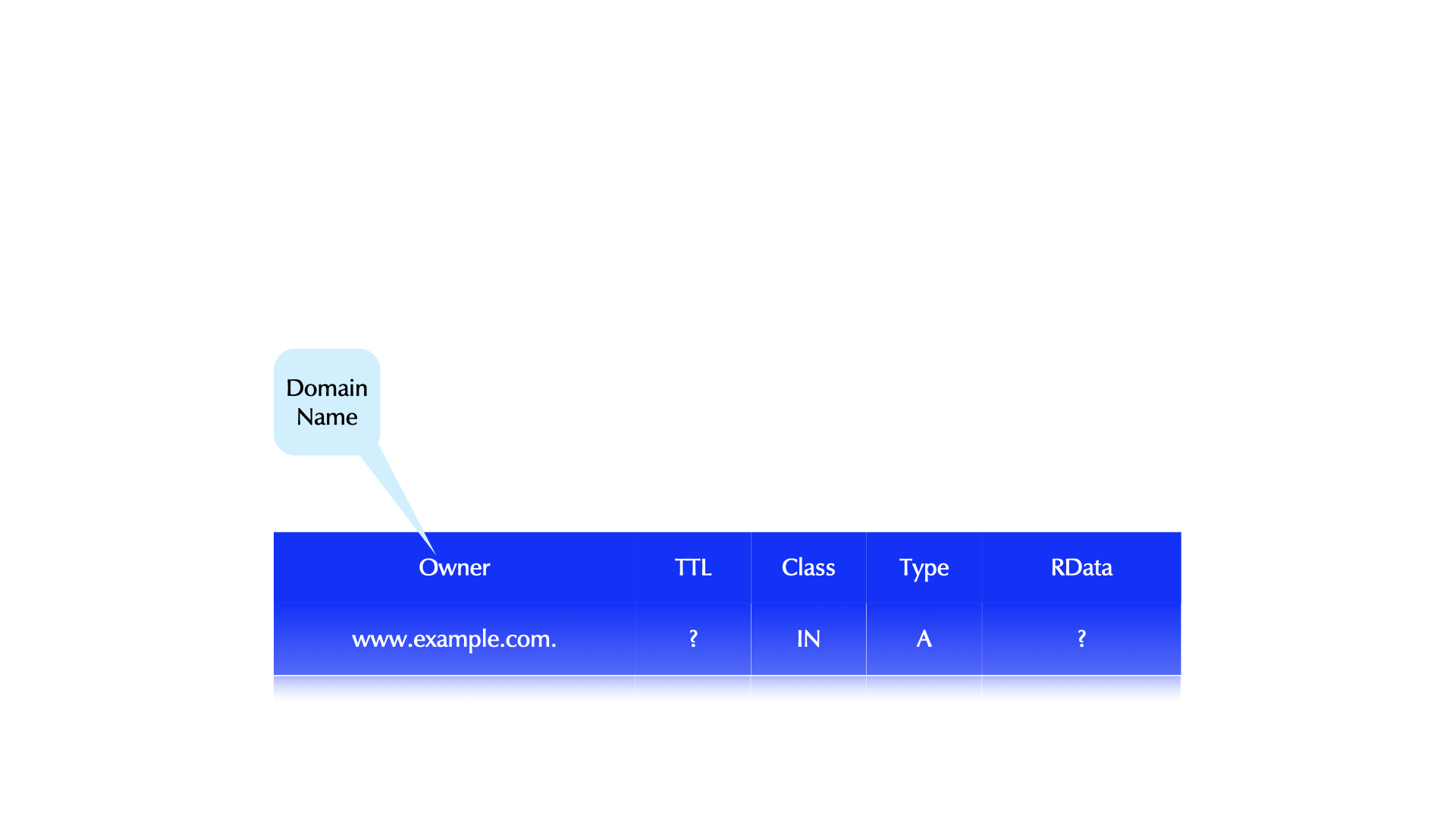
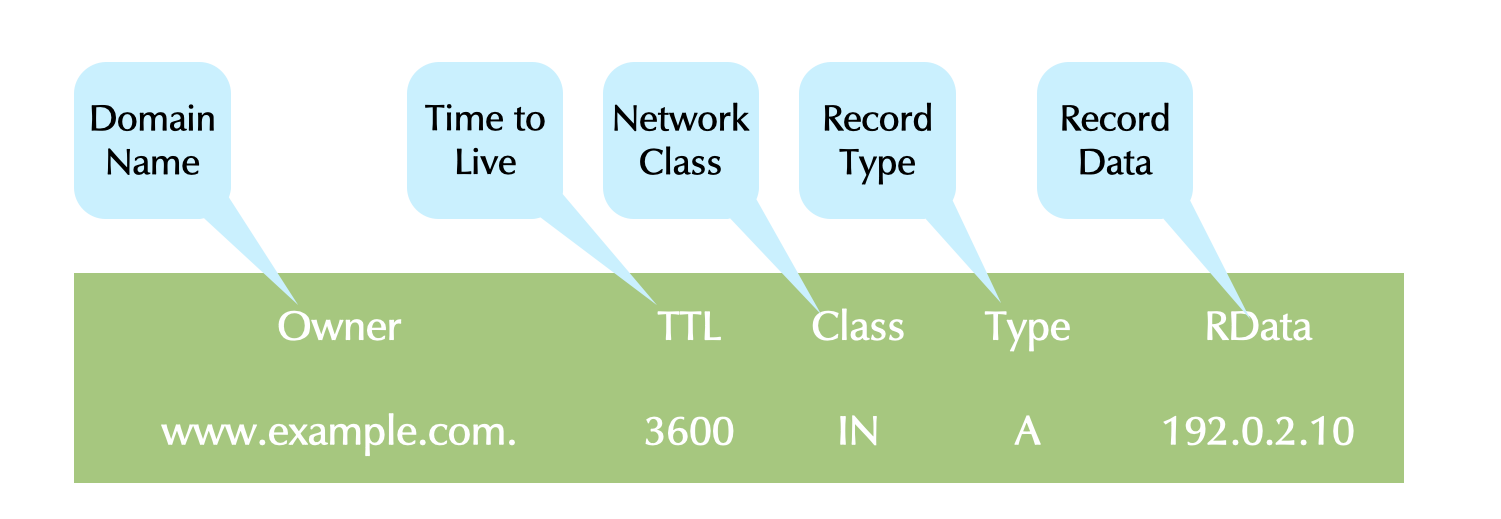
0115-DNS-Resource-Record.png

19.1 A Minimal Zone

  • A zone must have:
    • one SOA record
    • at least one NS record
  • We’ll show all RRs in their complete form.

19.2 The Start of Authority Record (SOA)

  • A SOA RR defines configurations parameters for a zone.
  • The owner name of a SOA RR matches the zone's name.
  • The SOA must be the first RR in a zone file.
  • The SOA is an internal RR that exists for DNS' own functionality.
  • Four SOA RDATA fields are information for secondaries.
  • One RDATA field is for resolvers.
dnslab.org. 86400 IN SOA (
   dns1.dnslab.org.            ; MNAME: primary server
   hostmaster.dnslab.org.      ; RNAME: responsible person
   2018061901                  ; SERIAL
   900                         ; REFRESH
   300                         ; RETRY
   604800                      ; EXPIRE
   900 )                       ; negTTL (officially:MINIMUM)

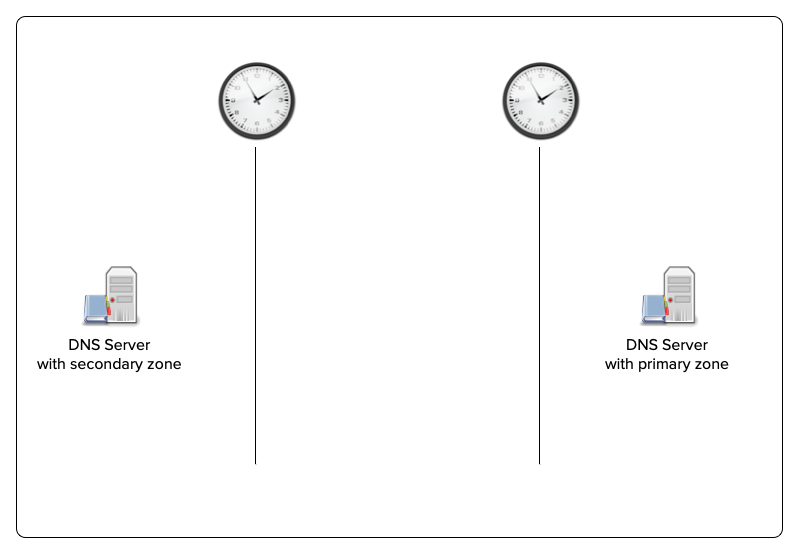
19.3 SOA record and zone transfer

  • A Day in the Life of two DNS Servers

19.4 Scaled Values

  • TTLs and the SOA timers can be entered as scaled values in most modern authoritative servers.
    • An integer value followed by:
      • s, for seconds
      • m, for minutes
      • h, for hours
      • d, for days
      • w, for weeks
  • Example:
    1w2d5h3m20s =
      1 week + 2 days + 5 hours + 3 minutes + 20 seconds =
      795,800 seconds
    

19.5 SOA Recommended Values

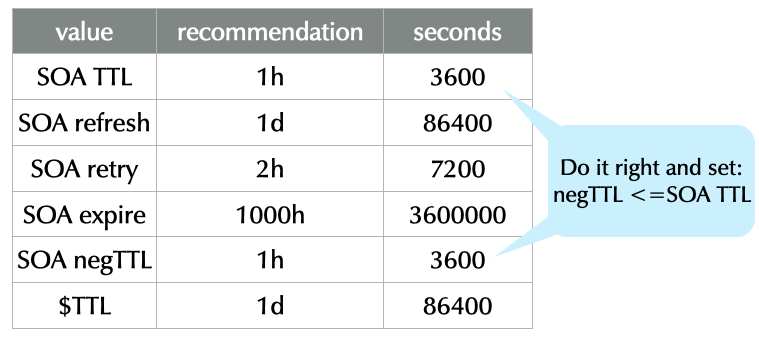
0505-soa-recommended-values.png SOURCE: https://www.ripe.net/ripe/meetings/ripe-55/presentations/koch-ripe203bis.pdf

"These recommendations are aimed at small and stable DNS zones. There are many legitimate reasons to use different values…"

19.6 Master File Format Comments

  • Comments in master file format begin with a semicolon (;) and extend to the end of the line.
  • Example:
    ; important router addresses
    router1.example.com.  3600 IN A 192.0.2.1   ; gateway1
    router2.example.com.  3600 IN A 192.0.2.100 ; tunnel GW
    

19.7 Extending RRs over Multiple Lines

  • A RR must be written on one line.
  • Records can be written over multiple lines using parentheses.
  • The parentheses can be at any whitespace in the RR.
  • The opening parenthesis must be on the first line.
  • Example 1
    example.com.  86400  IN SOA  dns1.example.com. (
                             hostmaster.example.com.
                             2012111701  ; serial
                             86400       ; refresh
                             7200        ; retry
                             3600000     ; expire
                             3600 )      ; negTTL
    
  • Example 2
    example.com. ( 86400  IN SOA  dns1.example.com.
                             hostmaster.example.com.
                             2012111701  ; serial
                             86400       ; refresh
                             7200        ; retry
                             3600000     ; expire
                             3600 )      ; negTTL
    
  • Example 3
    example.com.  86400  IN SOA  ( dns1.example.com.
                             hostmaster.example.com.
                             2012111701 86400 7200
                             3600000 3600 )
    
  • Example 4
    example.com.  86400  IN SOA ns1.test. admin.example. (
                        2012111701 86400 7200 3600000 3600 )
    

19.8 Zone File: Syntax & Integrity Check

  • BIND includes a tool to check a zone file for syntax errors and required missing data (e.g. no NS RR).
  • It is recommended to always check a zone file and correct all errors before having named (re)load it.
  • Syntax: named-checkzone <zonename> <filename>
    % named-checkzone example.com example.com.zonefile
    zone example.com/IN: loaded serial 2018072901  OK
    

19.9 Quiz

  • Spot the many errors: What’s wrong with this SOA record? Write your findings in the chat
    example.com  3600 IS SOA (
               hostmaster.example.com
               ns1.example.com
               20180101   // serial
               3600       // retry
               3600       // refresh
               3600       // expire
               3600       // negTTL )
    

19.9.1 Solution

  • Domain names are not FQDN (probable error).
  • CLASS: IS -> IN
  • email & mname probably swapped.
  • email & mname not FQDNs.
  • comments wrong.
  • serial probably two digits too few.
  • closing parenthesis commented out
  • Retry, refresh, expire timers illogical.
  • Retry and Refresh swapped (in the comments)

20 Fundamental DNS Resource Records

20.1 The NS Record

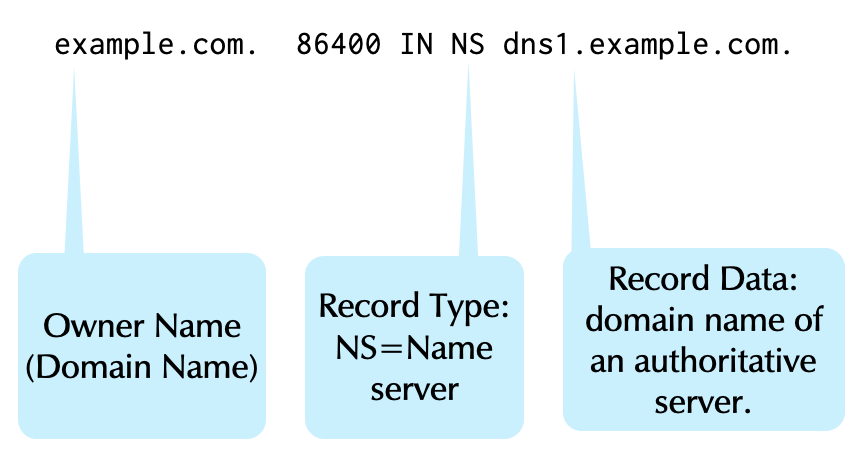
  • The NS record has two functions.
    • To define the authoritative servers for a zone.
    • To delegate to authoritative servers for a sub-domain.
  • Like the SOA, the NS is an internal RR that exists for DNS' functionality.
0506-ns-record.png

20.1.1 Rules for the NS Record

20.1.2 Glue Records

  • Glue records are used to solve the “chicken-and-egg” problem of DNS delegation.
  • Glue is required when a zone is delegated to a server whose domain name is in the delegated zone.
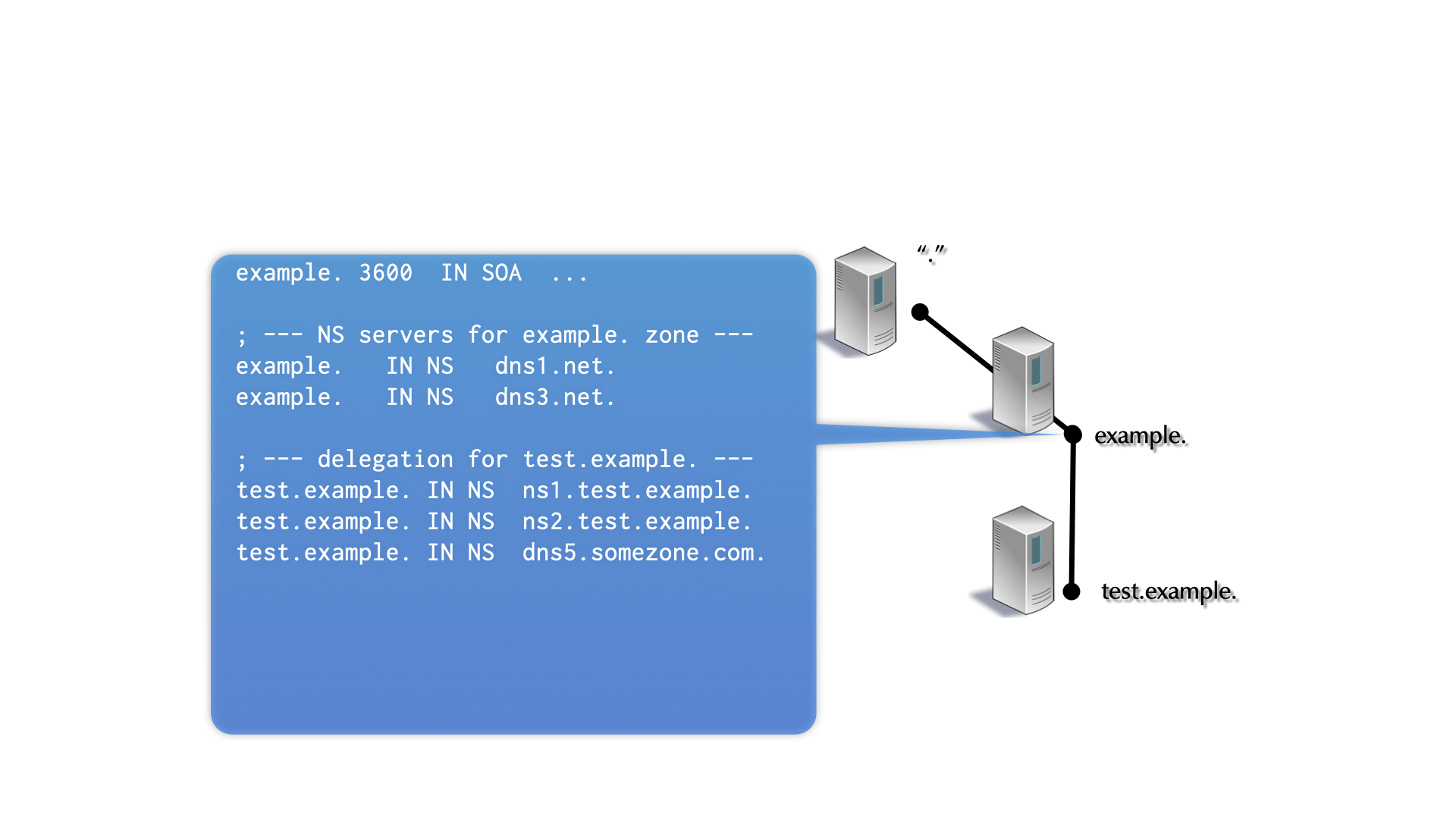
20.2 IPv4 Address record

  • An A RR maps a domain name to an IPv4 address
    www.example.com.  86400 IN A 192.0.2.10
    
  • One domain name can map to multiple A RRs.
    host.example.com.    3600 IN A 192.0.2.10
    host.example.com.    3600 IN A 10.0.10.2
    host.example.com.    3600 IN A 172.16.1.12
    
  • The server returns all addresses (a RRSet).
  • When a stub resolver returns multiple addresses to an application, the application should do something intelligent.
    • Many don’t :(

20.3 The IPv6 Address Record (AAAA)

  • The AAAA record maps a domain name to an IPv6 address
    www.example.com.  86400 IN AAAA 2001:db8:110:100:20:102f:ffeb:5380
    
  • Many applications query for a AAAA RR before falling back to an A RR.
  • When they get a response for the AAAA query, most will not try to lookup an IPv4 address.
  • If the successfully resolved AAAA doesn't lead to an active server, an application will likely fail.
  • So if a AAAA address exists, it must be available.
  • The Happy Eyeball protocol addresses the problem when present: RFC 8305: Happy Eyeballs Version 2: Better Connectivity Using Concurrency

20.4 The HTTPS Record

  • The HTTPS record is a relativly new record. It's type number is 65 (aka TYPE65)
    • It has been first observed "in the wild" in Summer 2020
    • It is being used in the new Apple operating systems (iOS, iPadOS, macOS) since fall 2020
    • It is now the 3rd most queried DNS record in the Internet (after A and AAAA)
  • The HTTPS delivers connection information for an HTTPS service
    • IPv4-Addresses of the service
    • IPv6-Addresses of the server
    • The public key of the server to be used to initiate an encrypted TLS "client hello"
    • Protocol selection: HTTP/2 (TCP) or HTTP/3 (QUIC)
    • One or more DoH-Resolver for the service
  • Example of a HTTPS Record for a service offering HTTP/2 and HTTP/3 (preferred)
example.com 3600 IN HTTPS 1 . alpn=”h3,h2”
  • Example of a HTTPS Record for a service with both IPv4 and IPv6 Addresses
example.com 3600 IN HTTPS 1 . alpn=”h3,h2” ipv4hint=”192.0.2.1” ipv6hint=”2001:db8::1”
  • Benefits of the HTTPS records
    • Browser don't need to request explicit IPv6 and IPv4 Addresses (faster connection)
    • The HTTPS Records is a signal to the web-browser to only allow TLS secured/encrypted connections for this domain name. This prevents downgrade attacks
    • With the HTTPS Record it is possible to create Domain-Alias definitions for whole zones (not possible with the CNAME Record)
  • The BIND 9 DNS server and tools (dig, host) support the HTTPS record since version 9.16.21 (September 2021)

21 The Zone Statement: Primary Zones

  • For primary zones, the zone statement minimally defines:
    • The domain name of the zone.
    • The zone type (primary).
    • The zone data file.
    zone "example.com" {
         type primary;
         file "example.com";
    };
    
  • For secondary zones, the zone statement minimally defines:
    • The domain name of the zone.
    • The zone type (secondary).
    • The IP address(es) of the primary name server(s).
    • A backup zone file (optional, but standard).
    zone "example.com" {
        type secondary;
        primaries { 192.0.2.10; 192.0.2.20; };
        file "example.com";
    };
    
  • A secondary zone can have more than one primary (max 10).
  • This adds robustness and allows secondaries that can't reach the primary (perhaps because of a firewall).

21.1 named.conf Syntax Check

  • the tool named-checkconf checks the syntax of the main configuration file named.conf
  • Usage: named-checkconf [filename]
  • The default file is named.conf in the sysconfdir when named was built
% named-checkconf /etc/named.conf
/etc/named.conf:10: missing ';' before 'zone'
/etc/named.conf:14: missing ';' before end of file
  • named-checkconf -z also checks primary zone files.

22 Setting up a DNS zone

  • Next we need a zonefile for our new zone. The zone-name will be zoneNN.dnslab.org. The authoritative name-server is named nsNNa.dnslab.org.
  • the ISC BIND 9 home-directory is at /var/named. Use the zone template below (replace the NN with your attendee number) to create a new zonefile with the filename zoneNN.dnslab.org in the BIND 9 home directory. Having a low TTL of 60 seconds is important in our lab environment. For production environments, the recommendation is 3600 seconds (1 hour) as a default TTL.
  • the period . at the end of domain names is very important in zone files. Don't omit it.
  • Display the IPv4 and IPv6 addresses of a Linux-Server
    hostname -I
    
  • Zone Template
    $TTL 60
    zoneNN.dnslab.org.             IN SOA    nsNNa.dnslab.org.  (
                                                 hostmaster  1001
                                                 1h 30m 41d 60s )
    zoneNN.dnslab.org.             IN NS     nsNNa.dnslab.org.
    zoneNN.dnslab.org.             IN A      <ipv4-address-of-the-lab-server>
    zoneNN.dnslab.org.             IN AAAA   <ipv6-address-of-the-lab-server>
    
  • create a zone block in the named.conf file (/etc/named.conf)
    [...]
    zone "zoneNN.dnslab.org" {
      type primary;
      file "zoneNN.dnslab.org";
    };
    
  • test the configuration and the zonefile(s) with parameter -z (for Zones)
    % named-checkconf -z
    
  • reload/reconfig the BIND 9 configuration
    % rndc reconfig
    
  • test if the zone resolves
    • on the authoritative DNS server
      $ dig @localhost zoneNN.dnslab.org
      
    • on your BIND 9 resolver machine (dnsrNN.dnslab.org)
      $ dig @nsNNa.dnslab.org zoneNN.dnslab.org
      

23 Other Basic DNS record types

23.1 CNAME

  • The CNAME record creates an alias from one domain name (the owner of the CNAME) to another.
    www.example.com.  86400 IN CNAME example.com.
    

23.1.1 CNAME Record Rules

  • Multiple RR types for the same domain name is common: NS, A, AAAA, TXT, etc.
  • A name with a CNAME RR, can not have other types.
    • This is ambiguous; an error that named-checkzone finds:
    www.example.com.  3600 IN CNAME example.com.
    www.example.com.  3600 IN A     192.0.2.10
    
    # named-checkzone example.com example.com.DB
    dns_master_load: example.com.DB:15: www.example.com: CNAME and other data
    <OUTPUT SUPPRESSED>
    
  • Don’t use CNAMEs in most RDATA (e.g. in MX or NS RRs.)
    • CNAMEs in other CNAME is acceptable, but be careful to avoid loops.
  • Example of bad CNAME use:
    example.com.             3600 IN NS    dnsserver.example.com.
    dnsserver.example.com.   3600 IN CNAME www.example.com.
    
  • CNAME cannot alias full zones
    • DNAME records can alias a full zone, but only in the parent zone (and a TLD is not editable for most domain owners)
    • The HTTPS record supports full zone aliasing for Websites

23.1.2 CNAME Quiz Question

  • Spot the error(s): What’s wrong with this CNAME record usage?
    example.com.  3600 IN SOA ns1.example.com. (
                              hostmaster.example.com.
                              2020102201 1d 4h 41d 2h )
    example.com.  3600 IN NS ns1.example.com.
    example.com.  3600 IN NS ns2.example.com.
    www.example.com. 3600 IN A 192.0.2.120
    example.com.  3600 IN CNAME www.example.com.
    

23.2 TXT Record

  • The TXT RR permits a free-form text to be associated with the domain name.
    mail.example.com.  86400 IN TXT "Mail Server for example Domain"
    
  • TXT records may contain multiple strings, each up to 255 characters in length.
  • These strings are concatenated by the DNS client
  • RDATA may not exceed 65535 bytes in total.
  • The TXT RR is often used for documentation purposes, for example:
    • Storing location information. (c.f. LOC record)
    • Documenting who is responsible for a particular host. (c.f. RP record)
    • This presumes the domain name is a host.
  • New or experimental protocols often use TXT RRs before a dedicated RR type is assigned.
    • Jabber (XMPP)
    • Sender Policy Framework (SPF)
      • The SPF RR has been deprecated in favor of TXT RRs.
    • Domain Key Identified Mail (DKIM)

23.3 MX Record

  • The MX RR defines a mail exchange (SMTP Mail Server) for the domain name.
    <domain-name> <ttl> IN MX <preference> <mail transfer agent hostname>
    
    example.com.  86400 IN MX 10 mail.example.com.
    
    • Preference: An unsigned, unscaled 16 bit value (not hops, time or anything else).
      • lower value => higher preference
    • Domain name (host name) of an SMTP server.

23.3.1 Mail Server Best DNS Practices (related to the MX record)

  • BEST PRACTICE: A PTR RR for the IP of a mail server should return the server's domain name.
    $ dig +noall +answer cisco.com MX
    cisco.com.		1772	IN	MX	10 alln-mx-01.cisco.com.
    <OUTPUT SUPPRESSED>
    
    # dig +noall +answer alln-mx-01.cisco.com A
    alln-mx-01.cisco.com.	1800	 IN	A	173.37.147.230
    
    # dig +noall +answer 230.147.37.173.in-addr.arpa PTR
    230.147.37.173.in-addr.arpa. 1800 IN	PTR	alln-mx-01.cisco.com.
    
    • The PTR and A RRs of the mail server point to each other.
    • If the PTR is missing, or it does not match the domain name, mail from that domain will likely be treated as SPAM.

23.4 SRV Record

  • The SRV record gives the domain name of a server that provides the service encoded in the owner name.
    • It is a generalized version of the MX RR (which only supports SMTP).
    • Like the MX RR, the SRV has additional fields that govern how clients should access the service.
  • Format:
    # Format: [owner]  [ttl]  [class]  SRV <priority> <weight> <port> <hostname>
    _ldap._tcp.example.com.   3600 IN SRV 10 100 389 dc.example.com.
    
    • Encoded service in the owner name. Here LDAP over TCP.
      • The service name is from: /etc/services
    • Priority: An unsigned, unscaled 16 bit value (Like the MX's preference.)
      • lower value => higher priority
    • Weight: Preference for RRs with equal priority.
      • Weight is a load distribution system.
    • The port the service is listening on. This allows running a protocol on a port that is not "well known".
    • Domain name (host name) of the server.

23.4.1 Use of SRV records

  • SRV RRs are heavily used by Microsoft's AD.
  • They are also used in Linux/UNIX systems:
    • looking up a whois server
    • Jabber (XMPP) instant messaging
    • VoIP deployments (SIP)
    $ dig +noall +answer  _nicname._tcp.ch SRV
    _nicname._tcp.ch.	3599	IN	SRV	     0 1 43 whois.nic.ch.
    
  • Applications assemble the domain name to query.

23.4.2 Example SRV Record Usage

  • A SIP gateway with a backup:
    _sip._tcp.example.com.  3600 IN SRV 0 0 5060 primary.example.com.
    _sip._tcp.example.com.  3600 IN SRV 1 0 5060 backup.example.com.
    
    • The endpoint with preference value 0 will always be used unless it is unreachable
  • Load distribution with 3 SIP gateways. In both samples:
    • sip1 will receive 50% of the traffic
    • sip2 + sip3 will each get 25% of the traffic
      _sip._tcp.example.com.  3600 IN SRV 0 50 5060 sip1.example.com.
      _sip._tcp.example.com.  3600 IN SRV 0 25 5060 sip2.example.com.
      _sip._tcp.example.com.  3600 IN SRV 0 25 5060 sip3.example.com.
      
    • different values for weight, but same result:
      _sip._tcp.example.com.  3600 IN SRV 0 2 5060 sip1.example.com.
      _sip._tcp.example.com.  3600 IN SRV 0 1 5060 sip2.example.com.
      _sip._tcp.example.com.  3600 IN SRV 0 1 5060 sip3.example.com.
      
  • Getting whois information
    _nicname._tcp.de.    3600  IN SRV  0 0 43 whois.denic.de.
    _nicname._tcp.at.    1800  IN SRV 10 0 43 whois.nic.at.
    
    
    $ dig +nocmd SRV _nicname._tcp.at +noall +answer
    _nicname._tcp.at.	10773	IN	SRV	10 0 43 whois.nic.at.
    

23.4.3 Empty Non-terminals (ENT)

  • Empty non-terminals are nodes that have no RRs, but have subdomains.
    • Example: _sip._tcp.example.com It is likely that _tcp.example.com. has no RRs, but that _sip._tcp.example.com. has at least an SRV RR.
  • Empty non-terminals apply to SRV RRs, but are an independent topic… that has now been covered.

24 Resilience - one or more secondary servers

  • Currently your zone only has one authoritative server
  • That is a single point of failure
  • To fix this, we install another BIND 9 server

24.1 Building a second authoritative server

  • Work on the 2nd authoritative server machine (nsNNb.dnslab.org)
  • We want to create a new secondary server
  • Become root
    $ sudo -s
    
  • Install BIND 9
    % dnf install bind
    
  • The BIND 9 configuration file for the BIND 9 is in /etc/named.conf. It is very minimal!
  • Enable and start ISC BIND 9
    % systemctl enable --now named
    
  • Let's tweak the configuration file /etc/named.conf for an authoritative-only DNS server
    options {
            directory "/var/named";
            listen-on { any; };
            listen-on-v6 { any; };
            dnssec-validation no;
            recursion no;
            minimal-responses yes;
            minimal-any yes;
            querylog no;
            max-udp-size 1232;
            edns-udp-size 1232;
    	   dnssec-dnskey-kskonly yes;
            zone-statistics yes;
            rate-limit {
                       responses-per-second 15;
                       window 5;
                       exempt-clients  { localhost; } ;
    	   };
    };
    
  • Logging for the authoritative server
    logging {
            channel default_syslog {
                    // Send most of the named messages to syslog.
                    syslog local2;
                    severity debug;
            };
            channel xfer {
                    file "transfer.log" versions 10 size 10M;
                    print-time yes;
            };
            channel update {
                    file "update.log" versions 10 size 10M;
    		print-time yes;
    	};
            channel named {
    	        file "named.log" versions 10 size 20M;
    		print-time yes;
    		print-category yes;
    	};
            channel security {
    	        file "security.log" versions 10 size 20M;
    		print-time yes;
    	};
            channel dnssec {
    	        file "dnssec.log" versions 10 size 20M;
    		print-time yes;
    	};
            channel ratelimit {
    	        file "ratelimit.log" versions 10 size 20M;
    		print-time yes;
    	};
            channel query_log {
                    file "query.log" versions 10 size 20M;
    		severity debug;
    		print-time yes;
            };
            channel query-error {
    	        file "query-errors.log" versions 10 size 20M;
    		severity info;
    		print-time yes;
    	};
    
            category default        { default_syslog;  named; };
            category general        { default_syslog;  named; };
            category security       { security; };
            category queries        { query_log; };
            category dnssec         { dnssec; };
            category edns-disabled  { default_syslog; };
            category config         { default_syslog; named; };
            category xfer-in        { default_syslog; xfer; };
            category xfer-out       { default_syslog; xfer; };
            category notify         { default_syslog; xfer; };
            category client         { default_syslog; named; };
            category network        { default_syslog; named; };
            category rate-limit     { ratelimit; };
    };
    
  • Test the configuration
    % named-checkconf
    
  • Open the firewall for DNS (port 53)
    % firewall-cmd --permanent --zone=public --add-service=dns
    % firewall-cmd --reload
    
  • Reload/reconfig the BIND 9 configuration
    % rndc reconfig
    
  • Test that zone transfer from the primary works
    $ dig @nsNNa.dnslab.org zoneNN.dnslab.org AXFR
    
  • Now we create a zone block for a secondary zone in named.conf
    [...]
    zone "zoneNN.dnslab.org" {
     type secondary;
     file "zoneNN.dnslab.org";
     primaries { <ipv6-address-of-primary-server>; <ipv4-address-of-primary-server>; };
    };
    
  • Test the BIND 9 configuration
    % named-checkconf -z
    
  • Reload/reconfig the configuration
    % rndc reconfig
    
  • Check if the zone file for the secondary zone has been created by a zone transfer
    % ls -l /var/named
    
  • Our second server should now also be authoritative for this zone (AA Flag)
    $ dig @localhost zoneNN.dnslab.org SOA
    
  • Try to look into the new zone file. Does it work?
    % less /var/named/zoneNN.dnslab.org
    
  • Since BIND 9.8 secondary zones are stored in a binary format. This speeds up saving and loading zone content on very large zones (> 10000 resource records). The binary format cannot be read without extra tooling
  • It is possible to configure BIND 9 to write secondary zones in the text format (was default in BIND 9 before 9.8)
    zone "zoneNN.dnslab.org" {
     type secondary;
     file "zoneNN.dnslab.org";
     primaries { <IPv4>; <IPv6> };
     masterfile-format text;
    };
    
  • Test configuration file and reload/reconfig the BIND 9 server
    % named-checkconf -z
    % rndc reconfig
    
  • Re-transfer the zone
    % rndc retransfer zoneNN.dnslab.org
    
  • List zone file content (should now work!)
    % less /var/named/zoneNN.dnslab.org
    

24.2 Fixing the NS records

  • Now we have a second authoritative DNS server for our zone
  • But it is not listed in the zone (Parent Child disagreement)
  • We need to fix this

  • Work on the authoritative primary (nsNNa.dnslab.org)
  • Add the second DNS server to the NS record set of your DNS zone
  • Don't forget to increment the SOA serial number
    $TTL 60
    zoneNN.dnslab.org.    IN SOA    nsNNa.dnslab.org.  (
                                      hostmaster  1002   ; <-- new serial
                                      1h 30m 41d 60s )
    zoneNN.dnslab.org.    IN NS     nsNNa.dnslab.org.
    zoneNN.dnslab.org.    IN NS     nsNNb.dnslab.org. ; <-- new secondary
    zoneNN.dnslab.org.    IN A      161.35.224.95
    zoneNN.dnslab.org.    IN AAAA   2604:a880:4:1d0::40:0
    
  • Check the zone configuration and reload the BIND 9 server (primary)
    $ named-checkconf -z
    $ rndc reload zoneNN.dnslab.org
    
  • Check on the primary and the secondary that the new zone has been transferred over to the secondary (check the transfer.log file)
  • On the DNS resolver machine dnsrNN.dnslab.org, test that the resolver sees both authoritative servers
    $ dig zoneNN.dnslab.org +nssearch
    

25 Transaction Signatures (TSIG)

  • TSIGs secure the communication of two endpoints.
    • TSIGs uses HMAC (i.e. symmetric encryption).
    • Trust is required between all systems (all endpoints).
    • Securely installing the key on all systems is external to DNS.
    • The endpoints must have reasonably accurate clocks.
  • TSIG is independent of DNSSEC.
  • TSIG use cases:
    • DNS dynamic updates (client / dhcp-server <-> server)
    • BIND server control messages (rndc <-> server)
    • Server communication (zone transfers, notifies, queries, …)
    • Queries (client <-> server): Impractical and rare.

      tsig-message.png

  • A TSIG is a dynamically generated pseudo-RR.
    • TSIG RRs are not found in zone files, but do have the standard format of RRs.
    • TSIGs are never cached (TTL=0).
    • A TSIG RR is sent in the additional section.
    • A TSIG assures the integrity and authenticity of the entire DNS message.

      tsig-overview.png

  • TSIG offers a choice of HMAC algorithms:
    • hmac-md5 (deprecated)
    • hmac-sha1 (deprecated)
    • hmac-sha224
    • hmac-sha256
    • hmac-sha384
    • hmac-sha512
  • All the algorithms take a random length input and create a fixed length fingerprint.
    Algorithm fingerprint length
    MD5 16 byte
    SHA1 20 byte
    SHA256 32 byte
    SHA512 64 byte
  • These BIND tools generate HMAC (TSIG) keys:
    • rndc-confgen: designed for keys for remote control.
    • ddns-confgen: designed for keys for DDNS/nsupdate.
    • tsig-keygen: a generic tool HMAC key creation. It was introduced in BIND 9.10.
  • BIND comes with the command tsig-keygen to generate TSIG-keys.
    % tsig-keygen
    key "tsig-key" {
    	   algorithm hmac-sha256;
    	   secret "EvfRifkexW+81OmqFJSc9Z07IBVZxvZbKVJBhF8BwHo=";
    };
    

25.1 TSIG for Remote Control (RNDC)

  • BIND's remote control tool, rndc, may use TSIG for authentication.
    • rndc-confgen creates a template configuration including keys.

25.2 TSIG to Secure Zone Transfer

  • A TSIG can be used to secure zone transfers (e.g. primary to secondary).
    • The key must be configured on the server providing the zone and the server transferring it in.
key prim-sec-example.com {
	algorithm hmac-sha256;
	secret "pDCQLRGpPN0h9ksqHBnGBra3U15QwlpQI5aPNO5d5xE=";
};

zone "example.com" {
 type primary;
 file "example.com";
 allow-transfer { key prim-sec-example.com; };
};
  • Note that both the key, and the key-name, must match on the sender and receiver.
key prim-sec-example.com {
	algorithm hmac-sha256;
	secret "pDCQLRGpPN0h9ksqHBnGBra3U15QwlpQI5aPNO5d5xE=";
};

# secondary zone
zone "example.com" {
 type secondary;
 file "example.com";
 primaries { 192.0.2.53 key prim-sec-example.com; };
};

25.3 TSIGs for Securing All Communication Between DNS Servers

  • TSIGs can be use to secure all communication between servers (queries, notifies, zone-transfers …):
    key server1-server2 {
    	   algorithm hmac-sha256;
    	   secret "pDCQLRGpPN0h9ksqHBnGBra3U15QwlpQI5aPNO5d5xE=";
    };
    
    server 192.0.2.53 {   # <-- IP Address of the remote DNS server
      keys { server1-server2; };
    };
    

25.4 Exercise

  • Generate a new TSIG-key with tsig-keygen and add the key to the BIND 9 configuration on both authoritative server nsNNNa and nsNNNb
  • Change the allow-transfer option on the primary authoritative DNS server to now only allow endpoints that present the correct TSIG key to request a zone transfer
  • Add the TSIG key to the primaries configuration of your zone on the secondary server
    zone "zoneNNN.dnslab.org" {
      type secondary;
      primaries { <ipv6-address-of-primary> key <name-of-tsig-key>;
                  <ipv4-address-of-primary> key <name-of-tsig-key>; };
      file "zoneNNN.dnslab.org";
    };
    
  • Check the configuration and reload (both servers)
  • Change the SOA serial number of the zone on the primary
  • Observe the zonetransfer in the transfer.log file, note the TSIG key mentioned in the log entries
  • Try to request a zone transfer from the commandline with dig from the secondary server without sending the TSIG-key. That request should be denied.
    (secondary)% dig @nsNNNa.dnslab.org zoneNNN.dnslab.org AXFR


26 Dynamic Updates (Plus NOTIFY & IXFR)

  • DNSIND is shorthand for a group of extensions to the original DNS protocol.
    • I is for Incremental Zone Transfer
    • N is for NOTIFY
    • D is for Dynamic Update
  • Together, the DNSIND extensions allow DNS to handle dynamic networks.
  • A dynamic update allows a node to change the contents of a zone.
    • DHCP servers, for example, can add A, AAAA and PTR records to reflect the leases they give out.
  • A dynamic update can:
    • Add resource records to a zone
    • Delete records from a zone:
      • One record
      • All records of a certain type with one domain name (an RRSet)
      • All records with one domain name
  • A server can be configured to only accept updates from senders with the proper PSK (Pre-Shared TSIG Key).
  • A sender can define update prerequisites, such as the existence/non-existence of:
    • A particular record
    • Resource Records with a specific domain name and type
  • A sender first tries to transmit an update to a zone's primary master.
    • Most compare the SOA's mname field to the NS RRSet.
    • If the mname matches an NS RR, the update is sent there.
    • Otherwise the update is sent to one of the domain names in the NS RRSet (from the sender's perspective, a secondary).

26.1 Dynamic update security with ACLs and TSIG keys

  • On a primary authoritative server, allow-update {}; enables DDNS.
    • It also limits the updates to specifics keys or addresses.
    • Using a symmetric key (TSIG) is more secure, but IP addresses can be provided instead.
zone "example.com" {
	type primary;
	file "example.com";
	allow-update { key dhcp-server; };
};

26.2 update-policy

  • The allow-update clause is coarse, allowing DDNS to a zone completely, or not at all.
    • Complex policies are possible with update-policy.
      • Each update-policy allows DDNS for a set of RRs.
zone "example.com." IN {
    type primary;
    file "masters/example.com-zone";
    update-policy {
	    grant ddns-key zonesub ANY;
    };
};

26.3 DNS dynamic update forwarding

26.4 Dynamic Zones: SOA Serial

  • There are three update options for the SOA in dynamic zones:
    • serial-update-method ( date | increment | unixtime );
      • increment: simple bump (the default).
      • date: YYYYMMDDnn. nn starts at zero and increments.
      • unixtime: standard unixtime in seconds.
  • The statement can be global in options { } or view { }, or specific to a zone { }.

26.5 Notes on Dynamic Updates

  • To avoid constant rewriting of the zone file, a BIND primary instead writes changes to a journal file:
    • The journal is known as a log and is not plain-text.
    • The journal's file name is the zone's, appended with .jnl.
    • The name and the max size of a journal are configurable.
zone "example.com" {
   type primary;
   file "example.com";
   allow-update { key dhcp-server; };
   journal "/fast-disk/example.com.jnl"
   max-journal-size 200M;
};

26.6 The Journal File

  • The journal allows the server to recover the most recent version of the zone after a crash.
    • After loading the zone file, the server loads the journal.
    • A journal can be viewed with: named-journalprint <journalfile>
  • Each line adds or deletes one RR.
% named-journalprint zone02.dnslab.org.jnl
del zone02.dnslab.org.	30	IN	SOA	server02.dnslab.org. hm.zone02.dnslab.org. 2016011308 7200 3600 5184000 30
del me.zone02.dnslab.org.	30	IN	TXT	"my birthday!  go me!"
add zone02.dnslab.org.	30	IN	SOA	server02.dnslab.org. hm.zone02.dnslab.org. 2016013100 7200 3600 5184000 30
add me.zone02.dnslab.org.	30	IN	TXT	"hi there"
  • Periodically, an authoritative server writes the zone from memory to the zone file.
    • BIND writes 15 minutes after receiving an update.
    • When the primary writes the file, the format changes dramatically: the order is changed, comments are gone, and variable directives are gone.
  • The logging category for dynamic updates: update

26.7 DDNS Zone File Editing

  • Manual changes to a dynamic zone file are lost when the zone file is written!
    • The changes are never used in query responses.
  • Manual changes can be made by freezing a zone, however freezing disabled DDNS!
    • Freezing should generally be avoided.
    • Use nsupdate to make changes to a dynamic zone.

26.7.1 DDNS: Freezing and Thawing

  • rndc freeze <zone>
    • Freezing without specifying a zone, freezes all zones.
    • The journal can be deleted when the zone is frozen.
      • It contains information for IXFR, and deletion is not recommended.
  • rndc thaw <zone>
    • A NOTIFY is sent when a zone is thawed.

26.8 Using nsupdate

  • nsupdate is a BIND application for sending dynamic changes to a server.
    • It works both interactively and non-interactively.
    • In both modes, commands are one-per-line.
  • The three main commands are:
    • update add
    • update delete
    • send
  • update prepares RRs changes, send executes them.
  • Note: ENTER by itself is the same as send
  • Non-interactively, commands come from a file or STDIN.
$ nsupdate nsupdate.input.file

$ nsupdate < nsupdate.input.file
  • Interactive mode:
$ nsupdate
>
  • The interactive command show allows changes to be reviewed before being sent.
    • Here no updates have been prepared.
$ nsupdate
> show
Outgoing update query:
;; ->>HEADER<<- opcode: UPDATE, status: NOERROR, id:      0
;; flags:; ZONE: 0, PREREQ: 0, UPDATE: 0, ADDITIONAL: 0
>
  • update add prepares a RR to be added to a zone.
    • All fields, except the Class must be provided.
    • TTL can be provided in a separate statement.
> update add a.example.com IN A 192.0.2.1
ttl 'IN': not a valid number
> update add a.example.com 3600 IN A 192.0.2.1
> ttl 3600
> update add a.example.com AAAA 2001:db8:0:deaf::1
> show
Outgoing update query:
;; ->>HEADER<<- opcode: UPDATE, status: NOERROR, id:      0
;; flags:; ZONE: 0, PREREQ: 0, UPDATE: 0, ADDITIONAL: 0
;; UPDATE SECTION:
a.example.com.		3600	IN	A	192.0.2.1
a.example.com.		3600	IN	AAAA	2001:db8:0:deaf::1
> send
  • update delete prepares RRs to be deleted.
    • Class is optional, and TTL, if provided, is ignored.
    • Providing all fields except TTL and Class deletes one RR.
> update delete b.example.com. 1800 A 192.0.2.99
> update delete example.net. MX 15 mailserver.example.net.
> show
Outgoing update query:
;; ->>HEADER<<- opcode: UPDATE, status: NOERROR, id:      0
;; flags:; ZONE: 0, PREREQ: 0, UPDATE: 0, ADDITIONAL: 0
;; UPDATE SECTION:
b.example.com.		0	NONE	A	192.0.2.99
example.net.		    0	NONE	MX	15 mailserver.example.net.
  • update delete Providing the RTYPE without RDATA, deletes a RRSet.
> update delete b.example.com. AAAA
> update delete c.example.com IN SRV
> show
Outgoing update query:
;; ->>HEADER<<- opcode: UPDATE, status: NOERROR, id:      0
;; flags:; ZONE: 0, PREREQ: 0, UPDATE: 0, ADDITIONAL: 0
;; UPDATE SECTION:
b.example.com.		0	NONE	A	192.0.2.99
example.net.		  0	NONE	MX	15 mailserver.example.net.
b.example.com.		0	ANY	AAAA
c.example.com.		0	ANY	SRV
>
  • update delete Omitting RTYPE and RDATA deletes all RRSets.
> update delete d.example.com.
> show
Outgoing update query:
;; ->>HEADER<<- opcode: UPDATE, status: NOERROR, id:      0
;; flags:; ZONE: 0, PREREQ: 0, UPDATE: 0, ADDITIONAL: 0
;; UPDATE SECTION:
b.example.com.		0	NONE	A	192.0.2.99
example.net.	    0	NONE	MX	15 mailserver.example.net.
b.example.com.		0	ANY	AAAA
c.example.com.		0	ANY	SRV
d.example.com.		0	ANY	ANY
  • Since BIND 9.9.0, the key word update is optional.
> delete  www.example.com. A
> add www.example.com. 600 A 192.0.2.80
> add www.example.com. 600 A 192.0.2.88
  • send - Transmit the prepared updates to the authoritative server.
    • WARNING - hitting ENTER is the same as send!
> send
  • answer - shows the results received from the server after a send.
> send
update failed: REFUSED
> answer
Answer:
;; ->>HEADER<<- opcode: UPDATE, status: REFUSED, id:  13117
;; flags: qr; ZONE: 0, PREREQ: 0, UPDATE: 0, ADDITIONAL: 0
>
  • prereq nxdomain <domain name> - requires that "domain name" doesn't exist (no RRs of any type).
> prereq nxdomain www.example.com
> update add www.example.com 3600 CNAME example.com.
> send
  • prereq yxdomain <domain name> - requires that "domain name" does exist.
> prereq yxdomain www.example.com
> update add web.example.com 3600 CNAME www.example.com.
> send
  • server <servername or IP> [port] - specifies the authoritative server that will receive the update.
    • If not set, nsupdate uses MNAME from the SOA RR and port 53.
    • Generally, updates should be sent to the primary authoritative server.
> server ns0.example.com
  • nsupdate -l sends all updates to localhost.
    • The MNAME is not checked, and server commands are ignored.
    • This is easy use, and is recommended if you are on the primary server
  • local <IP address> [port] - specifies the outgoing IP address. This is useful for multi-homed machines, especially when IPv6 is used, and when the server limits updates to specific IPs.
> local 2001:db8:100:0:ff:aa01:42:12:feaa
  • zone <zonename> - specify the zone to be changed.
    • This is necessary when the update is an NS or glue RR to be made in the parent zone.
$ nsupdate
> zone example.com.
> update add ns1.subdomain.example.com. 3600 IN A 192.0.2.53
> update add ns2.subdomain.example.com. 3600 IN A 203.0.113.53
> send

26.9 ddns-confgen

  • ddns-confgen generates a TSIG configuration for secure dynamic updates (e.g. nsupdate).
> ddns-confgen
# To activate this key, place the following in named.conf, and
# in a separate keyfile on the system or systems from which nsupdate
# will be run:
key "ddns-key" {
	algorithm hmac-sha256;
	secret "kDyXolMZX2YyGjiRm008GOr4NFnZ5drrvLA0owKbLZo=";
};

# Then, in the "zone" statement for each zone you wish to dynamically
# update, place an "update-policy" statement granting update permission
# to this key.  For example, the following statement grants this key
# permission to update any name within the zone:
update-policy {
	grant ddns-key zonesub ANY;
};

# After the keyfile has been placed, the following command will
# execute nsupdate using this key:
nsupdate -k <keyfile>

26.10 Exercise:

  • On the primary server, create a new delegated subdomain with the name dynamic.zoneNN.dnslab.org
    • Fill the zonefile with only the SOA and two NS records (for nsNNa and nsNNb)
  • Create a TSIG key for dynamic updates and place the TSIG key inside the configuration on the primary
  • Register this zone in the named.conf on the primary server as an primary dynamic zone using the configured TSIG key
  • Register this zone in the named.conf on the secondary server (secondary zone)
  • Add the delegation NS records to the parent zone zoneNN.dnslab.org, increment the SOA serial number, check the configuration and reload the zone.
  • From your resolver, make sure your BIND 9 resolver and also external public DNS resolver can resolver your new domain
    % dig @localhost dynamic.zoneNN.dnslab.org soa
    % dig @9.9.9.9   dynamic.zoneNN.dnslab.org soa
    
  • Use nsupdate -k <tsig-key>
    • add a IPv4-Address record with the IP-Address 192.0.2.53 to the new zone
    • add a TXT record with the subdomain info.dynamic.zoneNN.dnslab.org and the text "This is a dynamic zone" to the zone
  • Observe the notifies send and the zone transfer beween your authoritative server
  • Use nsupdate to remove the TXT record from the zone
  • Print the zones journal with named-journalprint

26.11 Solution: Dynamic update exercise

  • Zonefile for /var/named/dynamic.zoneNN.dnslab.org:
$TTL 60
@    IN SOA  nsNNa.dnslab.org.  hostmaster  1001  2h 1h 41d 60
     IN NS   nsNNa.dnslab.org.
     IN NS   nsNNb.dnslab.org.
  • BIND 9 configuration file on the primary server /etc/named.conf:
// TSIG Key for secure zone transfer
key "zoneNN-xfr" {
        algorithm hmac-sha256;
        secret "<secret>";
};

// TSIG key for secure dynamic updates
key "dynamic.zoneNN.dnslab.org" {
        algorithm hmac-sha256;
        secret "<secret>";
};

// Zone block for dynamic zone
zone "dynamic.zoneNN.dnslab.org" IN {
  file "dynamic.zoneNN.dnslab.org";
  type primary;
  allow-transfer { key zoneNN-xfr; };
  allow-update { key dynamic.zoneNN.dnslab.org; };
};

  • Check the BIND 9 configuration on the primary server
% named-checkconf -z
zone zoneNN.dnslab.org/IN: loaded serial 1003
zone dynamic.zoneNN.dnslab.org/IN: loaded serial 1001
  • Reload the new configuration
% rndc reconfig
  • Add delegation to the parent zone zoneNN.dnslab.org:
[...]
dynamic   IN NS nsNNa.dnslab.org.
          IN NS nsNNb.dnslab.org.

  • Increment the SOA serial on zoneNN.dnslab.org, check the configuration with named-checkconf -z and reload the BIND 9 configuration with rndc reload
  • Add new zone to the secondary server named.conf:
[...]
zone "dynamic.zoneNN.dnslab.org" IN {
     type secondary;
     file "dynamic.zoneNN.dnslab.org";
     primaries { <IPv6-address-of-primary-server> key zoneNN-xfr; <IPv4-address-of-primary-server> key zoneNN-xfr; };
};
  • Check the configuration, reload the BIND 9 configuration, check the zonetransfer in the logfile transfer.log
  • The new domain should now resolve through external public resolver:
dnsrNN% dig @1.1.1.1 dynamic.zoneNN.dnslab.org SOA
  • Write the TSIG key for dynamic update into a file
  • Launch nsupdate using the TSIG key file
% nsupdate -k <tsig-key-file>
  • Add the IPv4 Address for the name dynamic.zoneNN.dnslab.org to the zone using nsupdate
nsupdate> add dynamic.zoneNN.dnslab.org 60 IN A 192.0.2.53
nsupdate> send
nsupdate> quit
  • You should see a zone transfer between the two authoritative servers in the logfile transfer.log
  • Add a TXT record to the dynamic zone
nsupdate> add info.dynamic.zoneNN.dnslab.org 60 IN TXT "This is a dynamic zone"
nsupdate> send
nsupdate> quit
  • Check the update logfile in /var/named/update.log
  • Remove the TXT record from the zone using nsupdate
nsupdate> del info.dynamic.zoneNN.dnslab.org TXT
nsupdate> send
nsupdate> quit
  • Check the zone transfer, the update log
  • Print the content of the zones journal
% named-journalprint /var/named/dynamic.zoneNN.dnslab.org.jnl

26.12 DNS Notify

  • NOTIFY allows a primary authoritative server to inform its secondaries when a zone changes.
    • The secondary accept NOTIFY as a "pop" of the refresh timer.
  • Therefore secondary servers typically transfer a zone far more frequently.
    • For large zones, this generates a huge amount of traffic.
    • For a very large zone, a transfer might not complete before the next dynamic update and the next NOTIFY!
  • Each update to a zone can increment the serial number thereby triggering a NOTIFY.
  • A server with the primary zone determines which servers are secondaries by looking at the zone's NS RRset.
    • A name in the NS RRSet that matches the MNAME, is not sent a NOTIFY.
  • When a secondary receives a NOTIFY, it checks:
    • that it is for a zone for which it is authoritative.
    • that it came from a primary server for the zone.
    • that the SOA serial has increased.
  • If the NOTIFY is accepted, the secondary immediately schedules a refresh of the zone.
  • The secondary sends a NOTIFY to the other secondary servers.

26.12.1 Configuring NOTIFY

  • For primaries and secondaries, NOTIFY is on by default.
  • For a secondary not used as a downstream primary, it can be disabled:
options {
   notify no;
};
  • To disable NOTIFY for a particular zone:
    zone "example.com";
    	   type secondary;
    	   primaries { 192.0.2.110; };
    	   file "bak.example.com";
    	   notify no;
    };
    
    • Adding an address to the NOTIFY list for all zones:
options {
 	also-notify { 192.0.2.120; };
};
  • Adding an address to the NOTIFY list for a particular zone:
zone "example.com" {
	type primary;
	file "example.com";
	also-notify { 192.0.2.120; };
};
  • To notify only name servers listed in also-notify:
options {
	also-notify { 192.0.2.120; };
	notify explicit;
};
  • To notify only name servers listed in also-notify:
zone "example.com" {
	type primary;
	file "example.com";
	also-notify { 192.0.2.120; };
	notify explicit;
};

26.13 Incremental Zone Transfer (IXFR)

  • An Incremental Zone Transfer (IXFR) allows a client to query just the changes since a previous version.
    • This generally reduces the size (and duration) of the transfer considerably.
    • Like AXFRs (full zone transfer), IXFRs are sent to authoritative servers.
    • BIND secondaries and primary servers request and provide IXFRs by default.
  • A server querying an IXFR sends a previous serial number for the zone.
    • For a secondary, this is its current serial number.
    • Secondary: "send me changes since version 14284171."
  • The queried server responds with all changes since the IXFR's serial number.

26.13.1 QUIZ:

What do you think happens if the server receives an IXFR request and doesn't know the changes? Write the answer in the chat.

26.14 IXFR example

  • The next examples show BIND's response to an IXFR after the following update.
    • RFC 1995 allows several formats for the IXFR response
$ dig +short SOA dnslab.org
authoritative.dnslab.org. hostmaster.dnslab.org. 2013081127 7200 1800 3542400 30

% nsupdate -l
> update add zzz.dnslab.org 30 TXT "Zees"
> send
> quit
  • Query with a known previous serial number.
    • IXFR responses always start with the current (newest) SOA RR. This is the same as AXFR.
    • IXFR responses always end with the current (newest) SOA RR. This is the same as AXFR.
$ dig +noall +answer dnslab.org ixfr=2013081127 @::1 | grep -Ev 'RRSIG|NSEC'
dnslab.org.		40	IN	SOA	authoritative.dnslab.org. hostmaster.dnslab.org. 2013081128 7200 1800 3542400 30
dnslab.org.		40	IN	SOA	authoritative.dnslab.org. hostmaster.dnslab.org. 2013081127 7200 1800 3542400 30
dnslab.org.		40	IN	SOA	authoritative.dnslab.org. hostmaster.dnslab.org. 2013081128 7200 1800 3542400 30
zzz.dnslab.org.		30	IN	TXT	"Zees"
dnslab.org.		40	IN	SOA	authoritative.dnslab.org. hostmaster.dnslab.org. 2013081128 7200 1800 3542400 30
  • The second RR is always a SOA to delete. It is followed by additional RRs to delete (none in this case.)
    • This section continues until another SOA RR.
  • After a section of deletes, comes a sections of adds that always begins with a SOA.
    • In this case there are two additions.
$ dig +noall +answer dnslab.org ixfr=2013081127 @::1 | grep -Ev 'RRSIG|NSEC'
dnslab.org.		40	IN	SOA	authoritative.dnslab.org. hostmaster.dnslab.org. 2013081128 7200 1800 3542400 30
dnslab.org.		40	IN	SOA	authoritative.dnslab.org. hostmaster.dnslab.org. 2013081127 7200 1800 3542400 30
dnslab.org.		40	IN	SOA	authoritative.dnslab.org. hostmaster.dnslab.org. 2013081128 7200 1800 3542400 30
zzz.dnslab.org.		30	IN	TXT	"Zees"
dnslab.org.		40	IN	SOA	authoritative.dnslab.org. hostmaster.dnslab.org. 2013081128 7200 1800 3542400 30
  • The following example shows how BIND responds to an IXFR covering several versions.
  • Example: A zone is at version 2. Not including SOA changes:
    • One RR is added. Now version 3.
    • One RR is deleted. Two added. Now version 4.
    • Two RR deleted. Now version 5.
    • Only the SOA is changed. Now version 6.
dig @<Auth-Server> <Domain-Name>  ixfr=2

FQDN [...]  SOA 6 7200 3600 5184000 30
FQDN [...]  SOA 2 [...]
FQDN [...]  SOA 3 [...]
FQDN [...]
FQDN [...]  SOA 3 [...]
FQDN [...]
FQDN [...]  SOA 4 [...]
FQDN [...]
FQDN [...]
FQDN [...]  SOA 4 [...]
FQDN [...]
FQDN [...]
FQDN [...]  SOA 5 [...]
FQDN [...]  SOA 6 [...]
FQDN [...]  SOA 6 7200 3600 5184000 30

  • BIND authoritative servers use the journal to identify the changes necessary to respond to an IXFR.
    • A non-dynamic zone, doesn't have a journal.
    • Use ixfr-from-differences yes; in a zone stanza to create a journal for a non-dynamic zone.

In the examples above, we invoked nsupdate with option -l as the root user. Why do you think that was necessary? Write the answer in the chat.

27 Stub zone

  • A stub zone short circuits normal recursion by going directly to an authoritative server for the zone.
  • The authoritative servers (primaries) are specified in the configuration, and should match the zones' NS RRs.
  • A primaries is used only to retrieve the actual NS RRs, and glue RRs, if necessary.
  • The actual NSs are then used for resolution.
  • When the NS RRSet's TTL expires, the NS RRSet is pulled again.
    • This keeps the resolver's information for the zone up to date.
  • Stub zones keep normal name resolution intact, and are less likely to fail when NS names or their addresses change.
  • A stub zone is similar to a hint zone, but a hint zone is limited to reaching the root zone's authoritative servers.
  • A stub zone is similar to a secondary zone, except it replicates only the NS RRs, not the entire zone.

27.1 An example stub zone configuration

  • stub zones are configured in the named.conf of a DNS resolver
  • the backup file is optional and will be created
    zone "private.dns.zone.example" {
      type stub;
      primaries { <ip-addresses-of-primaries>; };
      file "private.dns.zone.example.stubzone";
    };
    

28 Forwarding

  • The standard recursive process sends iterative queries (RD=0) to authoritative servers and follows referrals.
  • Most RDNS servers support an alternate form of resolution, forwarding.
    • When configured to use forwarders, a resolver first checks its cache for the answer.
    • If the answer is not cached, the RDNS server recursively queries (RD=0) a forwarder (another resolver).

28.1 Forwarding Advantages

  • If multiple resolvers use a forwarder, they benefit from the forwarder's cache.
  • If the forwarder has better Internet connectivity than a resolver using it, the resolver benefits again.
    • This is particularly applicable for resolvers blocked by firewalls from reaching authoritative servers.

28.2 Forwarding Disadvantages

  • Forwarding architectures that depend on a small number of forwards are brittle.
  • Forwarding intercepts the standard resolution process and is harder to troubleshoot.
  • Forwarding configuration is not replicated by zone transfer, where normal delegation is (named.conf vs. zone data information).
    • Forwarding must be configured on each resolver using it.

28.3 Configuring Global Forwarding

  • If all forwarders fail, a RDNS server resolves normally (forward first mode).
  • forward only; completely disables normal resolution. The default is forward first;
  • If no forwarder returns an answer, the resolver returns: SERVFAIL
options {
  forwarders { <IP address>; <...> };
  forward only;   # The server can no longer be accurately called recursive!
};

28.4 Forward Zones / conditional forwarding

  • A forward zone configures the resolver to forward for one domain.
    • The domain "." is the equivalent of global forwarding.
    • Remaining queries are through the normal recursive process.
    • They are used primarily in intranets, were introduced in BIND 9.1, and are known as conditional forward in Microsoft DNS (introduced in Windows Server 2003).

28.5 Forward Zone Misuse

  • A forward zone should be directed to a recursive server that can resolve for the specified domain.
  • However, a forward zone is often directly to the authoritative server of the zone.
    • Before stub zones were introduced, this was reasonable.
    • Today, stub zones are the best way to redirect to an authoritative server.

28.6 Forward Zones example

zone "example.com." {
     type forward;
     forwarders { 192.0.2.110; 192.0.2.120; };
};
  • Forward zones apply to queries ending in the specified domain name.
  • Queries for sub.example.com and ab.de.fg.example.com would be forwarded.

28.7 Forwarding in action

Note: In this example the DNS resolver points the forward configuration towards authoritative server. While this is bad use of forwarding, it is common in practice

28.7.1 Exercise

  • Work on the DNS resolver machine dnsrNNN.dnslab.org
  • Configure a forwarding (forward only) to 2 (!) upstream DNS resolver from Quad9 (https://www.quad9.net) for the domain name dnslab.org (and everything below)
  • Check and reload the BIND 9 configuration
  • Run tcpdump in a separate terminal window (or use tmux) to observe the DNS queries going out from the server machine. Send test queries for dnslab.org and other domains. Validate that the requests for dnslab.org are being send to Quad9.

28.7.2 Solution

  • BIND 9 configuration
zone "dnslab.org" {
  type forward;
  forwarders { 9.9.9.9; 149.112.112.112; };
  forward only;
};
  • tcpdump
% tcpdump port 53 and host 9.9.9.9 or host 149.112.112.112
tcpdump: verbose output suppressed, use -v[v]... for full protocol decode
listening on eth0, link-type EN10MB (Ethernet), snapshot length 262144 bytes
15:34:03.721440 IP dnsrNNN.dnslab.org.31778 > dns9.quad9.net.domain: 30694+% [1au] DS? www.dnslab.org. (45)
15:34:03.733552 IP dns9.quad9.net.domain > dnsrNNN.dnslab.org.31778: 30694$ 0/4/1 (500)
15:34:03.733852 IP dnsrNNN.dnslab.org.18160 > dns9.quad9.net.domain: 23994+% [1au] DNSKEY? dnslab.org. (41)
15:34:03.742156 IP dns9.quad9.net.domain > dnsrNNN.dnslab.org.18160: 23994$ 3/0/1 DNSKEY, DNSKEY, RRSIG (765)
15:34:03.742854 IP dnsrNNN.dnslab.org.22697 > dns9.quad9.net.domain: 57733+% [1au] A? www.dnslab.org. (45)
15:34:03.929210 IP dns9.quad9.net.domain > dnsrNNN.dnslab.org.22697: 57733$ 2/0/1 A 188.166.104.92, RRSIG (233)
  • DNS Query to test the forward name resolution:
dig @localhost www.dnslab.org A

29 Automatic DNS provisioning with Catalog-Zones

29.1 Provisioning New Zones

  • Adding or deleting new zones can be a challenge.
  • In addition to updating the primary, every secondary needs to be modified.
  • It is intensive work for installations with many secondaries, or with frequent zone additions & deletions.
  • Many organizations have written scripts (or use tools like Ansible or SaltStack) for automatically modifying secondary DNS servers.
  • A catalog zone provisions normal zones using standard DNS content and communication.

29.2 Catalog Zone

  • A catalog zone works like a normal DNS zone.
  • A catalog zone is maintained on the primary server.
  • It contains zone names and configuration metadata that should exist on secondaries.
  • Zones added to the catalog zone are automatically provisioned on secondaries.
    • Zones in a catalog zone are member zones.
  • A primary hosting a catalog zone, does not need to be updated to BIND 9.11 or later.
    • This is because catalog zones use standard DNS content and communication.
    • Secondaries need to be updated so they will use a catalog zone's content as provision information.
  • A secondary will have a catalog zone for each primary.
    • Assuming the primary is configured with a catalog zone.

29.2.1 Catalog Zone: named.conf:Primary

  • In a primary's named.conf, a catalog zone is a completely normal zone.
  • There are no special requirements for the configuration, nor for the name of the zone.
zone "catz.dnslab.org" {
         type primary;
         file "catz.dnslab.org";
};

29.2.2 Catalog Zone: Zonefile:Primary

  • A catalog zone-file contains the SOA record and the NS records for the zone
  • It must also contain a TXT record with the version number of the catalog zone protocol implementation
    • Version 1: the catalog zone protocol as it has been implemented in BIND 9.11
    • Version 2: the catalog zone protocol as described in the Internet RFC and implemented in BIND 9.16
    • DNS server software will ignore catalog zones with a version number it does not support (BIND 9 will not load a catalog zone without the version number TXT record)
  • A catalog zone has a PTR RR for each member zone. In the catalog zone shown, no member zones are provisioned yet. It is empty. (It has no PTR RRs).

1001-catalog-zone.png

29.2.3 Catalog Zone: named.conf:Secondary

  • Configuration for catalog zones is found on secondaries.

1002-catalog-zone.png

29.2.4 Provisioned Member Zone

  • The zone file for a member zone is created as normal on the primary, just as is done with any zone (not shown). It is added to named.conf just like any other zone

1003-catalog-zone.png

29.2.5 Registering a new zone in the catalog

  • The new zone needs to be registered in the catalog zone
  • Registration happens with a PTR (Pointer) record where the data part of that record is the zone name (newzone.example.com in this example)
    • The domain name of the record must be a unique name (for example the SHA1 hash of the new zone's name), the label zones and the domain name of the catalog zone (zone2021111701.zones.catz.dnslab.org. in the example)

1004-catalog-zone.png

29.2.6 Provisioning Success

  • The secondary automatically serves the new member zone.
  • Updates to the member zone will automatically be transferred to the secondary.
    • This is with normal methods (NOTIFY, IXFR, etc).
  • Additional zones added to the catalog zone will also be automatically provisioned on the secondaries.
  • A zone removed from the catalog zone will be removed by the secondaries.
    • A zone backup file on a secondary will be deleted.

29.2.7 Additional zone block configuration

29.2.8 Available catalog zone options in BIND 9

  • primaries: this option sets one or more primary DNS servers for the secondary zone. Primaries can be defined as IPv4 A or IPv6 AAAA records.
  • allow-query: this option defines the allow-query ACL. The ACLs are defined with the help of the APL Resource record (see RFC 3123 "A DNS RR Type for Lists of Address Prefixes (APL RR)"
  • allow-transfer: this option defines the allow-transfer ACL. It also uses the APL record.

1005-catalog-zone.png

29.3 Exercise

  • Primary
    • Work on the primary authoritative server (nsNNNa).
    • Write a zone file in the home directory of the BIND 9 server for a catalog zone (one SOA record, two NS records). The name of the catalog zone should be dnscatalog.zoneNNN.dnslab.org. We are using a name from our own name space for the zone name to prevent clashes with existing zones in the Internet.
    • Add a zone statement for the catalog zone to the named.conf on the authoritative primary server
    • Check the configuration and reload the server
  • Secondary
    • Switch to the secondary server
    • Add the catalog zone as a secondary zone to the secondary server, use masterfile-format text; in the zone block of the secondary zone.
    • Register the new zone dnscatalog.zoneNNN.dnslab.org as a catalog zone in the secondary server options block
       options {
         [...]
         allow-new-zones yes;
         catalog-zones {
            zone "dnscatalog.zoneNNN.dnslab.org" in-memory yes
            default-masters { <IPv4-address of your primary server>; };
         };
      };
      
    • Check the configuration and reload the secondary server make sure the catalog zone is transferred over to the new primary
    • (check for the zone file and log entries in transfer.log)
  • Primary
    • On the primary server, register the reverse zone 1.168.192.in-addr.arpa in the catalog zone
    • Don't forget to increment the SOA serial number in the catalog zone
    • Check the configuration and reload the server
  • Secondary
    • Check that the new catalog zone version is transferred over to the secondary server
    • Check that the reverse zone is created on the secondary
    • Check the file transfer.log on the primary or on the secondary for a zone transfer of both the catalog zone and the reverse zone

30 A quick look at DNSSEC

30.1 DNS Security (or lack of)

  • the classic DNS from 1983 was not designed with security in mind
  • DNS cache poisoning 0205-dns-dangers.png
  • Men-in-the-Middle data spoofing 0206-dns-dangers.png
  • changes to the client DNS resolver configuration 0207-dns-dangers.png
  • attacks of authoritative DNS servers 0208-dns-dangers.png
  • DNSSEC can help 0210-roadsign.png

30.2 DNSSEC

  • the DNS security extension DNSSEC secures DNS data by augmenting the data with cryptographic signatures
    • the owner (administrator) creates a key pair of private and public key for each DNS zone (asymmetric crypto)
    • the owner/administrator signs all DNS data with the private key
    • the recipient of the data (DNS resolvers or client operating system or application) will verify (validate) the data
      • that the data has not been changed on the server nor during transit
      • that the data comes from the correct owner (the owner of the private key)

30.3 the chain of trust in DNS

  • DNSSEC creates a chain of trust between the parent zone and the child zone

dnssec-chain-of-trust.png

  • Applications and DNS resolvers can follow the chain of trust to a configured trust anchor to validate the DNS data
  • we will look into DNSSEC in more details later in this course* DNSSEC Intro :noexport:
  • In DNSSEC, each zone has one or more key pairs.
    • The private key of each pair
      • Is stored securely (probably on a hidden primary)
      • Is used to sign zone data
      • Should never be published or stored in a RR
    • The public key of each pair
      • It should be public
      • Is stored in the zone data, as a DNSKEY record
      • Is used to verify zone data
  • A private key signs the hashes of each RRSet in a zone.
  • The public key is accessible through a standard RR.
    • Recursive servers or clients query for the public key RR in order to decrypt a hash.
    • The RR is known as the DNSKEY and covered below.

30.4 DNSSEC key algorithms

Algorithm Note
RSAMD5 deprecated, not implemented
RSASHA1 not recommended, implemented
RSASHA256 recommended
RSASHA512 large keys
DSA slow validation, no extra security
ECC-GOST used in Russia
ECDSA small signatures, read ECDSA and DNSSEC: http://blog.apnic.net/2014/10/23/ecdsa-and-dnssec/
ED448/ED25519 new, not widely supported RFC 8080 / RFC 8032 Edwards-Curve Digital Signature Algorithm (EdDSA)

30.5 DNSSEC records

30.5.1 RRSIG

  • The RRSIG record holds the cryptographic signature over the DNS data. The first field of the RRSIG holds the type this RRSIG is for. Together with the domain name of the RRSIG this data is important to match the signature to the data record.
  • A zone's private key signs the RRSets in the zone.
    • The signatures are added to the zone as RRSIG RRs.
    • If two key pairs are in use, each RRSet is signed twice, and there is double the number of signatures.
  • Signatures have start and expiration times (typically a month or more apart).
    • They must be replaced before expiring. BIND 9 can automate the signature updates.
    • Keys don't have expiration timers.

  • work on the DNS resolver machine
  • ask for the DNSSEC signature of dnssec.works NS:
dig dnssec.works NS +dnssec +multi

30.5.2 DNSKEY

  • The public key of a DNSSEC key pair is stored in a DNSKEY RR.
    • The private key is not publicly available or accessible through DNS.
  • DNSKEY RRs are stored in the zone they can verify.
    • This conveniently means the zone administrator can sign all the RRSets and create the DNSKEY RRSet.

  • work on the DNS resolver machine
  • ask for the DNSSEC keys of dnsworkshop.cz:
    $ dig dnsworkshop.cz DNSKEY +dnssec +multi
    
  • answer these questions into the chat
    • which algorithm is this zone using?
    • compare the size of keys and signature with the zone dnssec.works
    • write in the chat the sizes of both DNS answer messages as reported by dig

30.5.3 DS Record

  • The Delegation Signer (DS) record holds the hash of the Key-Signing-Key of a DNSSEC signed child zone.
    • it is used to verify that the KSK has not been replaced without permission
    • the DS record is usually submitted to the parent zone operator via a web-based or API system implemented by the domain reseller (registrar)
      • this interface can become a target for attacker that want to change data in a DNSSEC signed zone and should be protected (two factor signon, registry lock etc).

31 DNSSEC signing and validation

32 DNSSEC validation (simplified)

  • When the validator gets an RRSIG in a response, it needs the DNSKEY, and DS RR to authenticate.
    • If validation fails, the signed RRs are discarded, and SERVFAIL error is returned to the client.
    • If no appropriate trust anchor exists, the RRSIG is ignored.
    • If the chain of trust is broken the signature is ignored.
  • The steps in the following animation are simplified.
    • It only shows validation using one key per zone (SSK/CSK).
    • Commonly, a zone has ZSK & KSK, so there are additional steps.

33 BIND 9 Views

  • "Views" let an authoritative server send different answers to identical queries.
    • The response depends on the querier's source address.
  • For example, if a type A query comes from:
    • An internal IP address, respond with a private IP address.
    • A public IP address, respond with a public IP address.
  • Each view is analogous to an independent DNS server.
  • Each view is created by a separate view statement within named.conf.
  • Each view statement is like a separate named.conf.
  • The global options statement must precede views.
  • Most configuration statements are allowed in views.
    • An options statement: View options are not enclosed in an options statement. They are written inside the view. View options override global options.
    • zone statements
    • server statements
    • key statements

33.1 Matching a view

  • A server needs to select which view to send to which clients.
  • Each view has a match-clients ACL identifying which IP addresses associated with the view.
  • A view without match-clients is a match for all IP addresses, equivalent to: match-clients { any; };
  • The order of views in named.conf is critical.
    • A querier's source address is compared with match-clients of the first view, second, and so on.
    • When a match is found, that view is used.

33.2 Views example with zones

options {
	    directory "/var/named";
	    recursion no;
};

acl internal-network  { !192.168.1.11; 192.168/16; };

view internal-view {
	    match-clients { internal-network; };
	    recursion yes;
	    zone "example.com" {
		    type primary;
		    // zone with private RFC 1918 addresses
		    file "internal/example.com-zone";
	    };
};

view external-view {
	    match-clients { any; };

	    zone "example.com" {
		    type primary;
		    // zone containing the public IP addresses
		    file "external/example.com-zone";
	    };
};

33.3 Views and Zone Transfer

  • A secondary without a view statement receives the one view that matches its source address.
    • A secondary not matching any view isn't sent any data.
  • Secondaries hosting multiple views, adds to the complexity of zone-transfer configuration.
  • To transfer multiple views a different TSIG key is used for each view or each zone. views-zone-transfer.png
  • transfer-source and transfer-source-v6 set a secondaries IP address zone-transfer query.

33.4 View Maintenance

  • When changing a primary's server view, check if the change is required on the secondary as well.
    • named.conf is not transferred between servers.
    • View configuration must be synchronized manually.
  • If a zone in multiple views share identical RRs, use $INCLUDE.
  • Troubleshoot and test zone transfers with dig:
dig -b source.address @server example.com AXFR
  • Example $INCLUDE usage with views:
    • Zonefile internal/example.com-zone
      $INCLUDE example.com-common
      dns1	  IN A	10.1.1.1
      mail	  IN A	10.1.2.10
      ldap	  IN A	192.168.1.100
      
    • Zonefile external/example.com-zone
      $INCLUDE example.com-common
      dns1	  IN A	192.0.2.1
      mail	  IN A	192.0.2.1
      ldap	  IN A	192.0.2.10
      
    • File example.com-common
      @		     IN SOA	dns1 hostmaster 2005010100 1d 2h 41d 1h
      @		     IN NS	dns1
      @		     IN MX	10 mail
      _ldap._tcp	IN SRV	0 0 ldap
      

34 DNS Server maintenance

34.1 Implementing Configuration Changes

  • reload <zonename>: after modifying a zone file.
    % rndc reload example.com
    
  • reload: after modifying named.conf or any zone. It reloads named.conf and all zone files. It can be a significant load on a server with many zones.
    % rndc reload
    
  • reconfig: reloads only named.conf. Newly defined zones are of course loaded.
    % rndc reconfig
    
  • Avoid using rndc reload, when rndc reconfig will suffice!
  • refresh <zonename>: refresh a zone from a secondary authoritative server. The SOA is queried and if the serial number has changed, a zone transfer is triggered.
    % rndc refresh example.com
    
  • retransfer <zonename>: transfer, regardless of the serial number. This is for a server slaving a zone.
    % rndc retransfer example.com
    
  • notify <zonename>: force notify messages for a zone, to trigger a refresh on the (known) secondaries. This is for a primary server of a zone.
    % rndc notify example.com
    

34.2 External Domain Checking

35 Security Best Practices

35.1 Separating authoritative and recursive DNS

  • authoritative DNS server and DNS resolver are separate functions in the DNS infrastructure
    • they have different security requirements
  • while BIND 9 can operate in "hybrid" mode (default), it is strongly recommended to separate the two functions
    • can run on the same hardware with operating system containers or virtualisation
  • benefits of separate authoritative and recursive DNS
    • required for DNSSEC validation of own zones
    • security configuration optimised for the function (for example query ACLs)
    • helps troubleshooting (logging)
    • easier maintenance (Updates)

35.2 process isolation

  • isolate the BIND 9 DNS server process from the operating system and other applications
    • reduces the impact of a security breach
    • classic Unix operating systems offer the chroot function to isolate a process into its own filesystem-tree
      • while many security tutorials still explain chroot, it might not be the best option available today
      • modern systems offer much richer isolation functions:
        • Linux container (LXC/LXD, Docker, Podman, systemd-nspawn, Firejail)
        • Linux GRSecurity Kernel enhanced "chroot" (https://grsecurity.net/features.php)
        • FreeBSD jails
        • Solaris/Illumnos "zones"

35.3 DNSSEC validation

  • classic DNS is vulnerable to a large number of attacks on the content of DNS answers
  • DNSSEC (digital signatures on DNS data) guards against many of these attacks
  • the DNS root-zone, all gTLDs and nTLDs and many ccTLDs are DNSSEC signed
    • many second level domains are also DNSSEC secured
  • BIND 9 comes with a trust-anchor for the Internet Root-Zone built-in
  • DNSSEC validation can be enabled with just one configuration line
    options {
            dnssec-validation auto;
    };
    
  • enable DNSSEC validation on a DNS resolver
  • test that DNSSEC validation is enabled:
    % rndc validation check
    DNSSEC validation is enabled (view _default)
    $ dig SOA . @127.0.0.1 +adflag
    ; <<>> DiG 9.4.2-P2 <<>> soa . @127.0.0.1 +adflag
    ;; global options:  printcmd
    ;; Got answer:
    ;; ->>HEADER<<- opcode: QUERY, status: NOERROR, id: 46337
    ;; flags: qr rd ra >>ad<<; QUERY: 1, ANSWER: 1, AUTHORITY: 13, ADDITIONAL: 0
    

35.4 Minimal responses

  • RFC 1034 defines the additional section in a DNS answer as "Carries RRs which may be helpful in using the RRs in the other sections."
    • in the default configuration, BIND 9 tries to be very helpful, sending additional information …
    • … creating larger than needed DNS answer packets
    • this is sometimes exploited by attackers in distributed denial of service attacks
  • configure "minimal-responses" in BIND 9
    options {
       minimal-responses yes;
    };
    
  • BIND 9 will only return the data required for the DNS protocol to work
  • this reduces the "ammo" available to attackers

0801-minimal-responses.png

35.5 Minimal ANY

  • a BIND 9 server getting an query with type ANY (QTYPE 255) will answer with all records matching the requested domain name and class
    • this can create large UDP DNS answer packets
  • starting with BIND 9.11, BIND 9 can be configured to only return the first entry of an matching ANY query
    • this mitigates the problem without causing breakage of older software (qmail etc)
    options {
           minimal-any yes;
    };
    

36 DNS and DNSSEC Monitoring

36.1 Why DNSSEC monitoring

  • a DNS infrastructure with DNSSEC signed zones is more fragile
    • more complex configuration
    • most errors are fatal, the zone cannot be resolved anymore (this is a security feature of DNSSEC!)
  • DNSSEC monitoring helps to detect issues before the DNS service is affected

36.2 Monitoring scripts

  • Men & Mice has compiled 15 essential monitoring test scripts
    • these scripts are simple (Bourne-) shell scripts that should work on any Unix/Linux system (and on Windows 10 with Linux-Sub-System or Windows with Cygwin)
    • the scripts are available in the Men & Mice Services Github repos https://github.com/menandmice-services/dns-monitoring-scripts
    • Please send pull-requests for fixes and additions
  • the scripts are deliberately simple
  • each script takes one input parameter
    • the domain-name of a delegated zone
  • the scripts can be used from a cron-job
    • or embedded into an monitoring system.

36.3 DNS-Server tests

  • Test 1 - UDPv4 reachability - test for each authoritative server of the DNS infrastructure
    $ dig -4 test-domain +nssearch
    
  • Test 2 - UDPv6 reachability - test for each authoritative server of the DNS infrastructure that it is reachable over UDP IPv6
    $ dig -6 test-domain +nssearch
    
  • Test 3 - TCPv4 reachability - test for each authoritative server of the DNS infrastructure that it is reachable over TCP IPv4
    $ dig -4 test-domain +tcp +nssearch
    
  • Test 4 - TCPv6 reachability - test for each authoritative server of the DNS infrastructure that it is reachable over TCP IPv6
    $ dig -6 test-domain +tcp +nssearch
    
  • Test 5 - EDNS0 response size: tests that the server signals the correct EDNS0 response size. Size needs to be checked against the local policy. Usually 1220-1232 bytes.
    echo " == #5 - EDNS0 response size == "
    
    err=0
    ednspolicy=1232
    
    dig NS ${1} +short | while read server; do
      echo "Server: ${server} "
      ednsbuf=$(dig @${server} ${1} | grep "; EDNS:" | cut -d " " -f 7)
    
      if [ "${ednsbuf}" -eq "${ednspolicy}" ]; then
        echo " EDNS0-Bufsize is ${ednsbuf}, good "
      else
        err=1
        echo " EDNS0-Bufsize is ${ednsbuf}, out of policy range "
      fi
    done
    
    exit ${err}
    

36.4 DNS-Zone tests

  • Test 6 - test that all authoritative server for a zone respond. Count is tested against the number of delegation authoritative servers for the zone.
    echo " == #6 - IPv4 zone response tests == "
    
    err=0
    # get TLD for the zone
    tld=$(echo ${1} | rev | cut -d'.' -f 1 | rev)
    # pick one TLD auth server
    tldns=$(dig NS ${1}. +short | tail -1)
    # query and count the delegation NS records for the zone
    parentnsnum=$(dig @${tldns} NS ${1} +short | wc -l)
    # query the authoritative DNS servers for the zone
    childnsnum=$(dig -4 ${1} +nssearch | wc -l)
    
    if [ "${parentnsnum}" -eq "${childnsnum}" ]; then
      echo "all authoritative DNS-Server answer"
    else
      err=1
      echo "Error: Mismatch"
      echo "Auth DNS-Servers in Delegation: ${parentnsnum}"
      echo "Auth DNS-Servers in answering: ${childnsnum}"
    fi
    
    exit ${err}
    
  • Test 7 - test that all authoritative server for a zone respond via TCP. Count should be tested against the known good number of authoritative servers for the zone. The return code of the dig command should be checked for errors.
    echo " == #7 - IPv4 (TCP) zone response tests == "
    
    err=0
    # get TLD for the zone
    tld=$(echo ${1} | rev | cut -d'.' -f 1 | rev)
    # pick one TLD auth server
    tldns=$(dig NS ${1}. +short | tail -1)
    # query and count the delegation NS records for the zone
    parentnsnum=$(dig @${tldns} NS ${1} +short | wc -l)
    # query the authoritative DNS servers for the zone
    childnsnum=$(dig -4 ${1} +nssearch +tcp | wc -l)
    
    if [ "${parentnsnum}" -eq "${childnsnum}" ]; then
      echo "all authoritative DNS-Server answer"
    else
      err=1
      echo "Error: Mismatch"
      echo "Auth DNS-Servers in Delegation: ${parentnsnum}"
      echo "Auth DNS-Servers in answering: ${childnsnum}"
    fi
    
    exit ${err}
    
  • Test 8 - test that all authoritative server for a zone have the same SOA serial. The return code of the dig command should be checked for errors.
    dig zone +nssearch
    
    • the SOA serial can be different for short amount of times after an update on the primary (propagation delay during zone transfer)
    • on a test interval of 5 minutes the test should issue a warning if the same SOA difference is seen in two successive tests
    • is the same SOA difference seen after three or more tests, an event of severity ERROR should be generated
  • Test 8 - test that all authoritative server for a zone have the same SOA serial. The return code of the dig command should be checked for errors.
    echo " == #8 - SOA serial == "
    
    err=0
    oldsoaserial="0"
    
    dig ${1} +nssearch | while read serverres; do
      soaserial=$(echo ${serverres} | cut -d ' ' -f 4)
    
      if [ "${oldsoaserial}" -eq "0" ]; then
        oldsoaserial=${soaserial}
      else
        if [ "${oldsoaserial}" -eq "${soaserial}" ]; then
         echo "Match for ${soaserial}"
        else
         err=1
         echo "Mismatch for ${soaserial} != ${oldsoaserial}"
        fi
      fi
    done
    
    exit ${err}
    
  • Test 9 - test for AA-Flag. Repeat this test for each authoritative server for the zone. Each server must respond with an AA-Flag.
    echo " == #9 - AA-Flag == "
    
    err=0
    
    dig NS ${1} +short | while read server; do
      echo "Server: ${server} "
      aaflag=$(dig @${server} ${1} SOA +norec | grep ";; flags" | cut -d " " -f 4 | cut -b 1-2)
    
      if [ "${aaflag}" = "aa" ]; then
        echo " AA-Flag found, good "
      else
        err=1
        echo " no AA-Flag, Server not authoritative "
      fi
    done
    
    exit ${err}
    
  • Test 10 - test for Parent-Child NS-RRset. Tests that the NS-RRset in the parent zone (delegation) matches the NS-RRset in the zone data.
    echo " == #10 - test for Parent-Child NS-RRset == "
    
    if [ "$1" = "" ]; then
      echo "This test fails without param. Exiting..."
      exit 1
    fi
    
    err=0
    # get one authoritative server for the zone
    child_dns=$(dig NS ${1} +short | tail -1)
    # get TLD of Domain
    tld=$(echo ${1} | rev | cut -d'.' -f 1 | rev)
    # get one authoritative server for the TLD
    tldns=$(dig NS ${tld}. +short | tail -1)
    # query the delegation records
    parns=$(dig @${tldns} NS ${1} +norec +noall +authority | grep "IN.*NS" | sort)
    
    while read nsrec; do
      ns=$(echo ${nsrec} | cut -d ' ' -f 5)
      parentns="${parentns} ${ns}"
    done <<EOF
    ${parns}
    EOF
    
    # query the zone records
    childns=$(dig @${child_dns} NS ${1} +short +norec | sort)
    parentns=$(echo ${parentns} | tr ' ' '\n' | sort)
    
    echo "Parent delegation:"
    echo ${parentns}
    echo "Child zonedata:"
    echo ${childns}
    
    if [ "${childns}" = "${parentns}" ]; then
      echo "Parent/Child NS-RRSet matches"
    else
      err=1
      echo "Parent/Child NS-RRSet mismatch"
    fi
    
    exit ${err}
    

36.5 DNSSEC tests

  • Test 11 - test for DNSKEY RRset answer size. The full answer packet of the DNSKEY rrset should be below the IPv6 fragmentation payload limit (1232 byte)
    echo " == #11 - test for DNSKEY RRset answer size == "
    
    err=0
    maxsize=1232
    replysize=$(dig ${1} DNSKEY +dnssec +cd | grep ";; MSG SIZE" | cut -d " " -f 6)
    
    if [ "${replysize}" -le "${maxsize}" ]; then
      echo "Good, DNSKEY RRSet size is ${replysize} which is below or equal to ${maxsize}"
    else
      err=1
      echo "Bad, DNSKEY RRSet size is ${replysize} which is above ${maxsize}"
    fi
    
    exit ${err}
    
  • Test 12 - RRSIG validity: check for the lifetime timestamps of RRSIGs in the zone. This test should be done for every important RRset in the zone (SOA, DNSKEY, MX, A/AAAA)
    dig zone soa +dnssec | egrep "RRSIG.*SOA" | cut -d " " -f 6
    dig zone soa +dnssec | egrep "RRSIG.*SOA" | cut -d " " -f 5
    
  • compare the output with the current system time date "+%Y%m%d%H%M%S"
    1. issue an ERROR event, if the inception time is in the future
    2. issue an ERROR event, if the expiry time is in the past
    3. issue an WARNING event, if the expiry time will be reached in less than 5 days
    4. issue an ERROR event, if the expiry time will be reached in less than 2 days
    echo " == #12 - RRSIG validity == "
    
    if [ "$1" = "" ]; then
      echo "This test fails without param. Exiting..."
      exit 1
    fi
    
    err=0
    today=$(date "+%Y%m%d%H%M%S")
    inception=$(dig ${1} SOA +cd +dnssec | egrep "RRSIG.*SOA" | cut -d " " -f 6)
    expiry=$(dig ${1} SOA +cd +dnssec | egrep "RRSIG.*SOA" | cut -d " " -f 5)
    
    echo "Today    : ${today}"
    echo "Inception: ${inception}"
    echo "Expiry   : ${expiry}"
    
    if [ "${inception}" -gt "${today}" ]; then
      err=1
      echo "ERROR: RRSIG validity (${inception}) is in the future"
    fi
    
    if [ "${expiry}" -lt "${today}" ]; then
      err=1
      echo "ERROR: RRSIG validity (${expiry}) is in the past, DNSSEC signature has expired"
    fi
    
    twodaysahead=$(date +%s)
    twodaysahead=$((${twodaysahead}+172800))
    twodaysahead=$(date -u --date="@${twodaysahead}" "+%Y%m%d%H%M%S")
    
    if [ "${expiry}" -lt "${twodaysahead}" ]; then
      err=1
      echo "ERROR: RRSIG validity (${expiry}) will end in less than two days"
    fi
    
    fivedaysahead=$(date +%s)
    fivedaysahead=$((${fivedaysahead}+432000))
    fivedaysahead=$(date -u --date="@${fivedaysahead}" "+%Y%m%d%H%M%S")
    
    if [ "${expiry}" -lt "${fivedaysahead}" ]; then
      err=1
      echo "WARNING: RRSIG validity (${expiry}) will end in less than five days"
    fi
    
    exit ${err}
    
  • Test 13 - DS Records - test the number and the content of the DS records in the parent zone. Issue a warning when the count or the content changes
    echo " == #13 - DS Records == "
    
    err=0
    
    if [ -f "$0.$1.saved.dscontent" ]; then
      oldds=$(cat $0.$1.saved.dscontent)
      olddscount=$(cat $0.$1.saved.dscount)
    else
      echo "First run. This result won't be meaningful until the next run.";
    fi
    
    ds=$(dig ${1} DS +short)
    echo "${ds}" > $0.$1.saved.dscontent
    
    dscount=$(dig ${1} DS +short | wc -l)
    echo "${dscount}" > $0.$1.saved.dscount
    
    if [ "${ds}" != "${oldds}" ]; then
      err=1
      echo "Warning: DS-Record has changed!"
    else
      echo "OK: DS-Record is the same as last time tested!"
    fi
    
    if [ "${dscount}" != "${olddscount}" ]; then
      err=1
      echo "Warning: number of DS-Record has changed!"
    else
      echo "OK: number of DS-Record is the same as last time tested!"
    fi
    
    exit ${err}
    
  • Test 14 - DS Records and KSK - test that the DS-Record matches the KSK in the zone. The two values (Key-ID) must match.
    echo " == #14 - DS Records and KSK == "
    
    if [ "$1" = "" ]; then
      echo "This test fails without param. Exiting..."
      exit 1
    fi
    
    err=0
    
    dskeyid=$(dig ${1} DS +short +cd | cut -d " " -f 1 | tail -1)
    rrsigkeyid=$(dig ${1} DNSKEY +dnssec +short +cd | egrep "^DNSKEY" | grep "${dskeyid}" | cut -d ' ' -f 7)
    
    if [ "${dskeyid}" != "${rrsigkeyid}" ]; then
      err=1
      echo "Error: Key-Tag of DS-Records does not match the Key-Tag of RRSIG on DNSKEY"
    else
      echo "OK: Key-Tag of DS-Records does match the Key-Tag of RRSIG on DNSKEY"
    fi
    
    exit ${err}
    
  • Test 15 - Count of DNSKEY records in the zone. The number can change during a key-rollover. Any change should create an WARNING event
    echo " == #15 - DNSKEY record count == "
    
    if [ -f "$0.$1.saved.dnskeycount" ]; then
      olddnskeycount=$(cat $0.$1.saved.dnskeycount)
    else
      echo "First run. This result won't be meaningful until the next run.";
    fi
    
    err=0
    dnskeycount=$(dig ${1} DNSKEY +cd +dnssec | egrep "DNSKEY.*2" | grep -v "RRSIG" | wc -l)
    
    echo "${dnskeycount}" > $0.$1.saved.dnskeycount
    
    if [ "${dnskeycount}" != "${olddnskeycount}" ]; then
      err=1
      echo "Warning: Number of DNSKEY-Record has changed!"
    else
      echo "OK: Number of DNSKEY-Record is the same as with last test!"
    fi
    
    exit ${err}
    

36.6 DNSSEC Monitoring tips

  • the DNSSEC monitoring system should write an audit trail of DNSSEC zone changes:
    • changes to the DNSKEY records (KEY-ID and SOA Serial of the change)
    • changes to the DS-Record (KEY-ID and SOA serial of the parent zone)

36.7 DNSSEC Monitoring - tools

36.8 DNS monitoring with Prometheus

Prometheus is a very popular application for event monitoring and alerting. It records metrics in real-time in a time-series database using an HTTP pull model. It's written in Go and is Open Source.

For monitoring BIND, Prometheus requires a so-called exporter which provides metrics which Prometheus consumes, and we'll use bind_exporter for doing so. bind_exporter has to access BIND's metrics which named will make available via its statistics-channels{} feature.

  • Login to your DNS resolver machine (dnsrNNN) and become root
    $ sudo -i
    
  • Ensure BIND is installed and running
    % rndc status
    
  • Run our Prometheus installer script
    % /usr/local/bin/prom-setup
    * Downloading bind_exporter software ..
    * Downloading prometheus software ..
    * Reconfiguring named ..
    * Setting up bind exporter ..
    * Setting up prometheus ..
    * Starting services ..
    Prometheus is running at https://dnsrNNN.dnslab.org:8443/
    
  • Use a Web browser to connect to the displayed URL. Note that this configuration is not ideal as we've purposely done away with any sort of authentication. In a productional environment you will want to add that by default.
  • In the input field which says Expression (press Shift+Enter...) enter the term bind_response_rcodes_total or select that from the dropdown list which appears when you click on the globe on the right of that field.
  • Press Execute and look at the values displayed
  • Query your DNS resolver for existing and non-existing names (purposely cause NXDOMAIN)
dig @localhost dnslab.org a       # NOERROR
dig @localhost xyz.dnslab.org a   # NXDOMAIN
dig @localhost fail02.dnssec.works a  # SERVFAIL
  • Click on Execute and view the new metrics.

37 Querying the DNS with "dig"

  • dig is the standard tool to send DNS queries.
  • It replaces the older (and obsolete nslookup)
  • the output of dig resembles the structure of DNS packets on the wire

0302-DNS-Components-DNS-packet.png

  • The dig output explained

0301-dig-command.png

  • the DNS data is separated in sections

0302-dig-command.png

37.1 Exercise

  • login to your virtual lab machine
  • install the dig tool
    % sudo dnf install bind-utils
    
  • use dig to answer the following questions. Please send the answer to the chat:
    • what is the IPv4 address of ftp.isc.org? use dig ftp.isc.org
    • what is the IPv6 address of ftp.isc.org? use dig AAAA ftp.isc.org

37.2 DNS Packet Header

0303-dig-command.png

  • opcode: query, notify, update, DSOsee IANA registry for DNS OpCodes
  • status/rcode:
    • NOERROR - the operation was successful
    • NXDOMAIN - the domain name requested does not exist (or is not delegated)
    • SERVFAIL - some remote DNS server failure or DNSSEC validation failure
    • FORMERR - the query was not correct DNS
    • REFUSED - this server has an access control list that forbids the answer to this client
    • NOTIMPL - a feature used/requested that this server does not implement
    • BADCOOKIE - Bad/missing Server Cookie

    see IANA registry for DNS RCODEs

  • queryid: 16bit value to sort DNS answers to DNS queries
  • flags: information on the query and the answer (see IANA registry for DNS Header Flags)
    • AA authoritative answer - answer is coming directly from an authoritative server
    • TC truncated - answer does not fit into the advertised UDP packet size, please re-query over TCP
    • RD recursion desired - this is a query from a client machine, please provide a full complete answer (no referral please)
    • RA recursion available - this answer comes from a DNS resolver that is willing to accept queries with RD flag set
  • DNSSEC flags: AD- and CD-Flag
    • AD authentic data - the DNS resolver sending this answer has performed a successful DNSSEC validation on the data. If we trust the resolver, we can trust the data
    • CD checking disabled - a client asking a DNSSEC validating DNS resolver to not perform DNSSEC validation but to pass all DNSSEC data unaltered (even if the data is invalid). Used for troubleshooting DNSSEC issues.
  • QUERY: number of query resource records (usually one)
  • ANSWER: count of DNS resource records in the answer. Can be more than one. Can be zero if no data is available for the query.
  • AUTHORITY: number of authority records in the answer. Can be a SOA-Record (for negative answers) or NS-Records for referrals or positive answers. Many modern DNS server only fill the authority section if required by the protocol to keep answer packets small
  • ADDITIONAL: additional resource records that not have been requested but might help with the name resolution, and the EDNS (Extended DNS) OPT-Record (see RFC 6891 Extension Mechanisms for DNS (EDNS(0))

37.2.1 Exercise

  • use your virtual lab machine dnsrNNN.dnslab.org
  • use dig to answer the following questions. Please send the answer to the chat:
    • what is the returncode of dig dns.google.com
    • what flags are set on this query?
    • what is the QUERY-ID?
    • how many records are in the answer section?

37.3 Extended DNS OPT Section

0304-dig-command.png

  • EDNS Version 0 is the current version
    • new Versions are being discussed in the IETF
  • additional EDNS flags. DO - DNSSEC OK, this DNS client supports DNSSEC records
  • maximum UDP answer packet size in byte as negotiated between dig and the DNS server/resolver. Current default is 4096, must be between 512 and 4096. The default changed to 1232 on DNS flag day 2020
  • RFC 8914 - Extended DNS Errors defines a way to deliver additional error information in an DNS response. It is already implemented in the latest versions of dig since version BIND 9.16.4. Some DNS resolver on the Internet (like Cloudflare) do support EDE messages:

    extended-dns-errors.png

37.3.1 Exercise

  • use your virtual lab machine dnsrNNN.dnslab.org
  • use dig to answer the following questions. Please send the answer to the chat:
    • what is the maximum allowed UDP answer size in bytes for dig @ns8.dnssec.works ch txt hostname.bind?

37.4 Answer Section

0305-dig-command.png

  • The answer section contains zero (if there is no data available), one or more DNS resource records that match the query

37.4.1 Exercise

  • use your virtual lab machine dnsrNNN.dnslab.org
  • use dig to answer the following questions. Please send the answer to the chat:
    • how many MX mailservers does the domain twitter.com have? Try dig twitter.com MX

37.5 Authority Section

0306-dig-command.png

  • if present, the authority section contains the authoritative name server that hosts the content delivered in the answer. For negative (NXDOMAIN/NOERROR-NODATA) answers, the authority section contains the SOA record of the zone that is authoritative for the negative answer.

37.5.1 Exercise

  • use your virtual lab machine dnsrNNN.dnslab.org
  • use dig to answer the following questions. Please send the answer to the chat:
    • how many authoritative name-servers does the domain twitter.com have? Use a similar query as in the previous exercise

37.6 Additional Section

0307-dig-command.png

  • if present, the additional section contains additional DNS records that have not been explicitly requested, but might help in the name resolution process. Because the additional section can be misused in attacks, modern DNS server software minimizes the additional section data.
  • If EDNS data is available, it is also in the additional section, but dig displays this data in the OPT pseudo-section

37.6.1 Exercise

  • use your virtual lab machine dnsrNNN.dnslab.org
  • use dig to answer the following questions. Please send the answer to the chat:
    • how many records show in the additional section for the following dig query?
      $ dig MX hetzner.company
      

37.7 Footer

0308-dig-command.png

  • the footer contains the size (in bytes) of the answer packet, the DNS server that has send the answer, the time it took to receive the answer and the time and date of the DNS communication

37.7.1 Exercise

  • use your virtual lab machine dnsrNNN.dnslab.org
  • use dig to answer the following questions. Please send the answer to the chat:
    • how many bytes is the answer packet for dig TXT twitter.com?
    • which server delivers the answer?

37.8 sending the query to a specific DNS server/resolver

0309-dig-command.png

  • usually dig sends the query to the DNS resolver configured in the operating system (file /etc/resolv.conf on Unix/Linux)
  • with the @ syntax the query can be sent to other DNS servers (resolver or authoritative server)

37.9 sending non-recursive queries

0310-dig-command.png

  • command line switches can alter the query sent by dig.
    • +multi formats the output in human readable form (wrapped for 80 column terminal)
    • +norec sends a query without RD flag (non-recursive or iterative query)

37.10 asking for DNSSEC data

0311-dig-command.png

  • the switch +dnssec requests DNSSEC data from the upstream server
  • the switch +cd sends the CD (checking disabled) flag to disable upstream DNSSEC validation (if the target of the query is a DNS resolver)

37.11 Zone-Transfer

0312-dig-command.png

  • dig can initiate a zone transfer from an authoritative server that contains the zone database (primary or secondary server)
  • the data is printed in the Master Zone Format and can be used to start a new zone database file
  • Example: list top level domains with DNSSEC delegation:
    $ dig @f.root-servers.net AXFR . +noidnout | \
      grep DS | \
      grep -v RRSIG | \
      cut -d "." -f 1 | \
      uniq
    

Day 2

38 Troubleshooting DNS

  • DNS is very robust, it just keeps running.
    • It will continue to function for a given zone, as long as at least one authoritative server remains functional.
    • It fails catastrophically when all servers are broken or unreachable.
  • What can go wrong?
    • Delegation, misconfigured zone data, named.conf errors, DNS server failures (software), host (hardware), network…

38.1 How to debug DNS

  • Turn on logging for the feature that is misbehaving.
    • Enable the logging category that covers the feature.
    • Send the output where you can find it.
    • Too much logging can be as bad as no logging.
  • Learn what normal logging looks like so that when something breaks, you recognize the abnormalities.
  • Is BIND listening?
    • System tools such as lsof, ss, and netstat list currently open network sockets:
      % lsof -Poni :53
      COMMAND    PID            USER   FD   TYPE DEVICE OFFSET NODE NAME
      systemd-r 2509 systemd-resolve   18u  IPv4  32663    0t0  UDP 127.0.0.53:53
      named     3131           named   21u  IPv4  38238    0t0  TCP 127.0.0.1:53 (LISTEN)
      named     3131           named   22u  IPv6  38240    0t0  TCP [::1]:53 (LISTEN)
      named     3131           named  512u  IPv4  38236    0t0  UDP 127.0.0.1:53
      named     3131           named  513u  IPv6  38239    0t0  UDP [::1]:53
      

38.2 Troubleshooting with "dig"

  • dig has a number of options that aid in debugging
    • +trace - resolve from the root servers
    • +nssearch - retrieve SOA from all authoritative servers
    • +tcp - use TCP instead of UDP for queries
    • +norecurse - Do not set the "RD" bit on outbound query
    • +multiline - produce output in multi-line (extended) format

38.3 External tools

  • DNS looking glasses are web interfaces for querying.
    • Like dig, they are DNS admin tools.
    • They can succeed when dig fails.
    • Some are simple a dig interface on a website.
    • Sometimes they are called, "web based dig."
  • Many sites offer a looking glass.
    • These are frequently terrible: limited input options, limited RR types support, cropped or edited output, old dig versions, etc.
    • Even good ones cannot query your internal-only domains.
    • They are useful when dig is not available.
    • They can provide insight into geo-located responses, because they run somewhere else.
  • Recommend Looking Glass:
    • https://dns.bortzmeyer.org/domain/[type]/[class]
  • Recommended web based dig:
  • Looking Glass: Looking At GeoIP
    • https://whatsmydns.net queries a domain name using resolvers worldwide. It exposes address variations based on location.
  • Other options:

39 Turning off answers from the CHAOS class

  • by default, BIND 9 answers queries to internal information in the CHAOS class (a network class not used in production anymore and repurposed for internet DNS server data)
  • the DNS queries in the chaos class are
  • example query with NSID
    $ dig +nsid google.com
    
    ; <<>> DiG 9.11.4-P2-RedHat-9.11.4-26.P2.el8 <<>> +nsid google.com
    ;; global options: +cmd
    ;; Got answer:
    ;; ->>HEADER<<- opcode: QUERY, status: NOERROR, id: 1785
    ;; flags: qr rd ra; QUERY: 1, ANSWER: 6, AUTHORITY: 0, ADDITIONAL: 1
    
    ;; OPT PSEUDOSECTION:
    ; EDNS: version: 0, flags:; udp: 512
    ; NSID: 70 72 6f 64 2d 72 64 6e 73 72 65 73 6f 6c 76 65 72 30 32 2e 61 6d 73 33 2e 69 6e 74 65 72 6e 61 6c 2e 64 69 67 69 74 61 6c 6f 63 65 61 6e 2e 63 6f 6d ("prod-rdnsresolver02.ams3.internal.digitalocean.com")
    ;; QUESTION SECTION:
    ;google.com.                    IN      A
    
    ;; ANSWER SECTION:
    google.com.             44      IN      A       108.177.126.100
    google.com.             44      IN      A       108.177.126.113
    google.com.             44      IN      A       108.177.126.139
    google.com.             44      IN      A       108.177.126.102
    google.com.             44      IN      A       108.177.126.101
    google.com.             44      IN      A       108.177.126.138
    
    ;; Query time: 1 msec
    ;; SERVER: 67.207.67.3#53(67.207.67.3)
    ;; WHEN: Tue May 26 05:41:20 UTC 2020
    ;; MSG SIZE  rcvd: 189
    
  • turning off these information sources in BIND 9
    options {
       [...]
       server-id none;
       version none;
       hostname none;
    };
    

40 Master Zone File Shortcuts

40.1 $ORIGIN

  • $ORIGIN is a variable that is appended to non full qualified domain names (FQDN).
    • It applies to owner names and RDATA name fields.
    • The default $ORIGIN is the name of the zone.
    • @ allows the explicit use of the $ORIGIN value.

1101-shortcuts.png

40.1.1 Example

$ORIGIN zoneNNN.dnslab.org.
@          30 IN SOA dns-main hostmaster 5 7200 3600 2592000 600
@          30 IN NS  dns-main
@          30 IN NS  dns2.someotherzone.com.
@          30 IN A   192.0.2.200
dns-main   30 IN A   192.0.2.100
www        30 IN CNAME @

40.1.2 Result in memory

zoneNNN.dnslab.org.		   30 IN SOA	 (
                                        dns-main.zoneNNN.dnslab.org.
                                        hostmaster.zoneNNN.dnslab.org.
                                        5 7200 3600 2592000 600 )
zoneNNN.dnslab.org.		   30 IN NS      dns2.someotherzone.com.
zoneNNN.dnslab.org.		   30 IN NS      dns-main.zoneNNN.dnslab.org.
zoneNNN.dnslab.org.                30 IN A       192.0.2.200
dns-main.zoneNNN.dnslab.org.       30 IN A       192.0.2.100
www.zoneNNN.dnslab.org.            30 IN CNAME   zoneNNN.dnslab.org.

40.2 Owner Name

  • A RR that begins with a white space inherits the most recently specified owner name.
    • This means that order matters in a zone file.
    • Be careful not to add a new RR with a new name before a RR inheriting its name.
    • A new owner name is always left justified.
    zoneNNN.dnslab.org.      30 IN NS   dns2.someotherzone.com.
                             30 IN NS   ns1
                             30 IN A    192.0.2.67
    

40.3 $TTL

  • A RR without a TTL is assigned the zone's default TTL.
    • The default is defined with the $TTL control statement.
    • $TTL can be used multiple times in a zone file.
    • The most recent $TTL is the default.
    $TTL 30
    zoneNNN.dnslab.org.      IN NS   dns2.someotherzone.com.
                             IN NS   ns1
                             IN A    192.0.2.67
    

40.4 Owner Name vs. Time to Live

  • Note the different inheritance rules for the Owner Name and the TTL.
    • A RR without an owner name inherits the previous RR's name.
    • A RR without a TTL inherits the zone's default TTL.

40.5 Network Class

  • Without being explicitly assigned, a RR inherits its class from the zone’s definition.
    • For BIND, the definition is in named.conf.
    • IN is the default class. You are unlikely to create zones with any other class.
    @         30 SOA ns1 hostmaster 5 7200 3600 2592000 600
              30 NS  ns1
    ns1       30 A   192.0.2.100
    

40.6 $INCLUDE

  • $INCLUDE reads another file into the zone file.
  • If you have zones with identical data, $INCLUDE lets you avoid recreating and maintaining the same information.
     @         30 SOA ns1 hostmaster 5 7200 3600 2592000 600
               30 NS  ns1
               30 NS  dns2.someotherzone.com.
    ns1       30 A   192.0.2.100
    $INCLUDE "common.rr.txt"
    

40.7 Quiz

  • What is the TTL of each RR?
    $TTL 30
    zoneNNN.dnslab.org.      IN NS   dns2.xy.com.
                          45 IN A    192.0.2.44
    zoneNNN.dnslab.org.      IN A    192.0.2.67
    
    $TTL 300
    abc                   90 IN AAAA 2001:db8::cafe
                         300 IN AAAA 2001:db8::dead
    def                      IN AAAA 2001:db8::dab
    

41 DNS reverse resolution

  • A-Records and AAAA-Records map domain names to IPv4 and IPv6 addresses
  • Aometimes we want to map IP addresses back to their domain names
  • DNS offers this function, it is called reverse lookup
  • Reverse lookup is optional except where required by protocol (X11 authentication) or custom (Anti-Spam checks for SMTP mail)

41.1 Reverse records

  • For reverse DNS lookup, the IP address must be converted into a domain name (because in DNS the query index is always a domain name)
    • In IP addresses, the hierarchy is from left to right (network part on the left of an IP address, host part on the right)
    • In domain names, the hierarchy is from right to left (Root-Zone and Top-Level domain on the right, host part on the left)
    • To map an IP address to a domain name, we reverse the order of all digits of the address, and add the second level domains in-addr.arpa. (IPv4) or ip6.arpa (IPv6)
      • For IPv4 = 192.0.2.100 -> 100.2.0.192.in-addr.arpa.
      • For IPv6 = 2001:db8:ff::1 -> 1.0.0.0.0.0.0.0.0.0.0.0.0.0.0.0.0.0.0.0.F.F.0.0.8.B.D.0.1.0.0.2.IP6.ARPA
    • The domain name for an IP address is stored as a PTR (Pointer) record with the domain name in the record data
132.0.2.192.IN-ADDR.ARPA.    3600 IN PTR www.example.com.

  • arpaname is a BIND tool for generating a PTR RR from an IP address.
    $ arpaname 10.4.13.132
    132.13.4.10.IN-ADDR.ARPA
    $ arpaname 2001:db8:a1:CAFE::fab
    B.A.F.0.0.0.0.0.0.0.0.0.0.0.0.0.E.F.A.C.1.A.0.0.8.B.D.0.1.0.0.2.IP6.ARPA
    
  • dig supports a shortcut notation for reverse lookup queries with the -x switch:
    $ dig -x 192.168.1.36
    
  • is the same as
    $ dig 36.1.168.192.in-addr.arpa PTR
    
  • Reverse domains are delegated from the Regional Internet Registries (RIRs) and Local Internet Registries (LIRs)
RIR Website
APNIC https://apnic.net/
ARIN https://arin.net
RIPE https://ripe.net/
AFRINIC https://afrinic.net/
LACNIC https://www.lacnic.net/
  • You need to request your reverse space be delegated to your authoritative servers by the entity that gave you IP address space (ISP, RIR, LIR etc)

41.2 Exercise

  • Work on the primary authoritative server (nsNNNa.dnslab.org)
  • Create a new zone file for the fictional IPv4 network in the picture below 0803-reverse-delegation-lab.png
  • The picture only shows the hostname label of the domain name. You need to add the forward domains name zoneNNN.dnslab.org. to the names. Example: Host beta is beta.zoneNNN.dnslab.org.. Ignore the "alias" names shown in the picture.
  • The "Home" directory for BIND 9 is /var/named
  • Add a zone block for this network to your BIND 9 configuration file named.conf on nsNNNa.
  • bonus: create a zone file and add a zone block for the second network in the picture 10.0.10.in-addr.arpa
  • Check the zonefile and the configuration for errors
  • Reload the BIND 9 DNS server
  • Test if the zone can be resolved
    $ dig @nsNNNa.dnslab.org 1.168.192.in-addr.arpa.
    $ dig @nsNNNa.dnslab.org 20.1.168.192.in-addr.arpa. PTR
    
  • Can it be reached via delegation?
    $ dig -x 192.168.1.1
    

41.3 Solution (Template)

  • Zonefile for reverse zone for network block 192.168.1.0/24:
    $TTL 60
    $ORIGIN 1.168.192.in-addr.arpa.
    
    ;; the domain names of the authoritative name servers are always in
    ;; a "normal/forward" zone, not in the namespace of a reverse zone!
    
    @               SOA   nsNNNa.dnslab.org.    .    1001 1h 30m 40d 60
                    NS    nsNNNa.dnslab.org.
    		   NS    nsNNNb.dnslab.org.
    
    ;; the Pointer Records point to the names of the machines
    1               PTR   beta.zoneNNN.dnslab.org.
    20              PTR   alpha.zoneNNN.dnslab.org.
    25              PTR   delta.zoneNNN.dnslab.org.
    100             PTR   gateway.zoneNNN.dnslab.org.
    
  • Zone-Block in named.conf
    zone "1.168.192.in-addr.arpa" {
         type primary;
         file "1.168.192.in-addr.arpa";
    };
    

42 Giving Delegation

  • A client/customer/colleague/subsidary requests a dekegation of the sub-domain trainer.zoneNNN.dnslab.org to their DNS nameserver
  • The target name server for the delegation are ns010a.dnslab.org and ns010b.dnslab.org
  • Create a delegation inside your zone for trainer.zoneNNN.dnslab.org towards the target DNS server
  • Make sure the changes propagate to your secondary server
  • Test the delegation by resolving the TXT record on trainer.zoneNNN.dnslab.org. You should get a TXT record in answer section.

42.1 Solution:

  • You zone needs new delegation NS record for the subdomain trainer.zoneNNN.dnslab.org. There are two NS records, one for each authoritative DNS server of the delegated zone:
trainer.zoneNNN.dnslab.org.     IN NS  ns010a.dnslab.org.
trainer.zoneNNN.dnslab.org.     IN NS  ns010b.dnslab.org.
  • Because this is a change in your zone, the SOA serial must be incremented, else the secondaries will not pick up the change
  • The zonetransfer should be visible in the zone transfer logfile transfer.log
  • The command dig zoneNNN.dnslab.org +nssearch should show the same SOA serial on both authoritative DNS server
  • The test dig TXT trainer.zoneNNN.dnslab.org should return the text Hurra, die Delegation funktioniert!

43 Notes

named-checkconf does not detect missing TSIG key in allow transfer